

Question # 4
When Control Orchestration rules are triggered where can you find the events?
A.
Default dashboards
B.
Overviews
C.
Incidents
D.
Analytics
Full Access
Answer:
C
Explanation:
Triggered Controls Orchestration rule events are found under Incidents . In Forcepoint DSPM, Controls Orchestration rules are designed to identify data that requires attention by evaluating selected datasets, such as files, trustees, or agent activities, against rule conditions. When a rule condition is met, the result is operationalized as an incident so the security or governance team can review the matched data and determine the appropriate response.
Forcepoint’s documentation states that each Controls Orchestration rule is “automatically added as a card in the Incidents tab,†and selecting an incident card takes the administrator back to the related rule. It also explains that the Incidents section provides a top-down view of all orchestration rules and available match results. The documented navigation path is Policy Center > Incidents .
The other options are not the correct location for triggered orchestration events. Default dashboards and overviews provide summary visibility, but they are not the dedicated rule-event review workspace. Analytics supports broader investigation and reporting, but Controls Orchestration match results are reviewed through the Incidents workflow. References/topics: Policy Center, Controls Orchestration, Incidents, Rule Match Results, Enterprise Search Review .
Question # 5
Which of the following is a key benefit of defining a custom data taxonomy?
A.
Reduces data storage costs.
B.
Decreases data duplication.
C.
Simplifies user authentication.
D.
Enhances data security.
Full Access
Answer:
D
Explanation:
The correct answer is D. Enhances data security . In Forcepoint DSPM, taxonomy is the structured classification model used to assign sensitivity meaning to discovered data. Forcepoint describes taxonomy as a machine-learning-based structured classification system that assigns sensitivity levels such as Confidential , General Business , Public , and Highly-Confidential . This classification directly corresponds to the Classification column in scan results, allowing security and governance teams to understand how sensitive a file or data asset is after scanning.
A custom taxonomy improves security because it lets an organisation align DSPM classification labels with its own internal data-handling rules, security protocols, and business language. Forcepoint notes that taxonomy customization ensures data handling aligns with an organisation’s security protocols, and that applied tags are visible in the Data Asset Inventory . In the administration taxonomy workflow, Forcepoint also explains that predefined AI Mesh tags can be supplemented with custom tags for pattern matching and detection rules, and those tags can be mapped to data-source taxonomies for label writeback.
The other options describe possible operational goals but not the primary purpose of taxonomy. Taxonomy is not an authentication mechanism, deduplication feature, or storage-reduction tool. References/topics: Taxonomy, Classification Tags, AI Mesh, Pattern Matching, Data Asset Inventory, Compliance Hub .
Question # 6
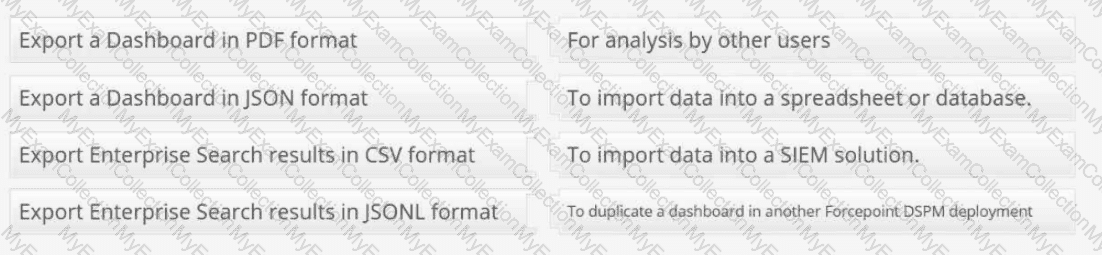
Match each export option with an appropriate use case:
Full Access
Answer:
Answer: 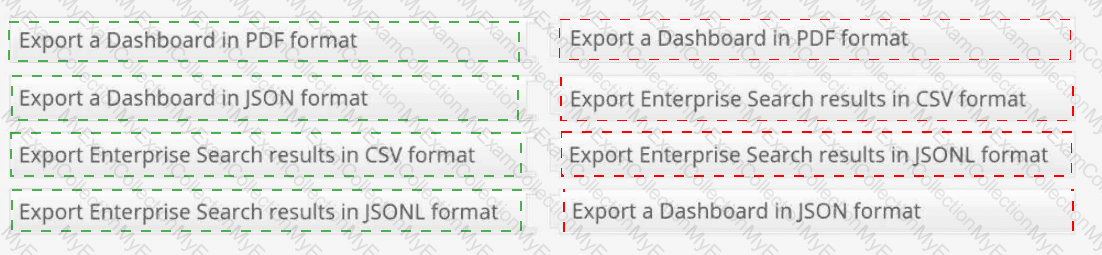
Explanation:
Export a Dashboard in PDF format → For analysis by other users
Export a Dashboard in JSON format → To duplicate a dashboard in another Forcepoint DSPM deployment
Export Enterprise Search results in CSV format → To import data into a spreadsheet or database
Export Enterprise Search results in JSONL format → To import data into a SIEM solution
Forcepoint DSPM uses different export formats for different operational purposes. A Dashboard PDF export is intended for human-readable sharing, review, and offline analysis. PDF is best when the dashboard needs to be distributed to managers, auditors, analysts, or department stakeholders who need a static visual report rather than a reusable configuration object. Forcepoint documents dashboard export capability as supporting PDF and JSON export from the dashboard interface.
A Dashboard JSON export preserves the dashboard definition rather than just the visual output. This makes JSON the correct format when the goal is to duplicate or migrate a dashboard into another Forcepoint DSPM deployment, because the dashboard structure, layout, panels, widgets, and configuration can be reused.
For Enterprise Search , CSV is the correct format for spreadsheet or database workflows. CSV is tabular, broadly compatible, and suited for Excel-style analysis, reporting, joins, and external data review. Forcepoint documents Enterprise Search export as producing CSV or JSON downloads of filtered data.
JSONL is most appropriate for SIEM ingestion because each line can represent an individual structured event or record, making it easier for log pipelines and event-processing systems to parse at scale. References/topics: Analytics Export, Dashboard Export, Enterprise Search Export, CSV, JSON/JSONL, SIEM Integration .
Question # 7
What is the primary function of a detector in Forcepoint DSPM?
A.
To create user credential tags during a data scan.
B.
To create tags based on specific keyword searches during scans.
C.
To increase network speed by blocking files tagged with sensitive data.
D.
To increase storage capacity by flagging files for archiving.
Full Access
Answer:
B
Explanation:
A detector in Forcepoint DSPM is a rule-based classification component used during scanning to identify files whose content or path matches defined detection logic. The correct answer is B because detectors are designed to locate specific patterns, words, or expressions and then contribute to classification/tagging outcomes. Forcepoint describes Detector Groups in AI Mesh as components where “detectors assess both the file path and its contents using rule-based logic, such as regular expressions and keywords,†returning a match when the content fits the defined patterns.
This is distinct from AI classifiers, which infer sensitive-data meaning from broader semantic or machine-learning signals. Detectors are the more deterministic mechanism: they look for defined indicators such as a keyword, phrase, regular expression, or path element. Forcepoint release notes also describe detector functionality as allowing content or path search when creating a detector, including an example where adding the word Archive to a detector can tag files located in an Archive folder.
The other options confuse detectors with unrelated platform functions. Detectors do not create credential tags specifically, optimize network throughput, block files for speed, or increase storage capacity. References/topics: Detectors, Pattern Matching, AI Mesh, Classification Tags, Content and Path Search .
Question # 8
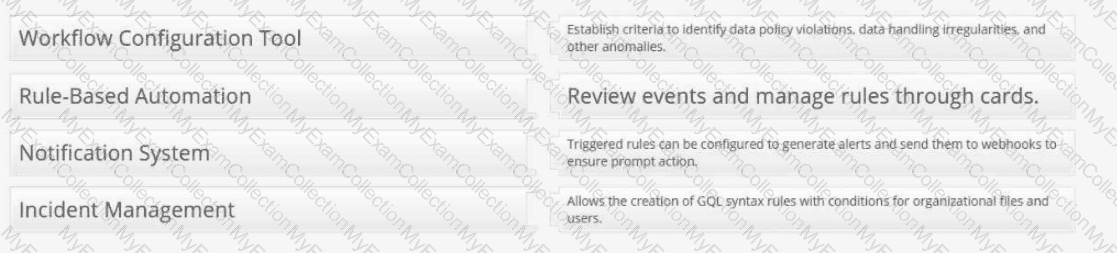
Provide the matching definitions for these Forcepoint DSPM Controls Orchestration terms:
Full Access
Answer:
Answer: 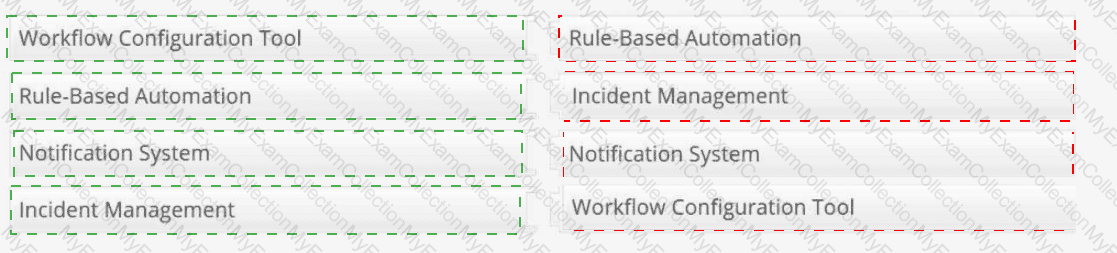
Explanation:
Workflow Configuration Tool → Allows the creation of GQL syntax rules with conditions for organizational files and users.
Rule-Based Automation → Establish criteria to identify data policy violations, data handling irregularities, and other anomalies.
Notification System → Triggered rules can be configured to generate alerts and send them to webhooks to ensure prompt action.
Incident Management → Review events and manage rules through cards.
Controls Orchestration in Forcepoint DSPM is the policy automation layer used to convert data-risk criteria into reviewable operational events. The Workflow Configuration Tool is represented by the rule-building interface under Policy Center > Controls Orchestration , where administrators define datasets, ownership, rule conditions, and GQL logic for organizational files, trustees, or agent activities. Forcepoint states that rules are created to identify data matching specific criteria and are applied during scans of the selected dataset.
Rule-Based Automation describes the criteria-driven detection model. Administrators establish rules that identify policy violations, data-handling irregularities, or other anomalies that require attention. Notification System maps to the ability to configure triggered rules to send external notifications, including webhook-based alerts, when matching data is detected. Incident Management maps to the Incidents workflow: Forcepoint states that each rule is automatically added as a card in the Incidents tab, and selecting the card takes the user back to the associated rule. References/topics: Policy Center, Controls Orchestration, GQL Conditions, Notifications, Webhooks, Incidents .
Question # 9
Put the following steps in order for applying a filter to a widget of a duplicated dashboard:
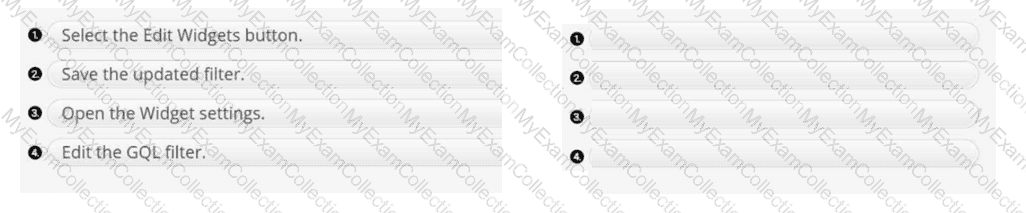
Full Access
Answer:
Answer: 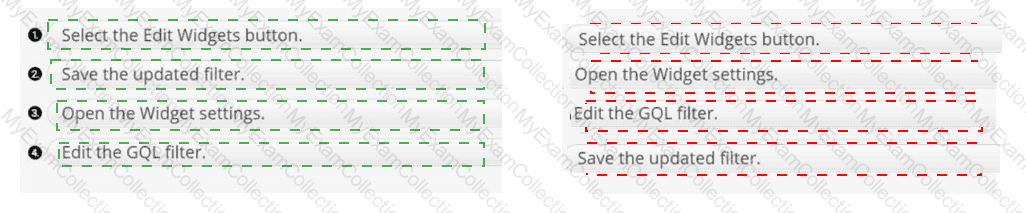
Explanation:
1 → 3 → 4 → 2
The correct sequence is Select the Edit Widgets button , Open the Widget settings , Edit the GQL filter , and then Save the updated filter . In Forcepoint DSPM Analytics, a duplicated dashboard must first be placed into a widget-editable state before any individual widget configuration can be changed. Forcepoint describes dashboards as being built from panels and widgets , and identifies Edit Widgets as the control used to open the edit view for modifying widgets on a board. ( help.forcepoint.com )
After edit mode is active, the administrator opens the specific widget’s settings because the filter is scoped to that widget rather than the whole dashboard. The GQL filter is then edited to constrain the widget’s selected dataset, such as files, trustees, connectors, agents, database tables, or other analytics objects. This follows Forcepoint’s dashboard model, where widgets present information from selected datasets and have their own customization options. ( help.forcepoint.com ) The final action is saving the updated filter so the duplicated dashboard preserves the modified widget logic. References/topics: Analytics, Dashboard Components, Edit Widgets, Widget Settings, GQL Filters, Custom/Duplicated Dashboards .
Question # 10
In which area of the Enterprise Search view would you click if you wanted to see the file details of the Technology Blueprint.CSV file?
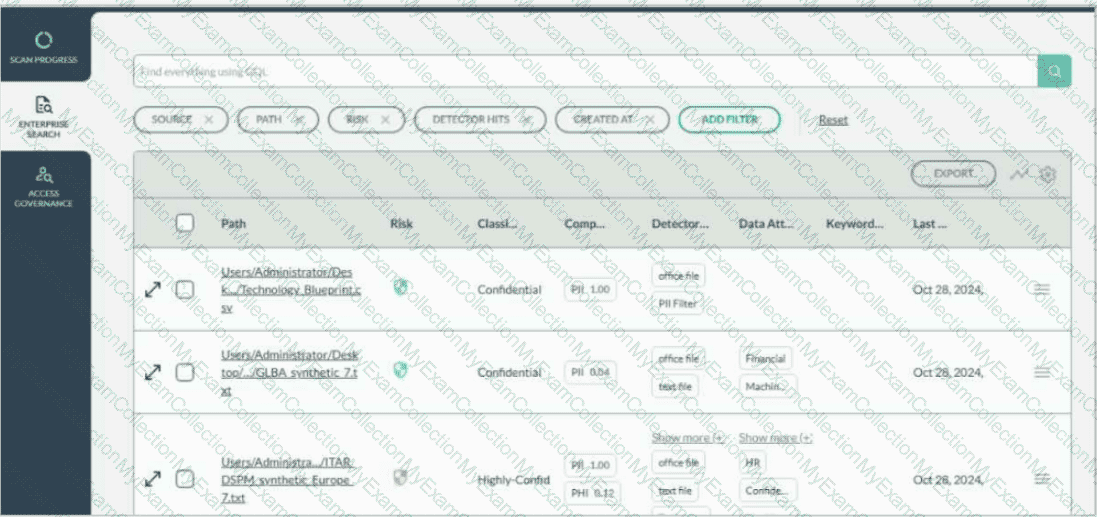
Full Access
Answer:
Answer: 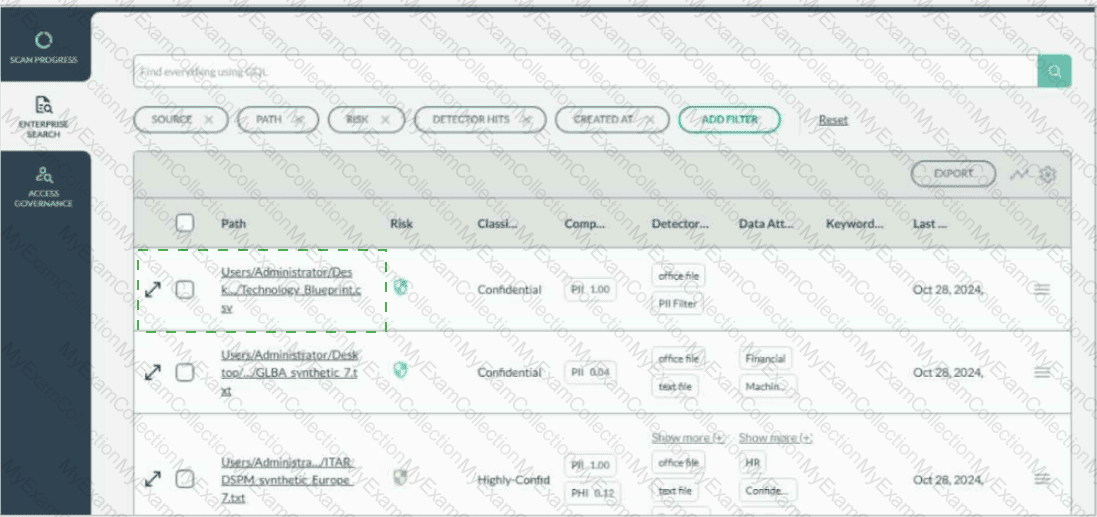
Explanation:
Users/Administrator/Desk.../Technology Blueprint.csv
To view the file details for Technology Blueprint.CSV , select the diagonal expand/open-details icon on the far-left side of that file’s row in Enterprise Search . This icon appears before the row checkbox and before the file path. It is the row-level control used to open the detailed file view for the selected file.
Forcepoint DSPM’s Enterprise Search view presents discovered files in a tabular results format, with each row representing an individual scanned file and columns showing properties such as path, risk, classification, compliance, detector hits, attributes, keywords, and last classification date. Forcepoint documentation describes Enterprise Search as the location where each listed file has associated file details shown in columns and where administrators can refine displayed information through column configuration.
The checkbox is used for selecting the row for bulk or action-based operations, and the hamburger menu on the right provides additional row actions such as permissions or other menu-driven options. To inspect the file itself, the correct target is the left-side expand/details icon aligned with the Technology Blueprint.CSV entry. References/topics: Enterprise Search, File Details, Search Results Table, Row-Level Expand Details, File Classification Review .
Question # 11
What is the purpose of assigning compliance tags to data patterns in Forcepoint DSPM?
A.
To oversee user activity and generate reports.
B.
To ensure regulatory adherence.
C.
To manage data encryption policies.
D.
To manage user credentials.
Full Access
Answer:
B
Explanation:
Compliance tags in Forcepoint DSPM are used to associate detected data patterns with regulatory or compliance obligations. The correct answer is B because these tags help the platform identify files and data objects that may fall under privacy, security, or industry-specific regulatory regimes. Forcepoint’s pattern-matching terminology defines Compliance as tags that help organizations conform to regulatory regimes, and gives the example of applying tags such as GDPR/PII to a Social Security number pattern so related documents can be identified.
Operationally, this means a pattern is not only detecting a technical string, such as a national identifier, payment card number, or health-related value; it is also attaching compliance meaning to the match. That compliance context can then support classification, filtering, analytics, remediation prioritisation, and audit evidence. Forcepoint also states that when adding a new pattern, selected Classification, Compliance, and Distribution values can override machine-learning model output during scans, making the assigned tags authoritative for scan results.
The other options are adjacent but incorrect. User monitoring and reporting are downstream analytics activities, encryption policy management is not the core purpose of pattern compliance tagging, and user credentials are handled through identity and access management workflows. References/topics: Pattern Matching, Compliance Tags, Classification Model, AI Mesh, Regulatory Data Identification .
Question # 12
Which of the following is an option to aid the process of reviewing the incidents generated from triggered rules in Controls Orchestration?
A.
Use the Timestamp filter to narrow the results based on time.
B.
In the search field, enter GQL filter to narrow the results based on the filter.
C.
Use the Risk type drop-down to narrow the results based on risk.
D.
In the search field, enter in a keyword to narrow the results based on the keyword.
Full Access
Answer:
B
Explanation:
The correct answer is B . Forcepoint DSPM Controls Orchestration rules are built around query-driven rule logic. In the rule configuration workflow, administrators select a dataset such as Files , Trustees , or Agent Activities , then configure the rule condition using GQL syntax . This GQL condition defines which records match the rule and therefore which results appear as incidents when the rule is triggered. Forcepoint documentation states that Controls Orchestration rules identify data matching specific criteria and that the Condition field uses GQL syntax to filter the selected dataset.
When reviewing incidents, Forcepoint’s Incidents page provides a top-down view of orchestration rules and available match results. Selecting an incident card opens a results preview, and choosing View in the Page displays those matched files in Enterprise Search , where additional review and action options are available. Enterprise Search is specifically designed to narrow scanned-file results using GetVisibility Query Language , and Forcepoint notes that GQL filtering helps reduce the result set to a more manageable subset for analysis and action.
Timestamp, Risk type, and keyword filtering may be useful in other contexts, but the documented advanced review mechanism for these results is GQL-based filtering. References/topics: Controls Orchestration, Incidents, Enterprise Search, GQL Filtering, Rule Match Review .

