Spring Sale Special - Limited Time 70% Discount Offer - Ends in 0d 00h 00m 00s - Coupon code: mxmas70

Home > Workday > Payroll, Absence, and Time Tracking > Workday-Pro-Time-Tracking

Workday-Pro-Time-Tracking Workday ProTime Tracking Exam Question and Answers

Question # 4

Refer to the following scenario to answer the question below.
You are reviewing time for a worker. The worker has reported hours for the seventh consecutive day and the hours are calculating as configured. This week, the worker reported 11 hours on the seventh consecutive day worked. This worker is eligible for double-time on all hours worked over 8 hours on the seventh consecutive day; however, all 11 hours are tagged as seventh consecutive day hours.

To solve this issue, you determine that the worker should be made eligible for a specific time tracking component.

What time tracking component should this worker be eligible for?

A.

Time Entry Template

B.

Time Calculation Tag

C.

Time Calculation Group

D.

Time Code Group

Full Access
Question # 5

You need to know a worker’s leave status on the date of a specific time block.

What calculated field will you use?

A.

True/False Condition

B.

Date Difference

C.

Lookup Value As of Date

D.

Arithmetic

Full Access
Question # 6

When using the Generate Period Schedule task, how many years can you automatically generate periods?

A.

Up to 1 year

B.

Up to 2 years

C.

Up to 5 years

D.

Indefinitely

Full Access
Question # 7

Which report should you run to ensure a worker only has one period schedule?

A.

View Work Schedule Calendar

B.

View Period Schedule

C.

View Worker’s Time Eligibility

D.

Audit - Workers with Multiple Time Period Schedules

Full Access
Question # 8

You need to count all hours in a week of system-generated time blocks for breaks.

What business object will you use?

A.

Time Block

B.

Time Week

C.

Time Day

D.

Worker

Full Access
Question # 9

Where can you configure daily and weekly totals for a worker’s time entry calendar?

A.

Time calculation tag

B.

Time calculation

C.

Time entry code

D.

Time entry template

Full Access
Question # 10

A worker’s Work Schedule Calendar has a Day Breaker of 2:00 AM (current day from previous day). They report regular hours from 8:00 PM, April 05 to 4:00 AM, April 06.

How will the calculated hours show on the time block?

A.

Two regular hours on April 05 and six regular hours on April 06.

B.

Eight regular hours on April 05 and no regular hours on April 06.

C.

Four regular hours on April 05 and four regular hours on April 06.

D.

Six regular hours on April 05 and two regular hours on April 06.

Full Access
Question # 11

What Time Type do you use to enter elapsed time?

A.

In/Out Time Type

B.

Hours Only Time Type

C.

Absence Table Time Type

D.

Time Off Time Type

Full Access
Question # 12

You have configured a time calculation to identify when a worker has reached or exceeded a number of consecutive days worked. You must now configure a time calculation for hours worked over 8 hours on the seventh consecutive day.

How do you assign priority to ensure the time is processed correctly?

A.

Workday will review the two time calculations and assign the appropriate priority automatically.

B.

Workday will assign priority automatically based on the Time Tracking Eligibility Rule.

C.

Assign a higher priority to the time calculation for hours worked on the seventh consecutive day.

D.

Assign both time calculations to a Time Calculation Group ensuring the appropriate workers are eligible.

Full Access
Question # 13

What restrictions apply to the Adjust Calculated Time task?

A.

Time off is eligible to be adjusted.

B.

Adjustments are submitted only during unlocked periods.

C.

A worker cannot adjust their own calculated time.

D.

Adjusted time will continue to be calculated by Workday just like normal time.

Full Access
Question # 14

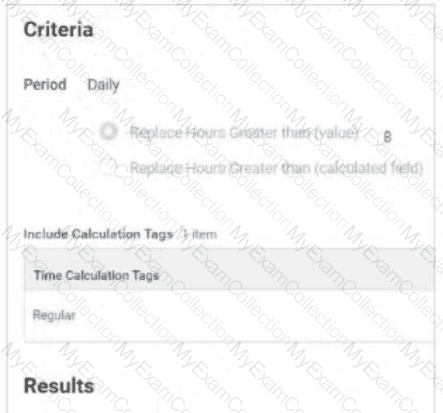
Refer to the following scenario to answer the question below.

Table is labeled Include Calculation Tags 1 Item

    The Time Calculation Tag included is Regular.

Results:

    Add Tags field includes Daily Overtime.

    Remove Tags field is empty.

    Time Day Based On field selection is Calculated Date

The Daily Overtime calculation is tagging hours with both the Regular and Daily Overtime tags. This calculation should only tag hours with the Daily Overtime tag.

What should you edit in the calculation?

A.

Add Tags

B.

Period

C.

Include Calculation Tags

D.

Remove Tags

Full Access
Question # 15

You have configured a Time Calculation Tag to tag all hours worked on the seventh consecutive day.

Where will these hours display in the Worker’s Time Entry Calendar?

A.

On the day’s shift in the Worker’s Work Schedule Calendar.

B.

On the Calculated tab in the Time Block in the Worker’s Time Entry Calendar on the day the hours were worked.

C.

In the Calculation Group Snapshots for the worker on the View Worker’s Time Eligibility report.

D.

On the top line of the Time Block in the Worker’s Time Entry Calendar on the day the hours were worked.

Full Access
Question # 16

Refer to the following scenario to answer the question below.

You are reviewing time for a worker in California. The worker has reported hours for the seventh consecutive day and the hours are calculating as configured. This week the worker reported 11 hours on the seventh consecutive day worked. This worker is eligible for double time on all hours worked over 8 on the seventh consecutive day; however, all 11 hours are tagged as seventh consecutive day hours.

While reviewing the Seventh Consecutive Day Double Time calculation, you notice there are two time calculation tags sharing the same row in the grid.

What does this signify?

A.

An AND condition is applied to the time calculation tags. Only hours that contain both calculation tags will be counted towards the 8 hour threshold.

B.

An OR condition is applied to the time calculation tags. Hours that contain either of the calculation tags will be counted towards the 8 hour threshold.

C.

If the SUM of hours worked with either of the two time calculation tags equals or exceeds the number of hours in the criteria, then the time calculation will be triggered.

D.

If the SUM of hours worked with either of the two time calculation tags equals but does not exceed the number of hours in the criteria, then the time calculation will be triggered.

Full Access
