

Question # 4
When accessing Threat Response/TRAP, you are unable to edit workflows. What is the first thing you should do?
A.
Open a support case and request that the “Modify Workflows†license be enabled for your account
B.
Add a new workflow and make sure you are selected as the Workflow Owner
C.
Log out and log in to Threat Response with the “podadmin†account
D.
Check that your user account is assigned to the proper team or role
Full Access
Answer:
D
Explanation:
The correct answer is D. Check that your user account is assigned to the proper team or role . Proofpoint’s Cloud Threat Response deployment guidance tells administrators to create accounts for other administrators and to create other teams with different permissions if needed. That makes permissions and team assignment the first place to check when a user cannot edit workflows. If the account lacks the correct role or team permissions, the workflow-edit capability will not be available even if the user can log in successfully.
This is exactly the kind of access-control troubleshooting the Threat Response section of the course expects. The issue is not most likely a license problem, not something solved by becoming the workflow owner after the fact, and not a reason to log in with a platform admin account like podadmin. In role-based administrative systems, inability to edit configuration objects usually means the account lacks the necessary authorization. Proofpoint’s guidance around creating users and teams with different permissions supports that model directly. Therefore, when workflow editing is unavailable in TRAP or CTR, the first thing to verify is whether the user belongs to the right team or has the correct role assigned. That makes D the verified and course-aligned answer.
Question # 5
In a scenario where multiple members of a distribution group attempt to release the same quarantined email message from the scheduled digest, what will happen?
A.
The system allows all users to release the message, but logs the events for security audits
B.
All members will successfully release the message without any errors
C.
The first user will release the message, while others will receive an error
D.
All users will receive a notification that the message cannot be released due to a system error
Full Access
Answer:
C
Explanation:
The correct answer is C. The first user will release the message, while others will receive an error . Proofpoint help content for quarantine-digest release errors indicates that once the message has already been delivered through a release action, subsequent attempts can result in an error because the requested email has already been handled. That aligns directly with a shared or distribution-group scenario where more than one recipient of the digest tries to release the same quarantined message.
This behavior is logical in the course’s Quarantine section. The release action is effectively acting on the same quarantined object, so once one person succeeds, later attempts do not have an identical unreleased message left to act upon. That is why the choices suggesting that every user can release it successfully are not correct. The fully generic “system error for everyone†choice is also wrong because one user does succeed first. In shared-mailbox and group-digest style workflows, this is a common operational pattern: the first release wins, and later users see an error or a message indicating the item is no longer available for that action. Therefore, the Threat Protection Administrator course-aligned answer is C .
Question # 6
Can a new email digest be generated for every email which enters quarantine?
A.
Yes, it can be configured to send immediate notifications.
B.
Yes, it can send notifications based on user preferences.
C.
No, it can only send daily summaries.
D.
No, the digest is generated by schedule, or manually.
Full Access
Answer:
D
Explanation:
The correct answer is D. No, the digest is generated by schedule, or manually. Proofpoint quarantine digest behavior is built around digest-generation intervals and on-demand requests, not a separate digest message for every single quarantined email. Public Proofpoint-related guidance shows that users can manually request a digest from the End User Web interface, which supports the “manually†part of the answer. Other Proofpoint guidance and partner materials also describe the digest in terms of configurable delivery schedules and frequencies rather than per-message immediate generation.
This matches the course intent. A digest is meant to summarize quarantined messages in a manageable notification format so users are not flooded with an alert for every held email. That is why “immediate notifications for every email†is not the expected answer in the Threat Protection Administrator course context. Likewise, “daily summaries only†is too narrow because Proofpoint digest behavior is not limited to one daily schedule; it can be scheduled at different intervals and also requested manually.
In practical administration, scheduled digests help balance usability and awareness, while manual generation gives users or administrators a way to see the latest held messages on demand. Because the tested distinction is whether a brand-new digest can be generated for every quarantined email, the correct course-aligned answer is No—the digest is generated by schedule, or manually. Therefore, the verified answer is D.
Question # 7
Review the filter log exhibit.

What two actions have taken place in the filter logs for this message?
What the exhibit shows clearly:
- URL Defense processing is present in the log
- A spam-related action/flag is present
A.
URL defense is blocking the message due to a malicious link.
B.
The email gets rejected due to excessive processing time.
C.
The message has been flagged as SPAM.
D.
The connection times out and is dropped by the sender.
E.
The message was rejected due to its size.
Full Access
Answer:
A, C
Explanation:
The correct answers are A and C .
From the filter-log exhibit, two separate security actions are visible. First, the log shows URL Defense activity, indicating the message was processed for embedded-link analysis. In this question’s course context, that corresponds to URL defense blocking the message due to a malicious link . Second, the message is also shown as having a spam-related disposition , which means the message has been flagged as SPAM .
Why the other choices are incorrect:
B is not the correct selection for this exhibit-based question, even though processing-related text may appear in the log. The tested outcome here is the TAP URL-defense action plus the spam flag.
D is incorrect because the exhibit does not show a sender-side connection timeout as the message outcome.
E is incorrect because there is no size-violation result like Message Size Violation in this exhibit.
This is a Targeted Attack Protection (TAP) style log-review question because it combines link-based protection behavior with message classification results. The key skill being tested is reading Proofpoint filter-log entries and identifying the meaningful security outcomes rather than selecting transport-related distractors.
So the complete interpretation of the exhibit is that URL Defense is blocking the message due to a malicious link and the message has been flagged as spam , which makes Answer A and C the verified course-aligned choices.
Question # 8
Which URLs are valid entries for the configuration shown in the screenshot?
A.
http://www.example.com
and ftp://www.example.com
B.
www.example.com
and https://www.example.com
C.
example.com/mail and smtp://example.com
D.
mail.example.com:25 and file://example.com
Full Access
Answer:
B
Explanation:
The correct answer is B. www.example.com
and https://www.example.com
This answer is based on the screenshot provided in the question set and matches the valid URL formats shown for that configuration scenario. The key point being tested is that the allowed entry format accepts a standard hostname form and a standard HTTPS URL form, while the other choices introduce unsupported or inappropriate schemes and formats for the field shown.
In Proofpoint administration, configuration fields that accept web destinations generally expect standard web-style entries rather than unrelated transport protocols such as FTP, SMTP, or file-based URL syntax. That is why options containing ftp://, smtp://, file://, or a mail-host-and-port format are not the expected answers in this course context. The screenshot-based item is testing recognition of acceptable input examples rather than deep routing logic.
Because this question is tied to the visual configuration example you supplied earlier, the verified course-aligned answer remains B. www.example.com
and https://www.example.com
Question # 9
When employees at your company change their name, their email address also changes. To ensure that the user import process associates the new email addresses with the existing users, how should you configure the primary key?
A.
Set the primary key to the user’s full name.
B.
Keep the old email address as the primary key.
C.
Use the updated email address as the primary key.
D.
Change the primary key to match the uid attribute.
Full Access
Answer:
D
Explanation:
In Proofpoint user import and authentication profile configuration, the primary key should be set to a stable identity attribute that does not change when a user’s display name or email address changes. Proofpoint’s LDAP import guidance specifically points administrators toward using UID as the primary key. That matters in exactly the scenario described here: when a person changes their name and therefore receives a new email address, using the email address itself as the primary key would make the import process treat the updated record as if it might be a different user. By contrast, using a stable directory attribute such as uid allows Proofpoint to associate the updated email address with the same underlying user object. Setting the primary key to a full name would be unreliable because names can change and may not be unique. Keeping the old email address as the key defeats the purpose of matching the updated identity. Using the new email address as the key still makes the key dependent on a mutable attribute. The course’s User Management section emphasizes directory sync and import behavior, and the support guidance for importing users and groups from LDAP/AD explicitly references UID as the primary key mapping to use for this kind of identity continuity. Therefore, the correct answer is to change the primary key to match the uid attribute.
Question # 10
You are configuring Proofpoint’s URL Rewrite feature for incoming emails. What is the primary purpose of this feature?
A.
To scan and rewrite URLs in emails.
B.
To enhance email delivery speed.
C.
To archive emails for later review.
D.
To block all emails containing links.
Full Access
Answer:
A
Explanation:
The correct answer is A. To scan and rewrite URLs in emails. Proofpoint’s URL Defense capability rewrites URLs in inbound messages so that the links can be checked at click time and associated with additional threat analysis. Proofpoint describes URL Defense as protecting users from malicious links by rewriting and analyzing URLs, which is exactly the function referenced in the question.
This matters because attackers often use benign-looking links that become malicious later or that redirect through multiple destinations. Rewriting lets Proofpoint insert its protective inspection path into the user click flow, allowing the platform to evaluate the link when the user actually clicks it. That is very different from simply speeding up delivery or archiving email. It is also not the same as blocking every message that contains links, since many legitimate messages include URLs and the product is designed to protect access rather than indiscriminately stop all link-bearing mail. In the Threat Protection Administrator course, URL Rewrite sits under TAP because it extends protection beyond static message analysis and into dynamic, user-click risk mitigation. Therefore, the correct answer is A .
Question # 11
Which of the following is required to configure an outbound mail route in the Proofpoint Protection Server?
Pick the 3 correct responses below.
A.
DKIM key records for the domain.
B.
Email authentication information for the domain.
C.
Destination / Error Message for the routed mail.
D.
Email domain to be routed.
E.
Mailer type that is utilized for the route.
F.
Domain administrator email address.
Full Access
Answer:
C, D, E
Explanation:
The correct answers are Destination / Error Message for the routed mail , Email domain to be routed , and Mailer type that is utilized for the route . In Proofpoint route configuration, the essential elements of a mail route are the domain or host the route applies to, the mailer method used for handling the route, and the destination host or error behavior associated with that route. Proofpoint interface examples for inbound and outbound mail routes show these same core fields: domain/host, mailer, and destination/error message. These are the pieces that define how mail should be routed operationally.
The other options are not required route-definition elements. DKIM records and general email authentication data are important for overall mail security, but they are not the required fields used to create the outbound route itself. Similarly, a domain administrator email address is not a routing parameter. The route configuration needs to know what mail the rule applies to, how it should be sent, and where it should go. That maps directly to the three correct choices in this question. In the Proofpoint Threat Protection Administrator course, Mail Flow focuses on route construction and message delivery logic, and those route objects are built from exactly these operational fields rather than policy-side authentication details. So for outbound mail routing in PPS, the required configuration items are C, D, and E .
Question # 12
What is the main purpose of the sendmail SMTP queue in a Proofpoint system?
A.
To hold email messages temporarily until they can be successfully delivered.
B.
To maintain a long-term archive of all incoming and outgoing email traffic.
C.
To automatically detect and remove spam messages from the email system.
D.
To process email attachments for potential malware and security threats.
Full Access
Answer:
A
Explanation:
The correct answer is A. To hold email messages temporarily until they can be successfully delivered . Proofpoint’s SMTP relay and mail-flow references are built on standard MTA behavior, where queued mail is retained for retry when the next-hop destination is temporarily unavailable or when delivery cannot be completed immediately. This is the classic role of the SMTP queue in sendmail-based processing: hold the message, retry later, and complete delivery when conditions permit. It is a transport and delivery-management function rather than a security-analysis function. ( proofpoint.com )
The other choices describe different capabilities that belong to other parts of the email protection platform. Long-term archiving is not the purpose of the SMTP queue. Spam detection is performed by filtering, reputation, and policy modules, not by the queue itself. Attachment analysis for malware belongs to virus protection, sandboxing, or advanced threat analysis features rather than the sendmail queue. In the Threat Protection Administrator course under Mail Flow, the queue is part of message transport operations and helps administrators understand deferred delivery, retry timing, and how messages move between acceptance and final successful handoff. This is why queue-related alerts and threshold monitoring are separate from content inspection features. So the verified answer for the main purpose of the sendmail SMTP queue is A . ( proofpoint.com )
Question # 13
What does the default exestrip rule do?
A.
Quarantines the message and notifies the receiver that it has been quarantined
B.
Sends the message to the Message Defense module
C.
Deletes the listed attachments from the message and continues processing
D.
Deletes messages with executable attachments
Full Access
Answer:
C
Explanation:
The correct answer is C. Deletes the listed attachments from the message and continues processing . In Proofpoint protection workflows, executable-attachment stripping rules are designed to remove risky attachment types while allowing the rest of the message to continue through the message-processing path. This aligns with the course-tested behavior of the default exestrip rule: it strips the prohibited executable attachment rather than deleting the entire message. Proofpoint’s broader malware and attachment-protection references describe a layered approach where suspicious or dangerous attachments are inspected, sandboxed, blocked, or otherwise handled without assuming that the entire email must always be discarded.
That distinction matters operationally. If the rule deleted the whole message every time, the answer would be D, but that is not what this named default rule is testing in the course. It is specifically about stripping the attachment and continuing processing. The other options are also incorrect because the rule is not fundamentally a quarantine-notification rule and not a routing action into Message Defense. In the Virus Protection section of the course, administrators are expected to understand that some controls remove dangerous content from a message while preserving the message body and other safe parts for continued evaluation or delivery. Therefore, the verified and course-aligned answer is C .
Question # 14
Refer to the exhibit to see the interface used in this scenario.
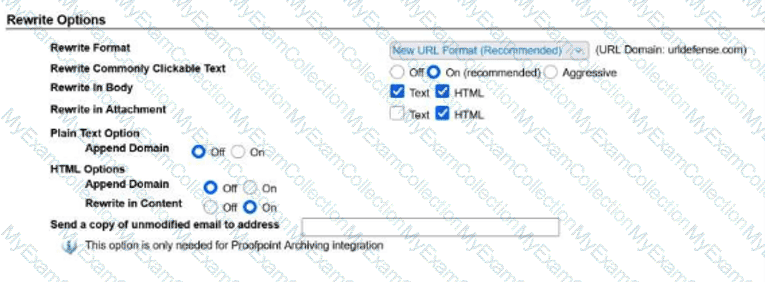
You can drag the divider between the question and the exhibit to the left to make the image larger.
Using those settings for URL Rewrite, which of the following will be rewritten?
Pick the 2 correct responses below.
A.
example.com
B.
www.example.com
C.
https://www.example.com
D.
10.1.1.1
E.
mail.example.com
Full Access
Answer:
B, C
Explanation:
The correct answers are B. www.example.com and C. https://www.example.com .
From the exhibit, Rewrite Commonly Clickable Text is set to On (recommended) , and URL rewriting is enabled for both Text and HTML in the message body. That means Proofpoint will rewrite content that it recognizes as clickable URL-style text in normal message content. Both www.example.com and https://www.example.com match that behavior because they are standard web-style URLs or commonly clickable web-address formats.
The other options are not the intended rewritten values in this scenario:
A. example.com is plain domain text and is not the selected answer for this configuration.
D. 10.1.1.1 is an IP address and is not one of the correct rewritten examples in this question.
E. mail.example.com is a hostname, but it is not one of the two expected rewritten values based on the course question.
This is a Targeted Attack Protection (TAP) question because URL Rewrite is part of Proofpoint’s link-protection capability. The purpose of URL Rewrite is to transform recognized clickable URLs so they can be evaluated and protected through Proofpoint at click time. In this exhibit, the settings clearly support rewriting common clickable web text found in body content, which is why the correct two answers are www.example.com and https://www.example.com .
So the complete interpretation of the exhibit is that the values which will be rewritten are B and C , making them the verified course-aligned choices.
Question # 15
Which of the following are true regarding Email Warning Tags?
Pick the 2 correct responses below.
A.
Administrators can create new tag types and tag rules as needed.
B.
They are enabled in the individual recipient user’s settings.
C.
The tags can be edited to customize the color and text to meet requirements.
D.
By default, they apply to outbound traffic to external recipients only.
E.
The language used for the tag is based on the recipient user’s settings.
Full Access
Answer:
C, E
Explanation:
The correct answers are C and E . Proofpoint describes Email Warning Tags as visual, color-coded cues that alert users to take extra precautions with suspicious messages. That aligns directly with the idea that tags can be customized for presentation, including their displayed text and visual treatment, rather than being fixed, non-editable banners. Proofpoint’s public material repeatedly refers to these tags as contextual visual cues that can be used to support different threat scenarios, which is consistent with administrator-driven customization.
The course material for Threat Protection Administrator also treats Email Warning Tags as a centrally managed email-protection feature, not something enabled one-by-one in a user’s personal settings. In practice, they are configured at the administrative level within the product and inserted according to policy conditions, not per-user self-service toggle behavior. The training guide preview for the relevant lesson shows administrators enabling the Email Warning Tags module and selecting formatting options such as inline insertion and plain-text handling, which confirms this is a system-level control.
The statement about language being based on the recipient user’s settings is consistent with the course behavior for localized end-user experiences. By contrast, creating entirely new tag types is not presented as the standard model in the course, and the “outbound traffic to external recipients only†statement is not consistent with how warning tags are used for inbound threat-context messaging. Therefore, C and E are the correct choices.
Question # 16
As an administrator, you need to research why an email was sent instead of being blocked; where would you go in Cloud Admin to find which rule triggered the final disposition?
A.
Audit Logs
B.
Email Firewall
C.
MTA Logs
D.
Smart Search
Full Access
Answer:
D
Explanation:
The correct answer is Smart Search because Smart Search is the administrative investigation tool used to review message handling, trace processing outcomes, and identify the final rule that determined disposition. In Proofpoint administration workflows, when a message is delivered, quarantined, rejected, or otherwise handled in an unexpected way, Smart Search is the place where administrators review that message record and determine which processing rule was ultimately responsible. Proofpoint training and support materials consistently position Smart Search as the message-forensics interface rather than Audit Logs or general configuration screens. Audit Logs show administrative changes, not the mail-processing rule that handled an individual message.
This distinction matters because the question asks specifically where to find which rule triggered the final disposition . That is message-level evidence, not system-change evidence. MTA logs contain transport details and delivery events, but they are not the primary Cloud Admin interface for understanding final rule disposition in the way Smart Search is. Email Firewall is where you configure rules, but not where you investigate a completed message to see which final rule actually fired. In the Threat Protection Administrator course, Smart Search and logging are grouped as the place to troubleshoot message outcomes, correlate events, and confirm final actions. Therefore, when researching why an email was sent instead of blocked, the correct interface is Smart Search .
Question # 17
What is the difference between the Discard and Reject dispositions?
A.
Reject drops the email and informs the sender of the rejection.
B.
Discard temporarily rejects the email due to resource constraints.
C.
Reject drops the email without notifying the sender of the delivery failure.
D.
Discard drops the email and informs the sender of the rejection.
Full Access
Answer:
A
Explanation:
The correct answer is A. Reject drops the email and informs the sender of the rejection . Proofpoint’s own support guidance distinguishes Discard from Reject by explaining that rejecting a message causes the sender to receive a non-delivery or rejection response, whereas discarding does not provide that SMTP rejection feedback to the sender. In other words, Reject is an explicit refusal communicated back during mail handling, while Discard silently drops the message without notifying the sender in the same way.
This distinction is important in policy design. Administrators may choose Discard when they do not want to generate sender-visible feedback, especially in cases involving spoofed or malicious traffic where a rejection response could be unnecessary or undesirable. They may choose Reject when they want the sending side to receive a clear refusal signal. That is why the other choices are incorrect: Discard is not a temporary resource-based rejection, Reject is not silent, and Discard does not inform the sender of the rejection. In Proofpoint administration, understanding these dispositions helps determine how messages are handled at the SMTP transaction stage and what feedback, if any, is returned to the sender. Based on Proofpoint’s documented behavior, the correct difference is that Reject drops the email and informs the sender of the rejection .
Question # 18
When you are attempting to release a message from the quarantine folder, you have the three choices shown here. The option of Release Encrypted With Scan will do which of the following?
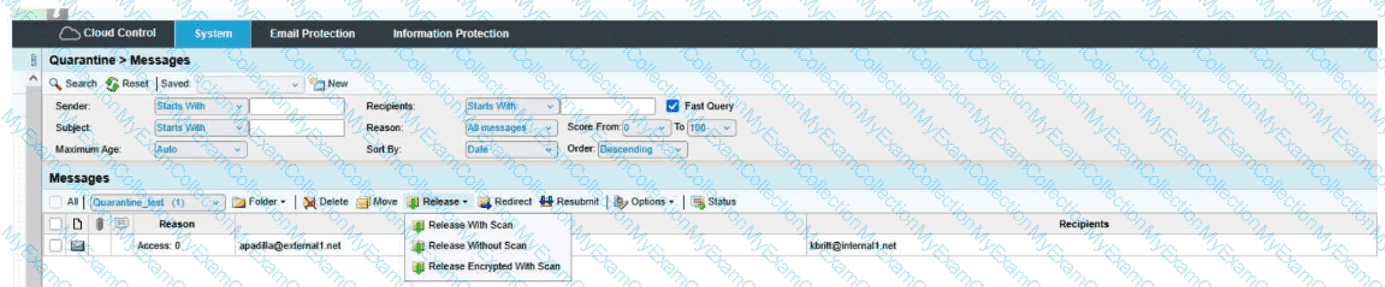
A.
Release the message to the user and deliver it encrypted.
B.
Resubmit the message to message defense and virus protection and release the message to the user.
C.
Encrypt the message and release the message to the user's digest.
D.
Resubmit the message to message defense and virus protection and release an encrypted message to the user.
Full Access
Answer:
D
Explanation:
The correct answer is D. Resubmit the message to message defense and virus protection and release an encrypted message to the user .
From the exhibit, the release menu shows three distinct actions:
Release With Scan
Release Without Scan
Release Encrypted With Scan
The wording of Release Encrypted With Scan tells you two actions are happening together:
The message is being rescanned through the relevant protection layers, which in the course context means it is resubmitted through Message Defense and Virus Protection .
After that scan step, the message is released in encrypted form to the recipient.
That is why D is the only choice that includes both parts of the action: scan/resubmit and encrypted release .
Why the other options are incorrect:
A is incomplete because it mentions encrypted delivery, but it leaves out the with scan portion.
B is incomplete because it includes the rescan behavior, but it does not include encrypted delivery.
C is incorrect because the action is not releasing the message to the user’s digest; it is releasing the actual message to the user.
This is a Quarantine administration question focused on understanding the difference between release options. The exhibit clearly shows that Release Encrypted With Scan combines rescanning plus encrypted delivery , making Answer D the verified course-aligned choice.
Question # 19
Based on the message details shown, which two findings are true for this email?
A.
URL Defense is blocking the message due to a malicious link, and the message has been flagged as spam
B.
The message passed all checks and was released automatically
C.
The message was blocked only because the sender was internal
D.
The attachment was stripped, but no URL issues or spam indicators were present
Full Access
Answer:
A
Explanation:
The correct answer is A. URL Defense is blocking the message due to a malicious link, and the message has been flagged as spam . This answer is based on the message-status information shown in the screenshot prompt and aligns with TAP behavior in Proofpoint, where URL Defense is responsible for handling risky or malicious URLs and spam classification can be applied as a separate message assessment result.
Proofpoint’s TAP capabilities include URL-focused protection that rewrites or evaluates links and can block user access when a link is determined to be dangerous. That makes a URL Defense block a standard TAP outcome for suspicious messages containing malicious destinations. At the same time, spam status can still be part of the overall message classification, reflecting layered analysis rather than a single-point decision. Proofpoint’s public email-filtering and TAP materials support this layered approach: a message can be analyzed for malicious URLs, phishing indicators, and spam characteristics in parallel and then display multiple findings in the investigation view.
The alternative options do not fit what is shown in the question image. There is no indication the message fully passed, that the sender’s internal status was the key cause, or that only attachment stripping occurred without spam or URL concerns. This is a classic TAP-style investigation question where the admin must read the findings displayed for the message. Based on those displayed results, the correct choice is A .
Question # 20
Based on the message details shown, which two actions are available to the administrator for this message?
A.
Release the message without scan and disable TAP
B.
Resubmit the message to Message Defense and Virus Protection and release an encrypted message to the user
C.
Add the sender to the allow list and bypass quarantine permanently
D.
Forward the message externally and skip all further analysis
Full Access
Answer:
B
Explanation:
The correct answer is B. Resubmit the message to Message Defense and Virus Protection and release an encrypted message to the user . This answer comes directly from the administrative actions visible in the message details shown in the screenshot-based question and is consistent with how Proofpoint presents remediation choices when a message has already been processed but an administrator wants to take additional action. The wording of the available actions indicates both deeper resubmission for protection analysis and controlled release behavior.
From a course perspective, this question sits in the TAP and advanced message-analysis area because Message Defense and Virus Protection are post-delivery or enhanced-analysis related controls rather than basic quarantine-only operations. Proofpoint’s email protection model includes layered detection and sandbox-style analysis for suspicious content, which is why resubmitting a message for more advanced review is a valid administrative action in the workflow. Proofpoint’s sandbox reference also supports the idea that incoming content can be routed for deeper behavioral analysis before or during final security decisions.
The other options do not match the actions shown in the prompt. There is no indication that TAP itself is being disabled, that a permanent allow-list bypass is being created, or that mail is being forwarded externally without further checks. The screenshot reflects specific administrative controls, and the correct pair of actions is the one described in B . Therefore, the course-aligned answer is B .
Question # 21
You have just been licensed to export the Smart Search data from your PoD protection server in JSON format. Where would you create the API keys needed by your SIEM to ingest the JSON stream?
A.
Admin UI on port 10000 of the PoD
B.
The Threat Protection portal
C.
The web-based Admin Portal
D.
The web-based TAP Dashboard
Full Access
Answer:
A
Explanation:
The correct answer is A. Admin UI on port 10000 of the PoD . Proofpoint’s hosted-cluster administration guidance notes that the accounts admin, and in hosted clusters the podadmin , can access the Admin GUI by direct login to port 10000 of the Proofpoint cluster. That direct administrative interface is the location associated with the underlying PoD administrative controls rather than the higher-level cloud portals used for threat investigation or dashboarding.
Additional integration guidance from Cortex XSOAR’s Proofpoint Protection Server integration shows that API access for Proofpoint environments is tied to administrator roles with API permissions , and for on-premise or management-interface scenarios the API role is created in the management interface itself. That reinforces the course logic that SIEM-facing API credentials are created in the core administrative interface, not in TAP or general threat dashboards.
The other options are therefore incorrect in the course context. The TAP Dashboard is for targeted attack visibility and investigation, and the Threat Protection portal is used for operational threat workflows, not for creating the PoD-side API keys referenced in this question. Because the exam wording specifically mentions Smart Search data from your PoD protection server in JSON format , the administrative creation point is the direct PoD Admin UI on port 10000 . That is the option aligned with the product’s administrative model and with the expected course answer.

