

Question # 4
Refer to the exhibits.
You configured a custom event handler and an associated rule to generate events whenever FortiMail detects spam emails. However, you notice that the event handler is generating events for both spam emails and clean emails.
Which change must you make in the rule so that it detects only spam emails?
A.
In the Log Type field, select Anti-Spam Log (spam)
B.
In the Log filter by Text field, type type==spam.
C.
Disable the rule to use the filter in the data selector to create the event.
D.
In the Trigger an event when field, select Within a group, the log field Spam Name (snane) has 2 or more unique values.
Full Access
Answer:
A
Explanation:
Understanding the Custom Event Handler Configuration:
The event handler is set up to generate events based on specific log data.
The goal is to generate events specifically for spam emails detected by FortiMail.
Analyzing the Issue:
The event handler is currently generating events for both spam emails and clean emails.
This indicates that the rule ' s filtering criteria are not correctly distinguishing between spam and non-spam emails.
Evaluating the Options:
Option A: Selecting the " Anti-Spam Log (spam) " in the Log Type field will ensure that only logs related to spam emails are considered. This is the most straightforward and accurate way to filter for spam emails.
Option B: Typing type==spam in the Log filter by Text field might help filter the logs, but it is not as direct and reliable as selecting the correct log type.
Option C: Disabling the rule to use the filter in the data selector to create the event does not address the issue of filtering for spam logs specifically.
Option D: Selecting " Within a group, the log field Spam Name (snane) has 2 or more unique values " is not directly relevant to filtering spam logs and could lead to incorrect filtering criteria.
Conclusion:
The correct change to make in the rule is to select " Anti-Spam Log (spam) " in the Log Type field. This ensures that the event handler only generates events for spam emails.
[References:, Fortinet Documentation on Event Handlers and Log Types., Best Practices for Configuring FortiMail Anti-Spam Settings., , ]
Question # 5
An analyst prioritizes blocking IP addresses and domains from every phishing campaign. Based on the Pyramid of Pain model, which two statements accurately describe this approach? Choose two answers.
A.
It helps identify strategic weaknesses in adversary infrastructure.
B.
It imposes a high operational cost on adversaries when their attacks are detected.
C.
It focuses on observable network indicators rather than underlying attack methods.
D.
It relies on blocking indicators that adversaries can easily replace or rotate.
Full Access
Answer:
C, D
Explanation:
Exact Extract: “The Pyramid of Pain illustrates why focusing on adversary TTPs is important: They are the most descriptive IOCs of a given adversary and the toughest for threat actors to change.†The guide ranks Domain Names as “Simple†and IP Addresses as “Easy,†while TTPs are “Tough.â€
Exact Extract: “As you progress from the top of the pyramid to the bottom, the disruption of an element becomes easier for the adversary to recover from… once those IP addresses start to be widely recognized as malicious and potentially blocked, it is easy for the attacker to start using other IP addresses.â€
The correct answers are C and D . Blocking IP addresses and domains is useful, but it targets low-level observable indicators, not the adversary’s deeper behavior. In the Pyramid of Pain, IP addresses and domain names sit near the bottom because attackers can replace them quickly by rotating infrastructure, registering new domains, using compromised hosts, or changing hosting providers. Therefore, this approach focuses on network indicators and creates only limited disruption.
Option A is too strong. IPs and domains may reveal infrastructure, but blocking them does not necessarily identify strategic weaknesses in the adversary’s operation. Option B is wrong because high operational cost is associated with forcing adversaries to change tools or TTPs, not merely rotating IPs and domains.
Technical Deep Dive: In a Fortinet SOC, blocking phishing IPs/domains can be automated through FortiSOAR playbooks using FortiGate address objects, DNS filtering, FortiMail blocklists, or FortiGuard threat intelligence enrichment. That is good hygiene, but it is reactive. Higher-value hunting looks for reusable phishing tradecraft: lure themes, sender infrastructure patterns, attachment behaviors, command-and-control sequence, credential collection workflow, and post-compromise TTPs. ASIC offloading is not the key issue here; the security value comes from intelligence quality and detection depth, not packet acceleration.
Question # 6
You are using FortiSIEM analytics to reference the configuration management database (CMDB) event type categories with the following requirements:
Attribute: Event Type
Value: Group: Logon Success
Which operator must you use for the analytics search? Choose one answer.
A.
CONTAIN
B.
IN
C.
HAS
D.
IS
Full Access
Answer:
B
Explanation:
Exact Extract: “Attribute: Event Type Operator: IN Value: EventTypes: Logon Failure.†The same section explains that when selecting a group from the CMDB, “the value displays Group: < Name > when you select the group from CMDB initially.â€
The correct answer is B because FortiSIEM uses the IN operator when a search condition references a CMDB group or category. In this case, the value is Group: Logon Success , meaning the query is not matching one literal event type string; it is matching membership in a CMDB event type category. Therefore, the condition should be configured as Event Type IN Group: Logon Success . CONTAIN is for substring matching, such as checking whether a text field contains a word. IS or exact equality-style logic would be appropriate for a single specific value, not a CMDB group. HAS is not the correct operator for matching Event Type membership in a CMDB category.
Technical Deep Dive: In FortiSIEM analytics, CMDB-backed values are object groups, not simple strings. The IN operator tells FortiSIEM to expand the selected CMDB group and match any event type inside that category. This is cleaner than manually adding many Event Type OR conditions. For example, a “Logon Success†group can include multiple normalized success-login event types across Windows, VPN, Unix, and other sources. This is SIEM query logic only; NP/CP ASIC offloading does not apply because FortiSIEM is searching normalized event data, not processing FortiGate traffic flows.
Question # 7
Refer to the exhibit.
You notice that the custom event handler you configured to detect SMTP reconnaissance activities is creating a large number of events. This is overwhelming your notification system.
How can you fix this?
A.
Increase the trigger count so that it identifies and reduces the count triggered by a particular group.
B.
Disable the custom event handler because it is not working as expected.
C.
Decrease the time range that the custom event handler covers during the attack.
D.
Increase the log field value so that it looks for more unique field values when it creates the event.
Full Access
Answer:
A
Explanation:
Understanding the Issue :
The custom event handler for detecting SMTP reconnaissance activities is generating a large number of events.
This high volume of events is overwhelming the notification system, leading to potential alert fatigue and inefficiency in incident response.
Event Handler Configuration :
Event handlers are configured to trigger alerts based on specific criteria.
The frequency and volume of these alerts can be controlled by adjusting the trigger conditions.
Possible Solutions :
A. Increase the trigger count so that it identifies and reduces the count triggered by a particular group :
By increasing the trigger count, you ensure that the event handler only generates alerts after a higher threshold of activity is detected.
This reduces the number of events generated and helps prevent overwhelming the notification system.
Selected as it effectively manages the volume of generated events.
B. Disable the custom event handler because it is not working as expected :
Disabling the event handler is not a practical solution as it would completely stop monitoring for SMTP reconnaissance activities.
Not selected as it does not address the issue of fine-tuning the event generation.
C. Decrease the time range that the custom event handler covers during the attack :
Reducing the time range might help in some cases, but it could also lead to missing important activities if the attack spans a longer period.
Not selected as it could lead to underreporting of significant events.
D. Increase the log field value so that it looks for more unique field values when it creates the event :
Adjusting the log field value might refine the event criteria, but it does not directly control the volume of alerts.
Not selected as it is not the most effective way to manage event volume.
Implementation Steps :
Step 1 : Access the event handler configuration in FortiAnalyzer.
Step 2 : Locate the trigger count setting within the custom event handler for SMTP reconnaissance.
Step 3 : Increase the trigger count to a higher value that balances alert sensitivity and volume.
Step 4 : Save the configuration and monitor the event generation to ensure it aligns with expected levels.
Conclusion :
By increasing the trigger count, you can effectively reduce the number of events generated by the custom event handler, preventing the notification system from being overwhelmed.
[:, Fortinet Documentation on Event Handlers and Configuration FortiAnalyzer Administration Guide, Best Practices for Event Management Fortinet Knowledge Base, By increasing the trigger count in the custom event handler, you can manage the volume of generated events and prevent the notification system from being overwhelmed., , , ]
Question # 8
Which three factors does the FortiSIEM rules engine use to determine the count when it evaluates the aggregate condition COUNT (Matched Events) on a specific subpattern? (Choose three answers)
A.
Group By attributes
B.
Data source
C.
Time window
D.
Search filter
E.
Incident action
Full Access
Answer:
A, C, D
Explanation:
The FortiSIEM rules engine evaluates subpatterns to detect complex attack behaviors. When a rule uses an aggregate condition like COUNT (Matched Events) , the engine calculates this value based on specific architectural parameters:
Group By attributes (A): The engine maintains a separate counter for each unique combination of " Group By " attributes defined in the subpattern. For example, if you group by " Source IP, " the engine tracks the count of events for each unique IP address independently.
Time window (C): The count is relative to a specific time duration (e.g., 5 minutes). The engine only counts events that fall within this sliding or fixed window. Once an event falls outside this window, it is no longer included in the aggregate count.
Search filter (D): Only events that satisfy the specific " Search Filter " criteria (e.g., Event Type = " Failed Login " ) are considered " Matched Events. " The filter defines the scope of the data that the rules engine processes before applying the count.
Why other options are incorrect:
Data source (B): While the data source determines where the logs come from, the rules engine itself uses the parsed attributes (defined in the search filter) rather than the raw data source to determine the count. Multiple data sources might contribute to the same filter and count.
Incident action (E): Incident actions (such as sending an email or triggering a SOAR playbook) are the result of a rule firing. They do not influence the internal logic or calculation of the event count during the evaluation phase.
Question # 9
Refer to the exhibits.
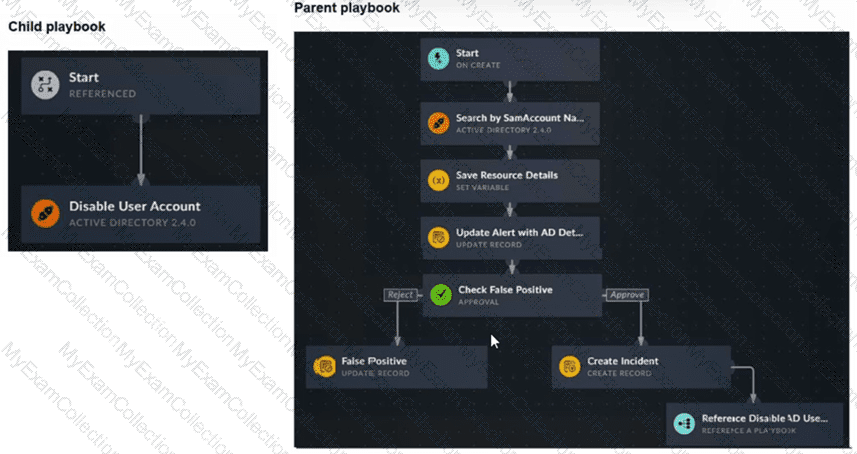
You have a playbook that, depending on whether an analyst deems the alert to be a true positive, could reference a child playbook. You need to pass variables from the parent playbook to the child playbook.
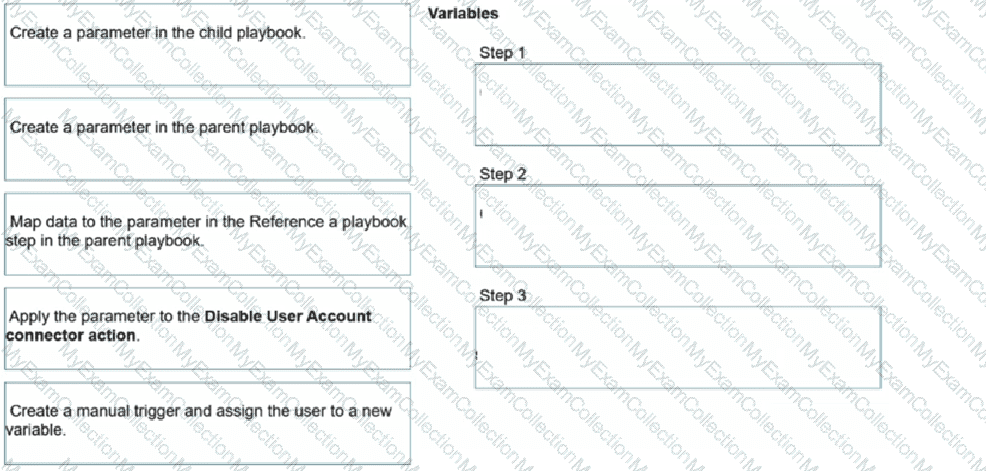
Place the steps needed to accomplish this in the correct order.
Full Access
Answer:
Answer: 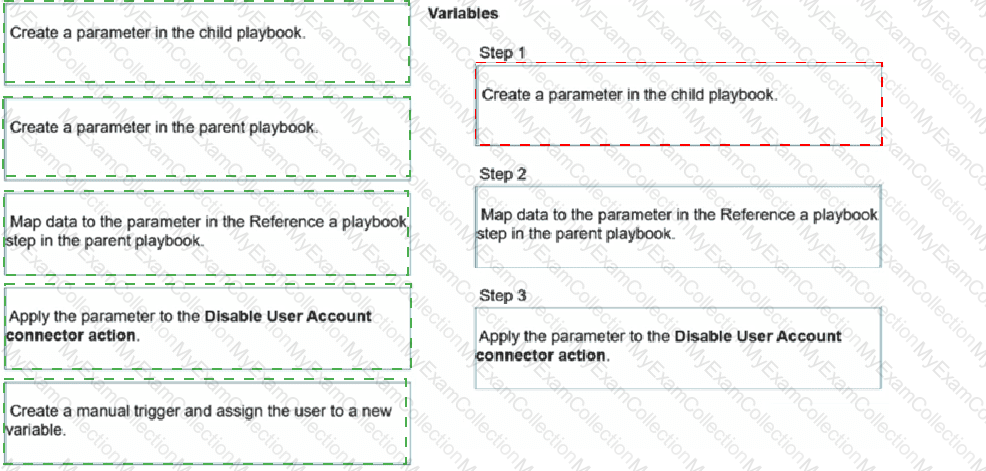
Explanation:
Step 1: Create a parameter in the child playbook.
Step 2: Map data to the parameter in the Reference a Playbook step in the parent playbook.
Step 3: Apply the parameter to the Disable User Account connector action.
Exact Extract: “To make the child playbook function properly, you must pass information from the parent playbook to the child playbook. If the child playbook is not aware of the AD user queried in the parent playbook, the action to disable a user cannot be completed. The easiest way to accomplish this task is to create a parameter in the child playbook.â€
Exact Extract: “After it is created, you can go back to your parent playbook to the Reference a Playbook step for the associated child playbook. You will find a new field to map data to. After the data is mapped in the parent playbook, when you return to the child playbook, you can see the parameter is available in the Dynamic Values window.â€
The correct order is child parameter → parent mapping → child connector usage . The child playbook must first expose an input parameter, such as user_name, because a referenced child playbook does not automatically inherit every variable from the parent workflow. After the child parameter exists, the parent playbook’s Reference a Playbook step displays that parameter as a mappable input field. The parent can then pass the AD username discovered earlier in the workflow. Finally, inside the child playbook, that parameter is selected from Dynamic Values and applied to the Disable User Account Active Directory connector action.
The option “Create a parameter in the parent playbook†is not required. The parent only maps data into the child’s parameter. The option “Create a manual trigger and assign the user to a new variable†is also wrong because the parent playbook in the exhibit already starts from an On Create trigger and already retrieves the AD account details before referencing the child playbook.
Technical Deep Dive: Referenced playbooks are modular automation units. Their clean design depends on explicit input parameters, just like function arguments in programming. This avoids brittle dependencies on parent-step variable names and allows the same child playbook to be reused by multiple parent workflows. Hardware offloading such as FortiGate NP/CP acceleration is irrelevant here because this is FortiSOAR workflow orchestration, not FortiGate data-plane traffic processing.
Question # 10
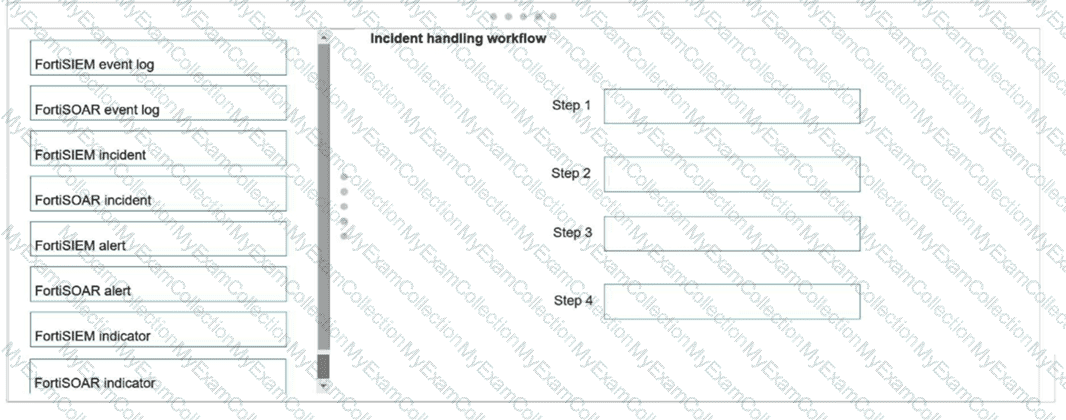
Using the default data ingestion wizard in FortiSOAR, place the incident handling workflow from FortiSIEM to FortiSOAR in the correct sequence. Select each workflow component in the left column, hold and drag it to a blank position in the column on the right. Place the four correct workflow components in order, placing the first step in the first position at the top of the column.
Full Access
Answer:
Answer: 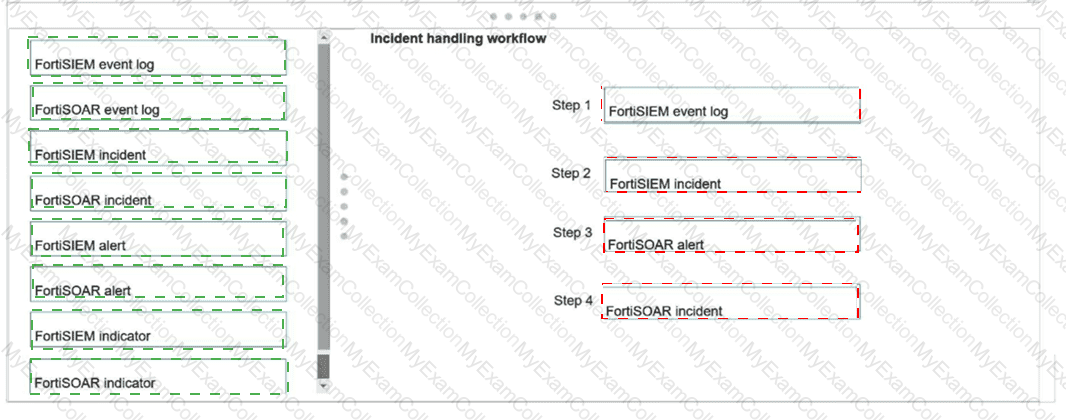
Explanation:
Step 1: FortiSIEM event log
Step 2: FortiSIEM incident
Step 3: FortiSOAR alert
Step 4: FortiSOAR incident
Exact Extract: “FortiSIEM: Event: An event refers to a single log or data point collected from a monitored device. It’s the most basic unit of information received by FortiSIEM, such as a firewall log or a system alert.†The guide also states: “Incident: An incident in FortiSIEM is created when a correlation rule is triggered.â€
Exact Extract: “This slide explains how to map fields between FortiSIEM incidents and FortiSOAR alerts during the ingestion process. Use the wizard to define how FortiSIEM data populates FortiSOAR alert fields.â€
Exact Extract: “FortiSOAR ingests FortiSIEM incidents as alerts… If the alert is not a valid threat, then the analyst can close it as a false positive. Otherwise, the analyst can open an incident.â€
The correct sequence is FortiSIEM event log → FortiSIEM incident → FortiSOAR alert → FortiSOAR incident . FortiSIEM first receives raw event logs from monitored devices. If those events match a correlation rule, FortiSIEM creates a FortiSIEM incident . The FortiSOAR default data ingestion wizard then ingests FortiSIEM incidents into FortiSOAR as alerts , not as FortiSOAR incidents directly. After triage and validation, the analyst or playbook can escalate the alert into a FortiSOAR incident .
Technical Deep Dive: FortiSIEM and FortiSOAR use different object models. FortiSIEM “incident†means a correlation result from event analytics. FortiSOAR “alert†is the first SOAR-side record created from that SIEM incident. FortiSOAR “incident†is a higher-level case-management container used after validation. This separation is intentional: not every SIEM incident deserves full incident-response handling. FortiGate NP/CP offloading is irrelevant because this workflow is log ingestion and case orchestration, not firewall packet acceleration.
Question # 11
Based on the Pyramid of Pain model, which two statements accurately describe the value of an indicator and how difficult it is for an adversary to change? (Choose two answers)
A.
IP addresses are easy because adversaries can spoof them or move them to new resources.
B.
Tactics, techniques, and procedures are hard because adversaries must adapt their methods.
C.
Artifacts are easy because adversaries can alter file paths or registry keys.
D.
Tools are easy because often, multiple alternatives exist.
Full Access
Answer:
A, B
Explanation:
The Pyramid of Pain (David Bianco) is a core concept taught in FortiSIEM 7.3 and FortiSOAR 7.6 curriculum to help SOC analysts prioritize threat intelligence and detection logic. The model ranks indicators based on the " pain " or effort they cause an adversary to change:
IP Addresses (Easy): These are classified as " Easy " to change. An attacker can simply rotate through a proxy service, use a different VPS, or utilize a new compromised host to continue their campaign. While more valuable than a file hash, they provide relatively low-long term value to the defender because they are so ephemeral.
TTPs (Tough/Hard): This is the apex of the pyramid. TTPs (Tactics, Techniques, and Procedures) represent the fundamental way an adversary operates. If a defender successfully detects and blocks a Tactic (e.g., a specific way an attacker performs privilege escalation), the adversary is forced to reinvent their entire operational process, which is time-consuming and difficult.
Why other options are incorrect:
Artifacts (C): According to the pyramid, Network/Host Artifacts are classified as " Annoying " , not " Easy " . While an attacker can change them, it requires modifying their code or script behavior, which causes more friction than simply switching an IP address.
Tools (D): Tools are classified as " Challenging " . While alternatives exist, an adversary usually invests significant time mastering a specific toolset; losing the ability to use that tool effectively disrupts their efficiency significantly.
Question # 12
Refer to the exhibit. What is the correct Jinja expression to filter the results to show only the MD5 hash values?
{{ [slot 1] | [slot 2] [slot 3].[slot 4] }}
Select the Jinja expression in the left column, hold and drag it to a blank position on the right. Place the four correct steps in order, placing the first step in the first slot.
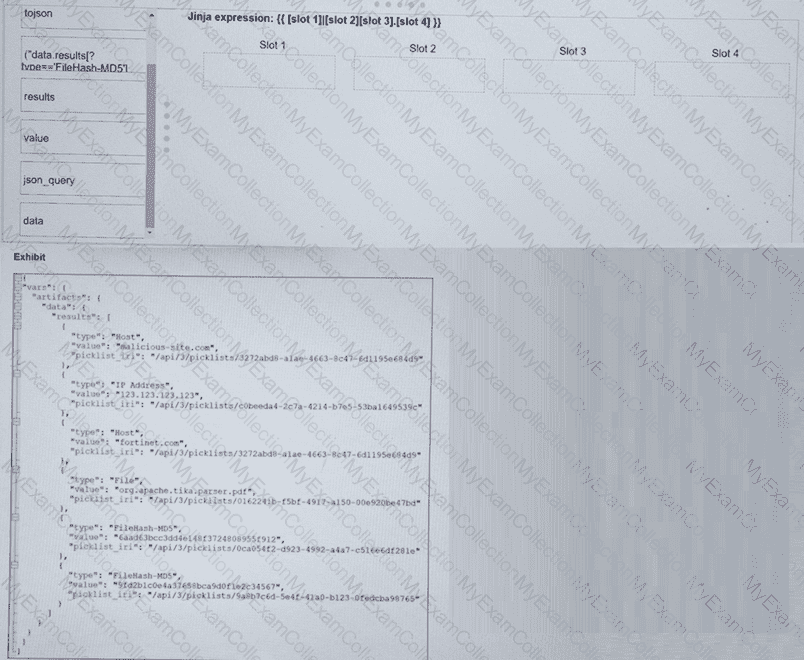
Full Access
Answer:
Answer: 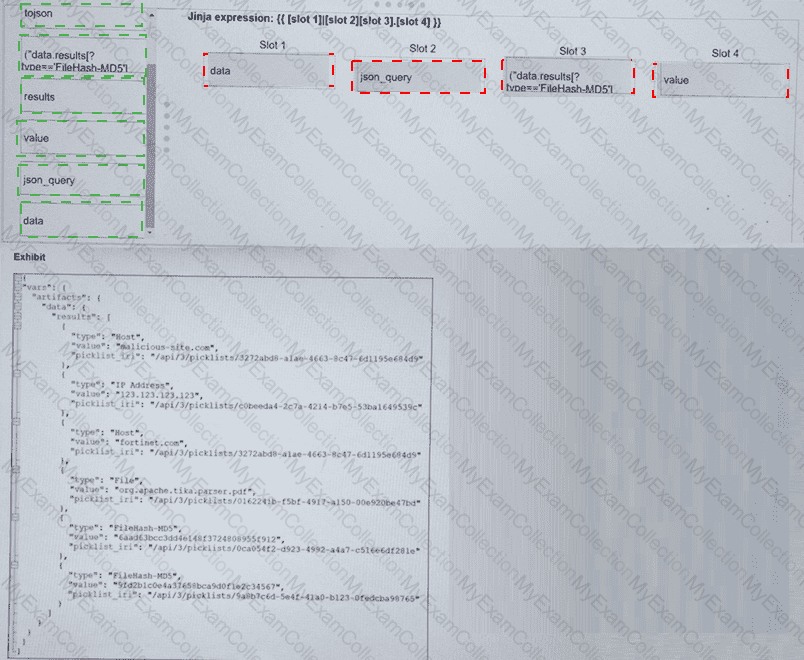
Explanation:
Slot 1: data Slot 2: json_query Slot 3: ( " results[?type== ' FileHash-MD5 ' ] " ) Slot 4: value
Final Expression: {{ vars.artifacts.data | json_query( " results[?type== ' FileHash-MD5 ' ] " ) .value }}
In FortiSOAR 7.6 , advanced data manipulation within playbooks often requires the use of JMESPath queries via the json_query Jinja filter. To extract specific data from a complex JSON object (like the vars.artifacts dictionary shown in the exhibit), the analyst must follow the structural hierarchy:
Slot 1 (data): Based on the exhibit, the root of the artifact information is located under vars.artifacts.data. Therefore, " data " is the starting point for the filter.
Slot 2 (json_query): To perform advanced filtering (searching for a specific type), the json_query filter must be applied. This allows the playbook to traverse the list and find items matching a specific key-value pair.
Slot 3 ( " results[?type== ' FileHash-MD5 ' ] " ): This is the JMESPath expression. It looks into the results array and applies a filter [?...] to find only those objects where the type attribute exactly matches FileHash-MD5.
Slot 4 (value): Once the correct object(s) are found, the expression needs to return the actual hash. In the JSON exhibit, the MD5 string is stored in the key named value.
Why other options are incorrect:
tojson: This filter converts a dictionary/list into a JSON string, which would break the ability to further query the object for the " value " field.
results (as a standalone slot): While " results " is part of the path, it is handled inside the json_query string to allow for conditional filtering.
Question # 13
Which three statements accurately describe step utilities in a playbook step? (Choose three answers)
A.
The Timeout step utility sets a maximum execution time for the step and terminates playbook execution if exceeded.
B.
The Loop step utility can only be used once in each playbook step.
C.
The Variables step utility stores the output of the step directly in the step itself.
D.
The Condition step utility behavior changes depending on if a loop exists for that step.
E.
The Mock Output step utility uses HTML format to simulate real outputs.
Full Access
Answer:
A, B, D
Explanation:
In FortiSOAR 7.6 , step utilities are advanced configurations applied to individual playbook steps to control logic, timing, and data processing. According to the Playbook Engine architecture:
Timeout (A): The Timeout utility allows an administrator to define a maximum duration for a step to complete. If the step does not finish within this designated window, the playbook engine terminates the step and the overall playbook execution to prevent hung processes and resource exhaustion.
Loop (B): The Loop utility is used for iterative processing (e.g., performing a lookup for every IP in a list). A playbook step can only contain one Loop utility configuration . If multiple iterations are required across different data sets, they must be handled in separate steps or nested child playbooks.
Condition (D): The Condition utility (Decision Step logic) behaves differently when a Loop is present. If there is no loop, the condition determines if the step executes once. If a loop is present, the condition is evaluated for each item in the loop, effectively acting as a filter for which iterations proceed.
Why other options are incorrect:
Variables (C): The Variables utility (Set Variable) is used to define new custom variables within the scope of that step for later use. It does not " store the output of the step directly in the step itself " ; step outputs are automatically stored in the vars.steps. < step_name > object by the engine regardless of the utility used.
Mock Output (E): The Mock Output utility is used for testing and development to simulate successful data returns without actually executing a connector. It uses JSON format , not HTML, to ensure the simulated data structure matches what the playbook engine expects for downstream Jinja processing.
Question # 14
Which three are threat hunting activities? (Choose three answers)
A.
Enrich records with threat intelligence.
B.
Automate workflows.
C.
Generate a hypothesis.
D.
Perform packet analysis.
E.
Tune correlation rules.
Full Access
Answer:
A, C, D
Explanation:
According to the specialized threat hunting modules and frameworks within FortiSOAR 7.6 and the advanced analytics capabilities of FortiSIEM 7.3 , threat hunting is defined as a proactive, human-led search for threats that have bypassed automated security controls. The three selected activities are core components of this lifecycle:
Generate a hypothesis (C): This is the fundamental starting point of a " Structured Hunt. " Analysts develop a testable theory—based on recent threat intelligence (such as a new TTP identified by FortiGuard) or environmental risk—about how an attacker might be operating undetected in the network.
Enrich records with threat intelligence (A): During the investigation phase, hunters use the Threat Intelligence Management (TIM) module in FortiSOAR to enrich technical data (IPs, hashes, URLs) with external context. This helps determine if an anomaly discovered during the hunt is indeed malicious or part of a known campaign.
Perform packet analysis (D): Since advanced threats often live in the " gaps " between log files, hunters frequently perform deep-packet or network-flow analysis using FortiSIEM’s query tools or integrated NDR (Network Detection and Response) data to identify suspicious lateral movement or C2 (Command and Control) communication patterns that standard alerts might miss.
Why other options are excluded:
Automate workflows (B): While SOAR is designed for automation, the act of " automating " is a DevOps or SOC engineering task. Threat hunting itself is a proactive investigation; while playbooks can assist a hunter (e.g., by automating the data gathering), the act of hunting remains a manual or semi-automated cognitive process.
Tune correlation rules (E): Tuning rules is a reactive maintenance task or a " post-hunt " activity. Once a threat hunter finds a new attack pattern, they will then tune SIEM correlation rules to ensure that specific threat is detected automatically in the future. The tuning is the result of the hunt, not the activity of hunting itself.
Question # 15
You wish to use FortiAI to help you design playbooks. Which two configurations on FortiSOAR are required? Choose two answers.
A.
Train the FortiSOAR machine learning engine.
B.
Install and configure the OpenAI connector.
C.
Grant CRUD permissions to the Playbook user.
D.
Install the FortiAI solution pack and run the configuration wizard.
Full Access
Answer:
C, D
Explanation:
Exact Extract: “FortiAI integration on FortiSIEM and FortiSOAR connects directly to LLMs from OpenAI… FortiAI lets you connect to your own OpenAI account, using your own OpenAI license key.†The guide also shows FortiSOAR configuration under Content Hub > FortiAI Connector.
Exact Extract: “Only authorized users can invoke the FortiAI assistant and perform CRUD operations to the relevant modules, based on FortiSOAR RBAC.â€
The correct answers are C and D. To use FortiAI for playbook design, FortiSOAR must have the FortiAI content installed and configured so it can communicate with the LLM service. In addition, the user invoking FortiAI must have the correct RBAC permissions, including CRUD permissions on the relevant playbook modules. FortiAI is not the FortiSOAR machine learning engine, so A is wrong. B is misleading because the FortiSOAR-side configuration is handled through FortiAI/FortiAI connector content, not by training a local model.
Technical Deep Dive: FortiAI can generate playbook workflow logic, but it does not remove the need for human validation. Generated playbooks may still require variable mapping, connector credential validation, permission checks, and testing through execution logs. FortiGate NP/CP offloading is irrelevant because this is FortiSOAR automation design, not firewall data-plane processing.
Question # 16
A partner organization recently suffered a distributed denial-of-service (DDoS) attack, but the adversary’s identity and TTPs remain unknown. Your SOC has not received any relevant threat intelligence from the partner organization, but you are asked to determine whether similar activity could be happening in your environment. Which threat hunting action should you perform first? Choose one answer.
A.
Configure SIEM rules to alert when inbound traffic exceeds baseline thresholds.
B.
Use a packet analyzer to capture and review all traffic flows on critical devices.
C.
Develop a hunting hypothesis based on how DDoS can be executed against your network.
D.
Use threat intelligence to enrich the IP addresses of all external source IP addresses.
Full Access
Answer:
C
Explanation:
Exact Extract: “What are two characteristics of threat hunting? … It looks for undetected threats… It requires a hypothesis and investigation.â€
Exact Extract: “By demonstrating competence in examining a simple threat hunting use case, you will be able to conduct threat hunting based on an easily verifiable hypothesis.â€
The correct answer is C . This is a threat hunting scenario, not a normal alert-engineering scenario. You do not know the attacker identity, infrastructure, tools, or exact TTPs, so the first mature action is to form a hypothesis such as: “If a similar DDoS campaign is targeting us, we may observe abnormal inbound request volume, source diversity, protocol concentration, SYN/UDP/HTTP flood patterns, or service degradation against exposed assets.†That hypothesis then drives the FortiSIEM analytics search and evidence collection.
A is useful later, after the hunt identifies a reliable detection condition. B is too broad and operationally expensive as a first step. D is weak because no relevant threat intelligence has been received, and enriching every external IP is noisy and inefficient.
Technical Deep Dive: A good DDoS hunt should start with exposed services, normal traffic baselines, traffic volume anomalies, source ASN/country dispersion, destination service concentration, firewall deny/accept spikes, SYN-to-completion ratios, and web request rates. After confirming patterns, you tune FortiSIEM rules and FortiSOAR response playbooks. FortiGate NP/CP acceleration may affect packet-forwarding performance under flood conditions, but the hunting workflow itself is driven by SIEM telemetry and hypothesis-based analytics.
Question # 17
Which role does a threat hunter play within a SOC?
A.
investigate and respond to a reported security incident
B.
Collect evidence and determine the impact of a suspected attack
C.
Search for hidden threats inside a network which may have eluded detection
D.
Monitor network logs to identify anomalous behavior
Full Access
Answer:
C
Explanation:
Role of a Threat Hunter :
A threat hunter proactively searches for cyber threats that have evaded traditional security defenses. This role is crucial in identifying sophisticated and stealthy adversaries that bypass automated detection systems.
Key Responsibilities :
Proactive Threat Identification :
Threat hunters use advanced tools and techniques to identify hidden threats within the network. This includes analyzing anomalies, investigating unusual behaviors, and utilizing threat intelligence.
[Reference: SANS Institute, "Threat Hunting: Open Season on the Adversary" SANS Threat Hunting, Understanding the Threat Landscape:, They need a deep understanding of the threat landscape, including common and emerging tactics, techniques, and procedures (TTPs) used by threat actors., Reference: MITRE ATT&CK Framework MITRE ATT&CK, Advanced Analytical Skills:, Utilizing advanced analytical skills and tools, threat hunters analyze logs, network traffic, and endpoint data to uncover signs of compromise., Reference: Cybersecurity and Infrastructure Security Agency (CISA) Threat Hunting Guide CISA Threat Hunting, Distinguishing from Other Roles:, Investigate and Respond to Incidents (A):, This is typically the role of an Incident Responder who reacts to reported incidents, collects evidence, and determines the impact., Reference: NIST Special Publication 800-61, "Computer Security Incident Handling Guide" NIST Incident Handling, Collect Evidence and Determine Impact (B):, This is often the role of a Digital Forensics Analyst who focuses on evidence collection and impact assessment post-incident., Monitor Network Logs (D):, This falls under the responsibilities of a SOC Analyst who monitors logs and alerts for anomalous behavior and initial detection., Conclusion:, Threat hunters are essential in a SOC for uncovering sophisticated threats that automated systems may miss. Their proactive approach is key to enhancing the organization's security posture., References:, SANS Institute, "Threat Hunting: Open Season on the Adversary", MITRE ATT&CK Framework, CISA Threat Hunting Guide, NIST Special Publication 800-61, "Computer Security Incident Handling Guide", By searching for hidden threats that elude detection, threat hunters play a crucial role in maintaining the security and integrity of an organization's network., , ]
Question # 18
Review the following incident report:
Attackers leveraged a phishing email campaign targeting your employees.
The email likely impersonated a trusted source, such as the IT department, and requested login credentials.
An unsuspecting employee clicked a malicious link in the email, leading to the download and execution of a Remote Access Trojan (RAT).
The RAT provided the attackers with remote access and a foothold in the compromised system.
Which two MITRE ATT & CK tactics does this incident report capture? (Choose two.)
A.
Initial Access
B.
Defense Evasion
C.
Lateral Movement
D.
Persistence
Full Access
Answer:
A, D
Explanation:
Understanding the MITRE ATT & CK Tactics:
The MITRE ATT & CK framework categorizes various tactics and techniques used by adversaries to achieve their objectives.
Tactics represent the objectives of an attack, while techniques represent how those objectives are achieved.
Analyzing the Incident Report:
Phishing Email Campaign: This tactic is commonly used for gaining initial access to a system.
Malicious Link and RAT Download: Clicking a malicious link and downloading a RAT is indicative of establishing initial access.
Remote Access Trojan (RAT): Once installed, the RAT allows attackers to maintain access over an extended period, which is a persistence tactic.
Mapping to MITRE ATT & CK Tactics:
Initial Access:
This tactic covers techniques used to gain an initial foothold within a network.
Techniques include phishing and exploiting external remote services.
The phishing campaign and malicious link click fit this category.
Persistence:
This tactic includes methods that adversaries use to maintain their foothold.
Techniques include installing malware that can survive reboots and persist on the system.
The RAT provides persistent remote access, fitting this tactic.
Exclusions:
Defense Evasion:
This involves techniques to avoid detection and evade defenses.
While potentially relevant in a broader context, the incident report does not specifically describe actions taken to evade defenses.
Lateral Movement:
This involves moving through the network to other systems.
The report does not indicate actions beyond initial access and maintaining that access.
Conclusion:
The incident report captures the tactics of Initial Access and Persistence .
[References:, MITRE ATT&CK Framework documentation on Initial Access and Persistence tactics., Incident analysis and mapping to MITRE ATT&CK tactics., , ]
Question # 19
What are three capabilities of the built-in FortiSOAR Jinja editor? (Choose three answers)
A.
It renders output by combining Jinja expressions and JSON input.
B.
It checks the validity of a Jinja expression.
C.
It creates new records in bulk.
D.
It loads the environment JSON of a recently executed playbook.
E.
It defines conditions to trigger a playbook step.
Full Access
Answer:
A, B, D
Explanation:
The built-in Jinja editor in FortiSOAR 7.6 is a powerful utility designed to help playbook developers write and test complex data manipulation logic without having to execute the entire playbook. Its primary capabilities include:
Renders output (A): The editor provides a " Preview " or " Evaluation " pane. By combining a Jinja expression with a sample JSON input (manually entered or loaded), the editor dynamically calculates and displays the resulting output. This allows for immediate verification of data transformation logic.
Checks validity (B): The editor includes built-in linting and syntax validation. It alerts the developer to errors such as unclosed brackets, incorrect filter usage, or invalid syntax, ensuring that only valid Jinja code is saved into the playbook step.
Loads environment JSON (D): One of the most significant features for troubleshooting is the ability to load the environment JSON from a recent execution. This populates the editor ' s variable context (vars) with the actual data from a specific playbook run, allowing the developer to test expressions against real-world data that recently passed through the system.
Why other options are incorrect:
Creates new records in bulk (C): While Jinja expressions are used to format the data that goes into a record, the actual creation of records is handled by the " Create Record " step or specific Connectors , not by the Jinja editor utility itself.
Defines conditions to trigger a playbook step (E): Jinja is the language used to write conditions within a " Decision " step or " Step Utilities, " but the Jinja Editor is a tool for evaluating and testing those expressions. The definition of the condition logic and the triggering behavior is a function of the Playbook Engine and Step configuration, not the editor ' s standalone capabilities.
Question # 20
Refer to the exhibits.
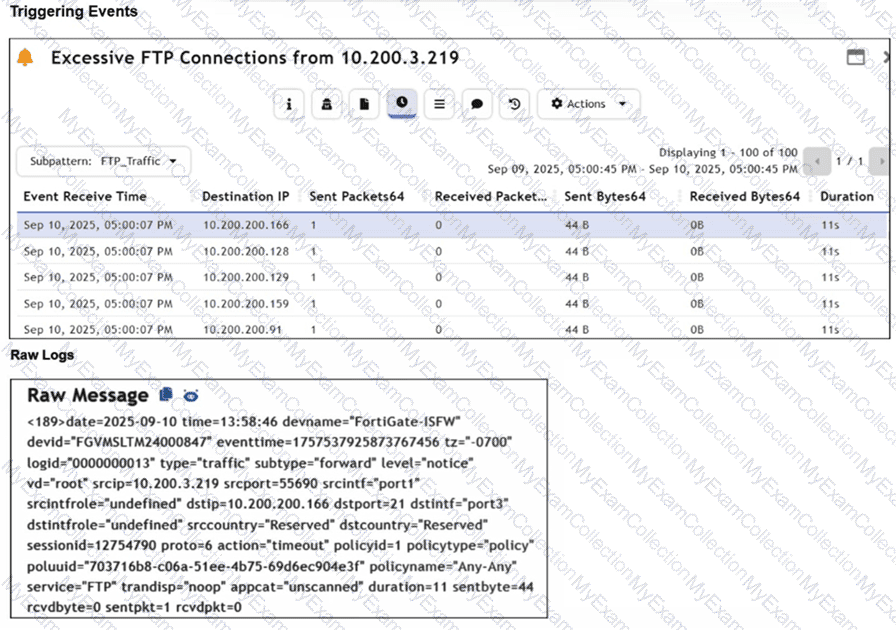
Assume that the traffic flows are identical, except for the destination IP address. There is only one FortiGate in network address translation (NAT) mode in this environment.
Based on the exhibits, which two conclusions can you make about this FortiSIEM incident? (Choose two answers)
A.
The client 10.200.3.219 is conducting active reconnaissance.
B.
FortiGate is not routing the packets to the destination hosts.
C.
The destination hosts are not responding.
D.
FortiGate is blocking the return flows.
Full Access
Answer:
A, C
Explanation:
Based on the analysis of the Triggering Events and the Raw Message provided in the FortiSIEM 7.3 interface:
Active Reconnaissance (A): The " Triggering Events " table shows a single source IP ( 10.200.3.219 ) attempting to connect to multiple different destination IP addresses ( 10.200.200.166, .128, .129, .159, .91 ) on the same service (FTP/Port 21). Each attempt consists of exactly 1 Sent Packet and 0 Received Packets . This pattern of " one-to-many " sequential connection attempts is the signature of a horizontal port scan, which is a primary technique in Active Reconnaissance .
Destination hosts are not responding (C): The Raw Log shows the action as " timeout " and specifically lists " sentpkt=1 rcvdpkt=0 " . In FortiGate log logic (which FortiSIEM parses), a " timeout " with zero received packets indicates that the firewall allowed the packet out (Action was not ' deny ' ), but no SYN-ACK or response was received from the target host within the session timeout period. This confirms the destination hosts are either offline, non-existent, or silently dropping the traffic.
Why other options are incorrect:
FortiGate is not routing (B): If the FortiGate were not routing the packets, the logs would typically not show a successful session initialization ending in a " timeout, " or they would show a routing error/deny. The fact that 44 bytes were sent indicates the FortiGate processed and attempted to forward the traffic.
FortiGate is blocking return flows (D): If the return flow were being blocked by a security policy on the FortiGate, the action would typically be logged as " deny " for the return traffic, and the session state would reflect a policy violation rather than a generic session " timeout " .
Question # 21
A customer wants FortiAnalyzer to run an automation stitch that executes a CLI command on FortiGate to block a predefined list of URLs, if a botnet command-and-control (C & C) server IP is detected.
Which FortiAnalyzer feature must you use to start this automation process?
A.
Playbook
B.
Data selector
C.
Event handler
D.
Connector
Full Access
Answer:
C
Explanation:
Understanding Automation Processes in FortiAnalyzer:
FortiAnalyzer can automate responses to detected security events, such as running commands on FortiGate devices.
Analyzing the Customer Requirement:
The customer wants to run a CLI command on FortiGate to block predefined URLs when a botnet C & C server IP is detected.
This requires an automated response triggered by a specific event.
Evaluating the Options:
Option A: Playbooks orchestrate complex workflows but are not typically used for direct event-triggered automation processes.
Option B: Data selectors filter logs based on criteria but do not initiate automation processes.
Option C: Event handlers can be configured to detect specific events (such as detecting a botnet C & C server IP) and trigger automation stitches to execute predefined actions.
Option D: Connectors facilitate communication between FortiAnalyzer and other systems but are not the primary mechanism for initiating automation based on log events.
Conclusion:
To start the automation process when a botnet C & C server IP is detected, you must use an Event handler in FortiAnalyzer.
[References:, Fortinet Documentation on Event Handlers and Automation Stitches in FortiAnalyzer., Best Practices for Configuring Automated Responses in FortiAnalyzer., , , , ]
Question # 22
Refer to the exhibits.
The Malicious File Detect playbook is configured to create an incident when an event handler generates a malicious file detection event.
Why did the Malicious File Detect playbook execution fail?
A.
The Create Incident task was expecting a name or number as input, but received an incorrect data format
B.
The Get Events task did not retrieve any event data.
C.
The Attach_Data_To_lncident incident task wasexpecting an integer, but received an incorrect data format.
D.
The Attach Data To Incident task failed, which stopped the playbook execution.
Full Access
Answer:
A
Explanation:
Understanding the Playbook Configuration:
The " Malicious File Detect " playbook is designed to create an incident when a malicious file detection event is triggered.
The playbook includes tasks such as Attach_Data_To_Incident, Create Incident, and Get Events.
Analyzing the Playbook Execution:
The exhibit shows that the Create Incident task has failed, and the Attach_Data_To_Incident task has also failed.
The Get Events task succeeded, indicating that it was able to retrieve event data.
Reviewing Raw Logs:
The raw logs indicate an error related to parsing input in the incident_operator.py file.
The error traceback suggests that the task was expecting a specific input format (likely a name or number) but received an incorrect data format.
Identifying the Source of the Failure:
The Create Incident task failure is the root cause since it did not proceed correctly due to incorrect input format.
The Attach_Data_To_Incident task subsequently failed because it depends on the successful creation of an incident.
Conclusion:
The primary reason for the playbook execution failure is that the Create Incident task received an incorrect data format, which was not a name or number as expected.
[References:, Fortinet Documentation on Playbook and Task Configuration., Error handling and debugging practices in playbook execution., , , ]
Question # 23
Review the incident report. Shortly after being compromised, an infected host collected its own network configuration and connection details, then began sending low-volume connection attempts to multiple internal addresses to identify responding hosts. Which two MITRE ATT & CK techniques best describe this activity? Choose two answers.
A.
System Network Connections Discovery
B.
Network Sniffing
C.
Lateral Movement
D.
Active Scanning
Full Access
Answer:
A, D
Explanation:
Exact Extract: “MITRE ATT & CK classifies and describes cyberattacks and intrusions through 14 tactics… These categories are further broken down into specific techniques and subtechniques.â€
Exact Extract: “The attacker then performs active reconnaissance using a mix of techniques, including port scanning and IP discovery, to find high-priority targets.â€
The correct answers are A and D . The infected host first collected its own network configuration and connection details. That maps to System Network Connections Discovery , because MITRE defines this technique as attempting to list network connections to or from the compromised system. The later behavior—sending low-volume connection attempts to multiple internal addresses to identify responding hosts—maps best to Active Scanning , because MITRE describes active scanning as probing victim infrastructure through network traffic.
Network Sniffing is wrong because the scenario does not describe passive packet capture or monitoring traffic on an interface. Lateral Movement is also wrong because it is a MITRE tactic, not the best technique for host discovery activity. The host is still discovering reachable systems; it has not yet moved to another internal system.
Technical Deep Dive: In a Fortinet SOC investigation, this sequence is a classic post-compromise discovery pattern. Commands such as ipconfig, route print, netstat, Get-NetTCPConnection, or arp -a support System Network Connections Discovery. Low-rate probes to many internal IPs are often stealthier than noisy scans and may appear as sparse FortiGate traffic logs, Windows firewall events, or EDR telemetry. FortiSIEM should correlate this with source host, destination spread, port diversity, and time window. FortiGate NP/CP chips may accelerate allowed sessions, but detection occurs in FortiSIEM from logs and metadata, not inside the ASIC forwarding path.
Question # 24
Refer to the exhibit.
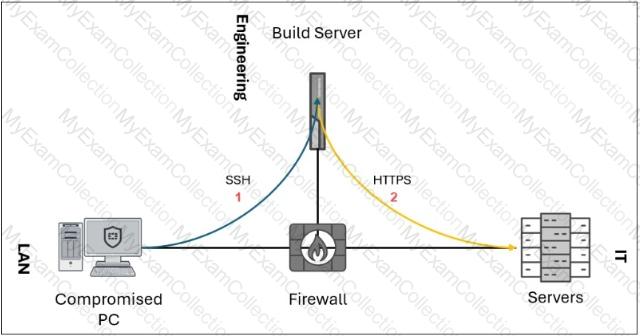
A compromised PC establishes an SSH connection to an engineering build server, which then relays HTTPS traffic to reach servers that would otherwise have blocked access from the LAN. Which technique is used for this attack?
A.
Port knocking
B.
Exfiltration over C2 channel
C.
Man-in-the-middle (MITM)
D.
Protocol tunneling
Full Access
Answer:
D
Explanation:
Exact Extract: “Next, they will use SSH tunneling to bypass firewall rules that prevent LAN devices from accessing some devices in the SOC network. They will be able to gain access to crucial network infrastructure.â€
The correct answer is D. Protocol tunneling . The exhibit shows the compromised PC using SSH to connect to a permitted intermediary system—the engineering build server—and then using that path to relay HTTPS traffic toward internal servers that the LAN host could not normally access directly. That is tunneling: one protocol or traffic flow is encapsulated or relayed through another allowed channel to bypass segmentation or firewall policy.
A is wrong because port knocking is a stealth access-control mechanism where a sequence of connection attempts opens a port. B is wrong because the exhibit is about reaching internal servers, not stealing data through an established C2 channel. C is wrong because there is no interception or manipulation of traffic between two victims; the build server is being used as a pivot/tunnel.
Technical Deep Dive: In MITRE terms, this behavior aligns with tunneling/proxy-style defense evasion and lateral movement support. In real operations, an attacker may use SSH local forwarding, remote forwarding, or dynamic SOCKS proxying, for example ssh -L 8443:internal-server:443 user@build-server or ssh -D 1080 user@build-server. From a Fortinet SOC perspective, FortiSIEM should flag unusual SSH sessions from workstations to build servers, followed by unexpected HTTPS connections from the build server to protected server zones. FortiGate NP/CP offload may accelerate allowed sessions, but the detection value comes from log correlation and segmentation policy violations, not ASIC behavior.
Question # 25
When configuring an Ingest Bulk Feed playbook step, which two restrictions must you consider? Choose two answers.
A.
It cannot use step output from a connector action.
B.
It is slower than the Create Record step.
C.
It will not trigger On Create triggers.
D.
It will not trigger On Update triggers.
Full Access
Answer:
C, D
Explanation:
Exact Extract: “Ingest Bulk Feed: Insert and update large volumes of records. Significantly faster than Create Record, but does not trigger On Create and On Update triggers. Only primary fields, tags, lookups, and picklists are supported.â€
The correct answers are C and D . The Ingest Bulk Feed step is designed for high-volume ingestion, such as threat intelligence feeds, vulnerabilities, or asset imports. Its tradeoff is that it bypasses normal record-trigger behavior. Therefore, records inserted or updated through this step will not trigger playbooks configured with On Create or On Update triggers. That is a major design restriction because downstream automation that depends on those triggers will not run automatically.
A is wrong because the step can be driven by data prepared earlier in the playbook, including connector output transformed into the expected structure. B is the opposite of the guide: Ingest Bulk Feed is significantly faster than Create Record.
Technical Deep Dive: Use Create Record when you need full model behavior, uniqueness handling, trigger execution, and precise per-record workflow control. Use Ingest Bulk Feed when volume and speed matter more than trigger execution. A common mistake is bulk-ingesting indicators or assets and expecting On Create playbooks to fire for enrichment. They will not. You must either enrich before ingestion or run a separate scheduled/manual playbook afterward. NP/CP offloading is irrelevant; this is FortiSOAR database/workflow behavior.
Question # 26
You are designing a FortiSOAR hybrid multi-tenant deployment. The architecture must support remote tenant execution and automation inside segmented networks. Which three elements are true for this design? Choose three answers.
A.
The secure message exchange must be a dedicated instance instead of an embedded one.
B.
The FortiSOAR master cluster can host shared tenants, with strict data isolation between them.
C.
Each tenant or agent has a dedicated, access-controlled space on a secure message exchange for message routing.
D.
FortiSOAR tenant nodes or agents use TCP port 5671 to communicate with the secure message exchange.
E.
FortiSOAR agents are deployed on the master cluster to improve high availability (HA) performance.
Full Access
Answer:
B, C, D
Explanation:
Exact Extract: “Hybrid tenancy • Some tenants are distributed, but some are shared.†The guide also states that shared tenancy uses “one FortiSOAR instance†for multiple tenants and that “tenant data is isolated from other tenants through RBAC.â€
Exact Extract: “The master cluster is a hybrid multi-tenant deployment because shared tenants are hosted locally on the cluster, in addition to the remote tenants that communicate through an SME.†It also states that the SME uses TCP 5671 and that “each tenant node has a dedicated space with the SME.â€
Exact Extract: “For isolated and segmented networks, you can deploy a FortiSOAR agent to receive and execute connector actions… The agent requires outbound network connectivity only to the SME on TCP port 5671.â€
The correct answers are B, C, and D . In a hybrid multi-tenant FortiSOAR design, the master cluster can host local shared tenants while also communicating with remote distributed tenant nodes through the secure message exchange. Shared tenants remain isolated through RBAC, so B is correct. The SME provides controlled message routing, and each tenant node has a dedicated space on the SME, so C is correct. Tenant nodes and agents use TCP 5671 to communicate with the SME, so D is correct. A is wrong because the guide says FortiSOAR can use either the embedded SME or a dedicated external SME; a dedicated SME is recommended for production scalability, but it is not mandatory. E is wrong because agents are deployed in isolated or segmented networks, not on the master cluster for HA performance.
Technical Deep Dive: FortiSOAR hybrid tenancy separates control, execution, and data ownership. The master cluster coordinates workflows and can push actions to tenant nodes, but remote execution happens at the tenant side using tenant credentials. The SME acts as the secure broker between master, tenants, and agents. This is critical when segmented networks block inbound access: an agent only needs outbound connectivity to the SME, which avoids opening risky inbound management paths. FortiGate NP/CP offloading is irrelevant here because SME communication is FortiSOAR application messaging, not firewall data-plane acceleration.
Question # 27
Which two statements accurately describe the Custom API Endpoint playbook trigger? Choose two answers.
A.
It supports token-based, basic, and no authentication.
B.
One custom API endpoint can trigger multiple playbooks at the same time.
C.
It supports HTTP POST, GET, and PUT methods.
D.
An external system can initiate a playbook using an arbitrary endpoint on FortiSOAR.
Full Access
Answer:
A, D
Explanation:
Exact Extract: “Custom API Endpoint: Specify an arbitrary endpoint used to externally start a playbook. Uses a REST API POST action from another system. Supports token-based, basic, and no authentication.â€
The correct answers are A and D. A Custom API Endpoint trigger allows an external system to start a FortiSOAR playbook through a defined arbitrary endpoint. It supports token-based authentication, basic authentication, or no authentication, depending on how you configure the trigger. C is wrong because the guide specifies REST API POST, not GET and PUT. B is not supported by the described trigger behavior; the endpoint is configured as a trigger for a playbook, not as a broadcast mechanism to trigger multiple playbooks simultaneously.
Technical Deep Dive: This trigger is useful when an external system cannot use a native FortiSOAR connector but can make an HTTP API call. Common use cases include webhook-style ingestion, third-party alert forwarding, and external workflow integration. Secure it properly; “no authentication†is possible but usually unacceptable in production unless protected by network controls.

