Pre-Summer Sale Special - Limited Time 70% Discount Offer - Ends in 0d 00h 00m 00s - Coupon code: mxmas70

Home > Fortinet > NSE 5 Network Security Analyst > NSE5_FWB_AD-8.0

NSE5_FWB_AD-8.0 Fortinet NSE 5 - FortiWeb 8.0 Administrator Question and Answers

Question # 4

Refer to the exhibit.

You are a FortiWeb administrator reviewing the biometrics-based detection rule shown in the exhibit. Your goal is to configure a rule that detects bots that avoid typical human interactions like using a mouse or clicking. You also want to log the detection event and apply a high-severity alert.

Based on the current configuration, which settings should you change to meet this goal?

A.

Select Screen Touch and Page Focus , set the severity to Low , and keep action as Deny (no log) .

B.

Select Keyboard and Scroll , change the action to Alert , and set the severity to High .

C.

Select Mouse Movement and Click , change the action to Alert , and set the severity to High .

D.

Do not select any client events to monitor, enable Bot Trait Checking , keep the current severity, and keep the action as Deny (no log) .

Full Access
Question # 5

A large enterprise has an existing web infrastructure with complex routing rules and static IP address assignments. The network administrators cannot modify the current IP address scheme, but they need FortiWeb to inspect and block threats like SQL injection and cross-site scripting (XSS) without changing the client-server communication flow.

In this situation, which FortiWeb operation mode is the most suitable?

A.

Reverse proxy mode

B.

Web Cache Communication Protocol (WCCP) redirection mode

C.

True transparent proxy mode

D.

Decryption mirror mode

Full Access
Question # 6

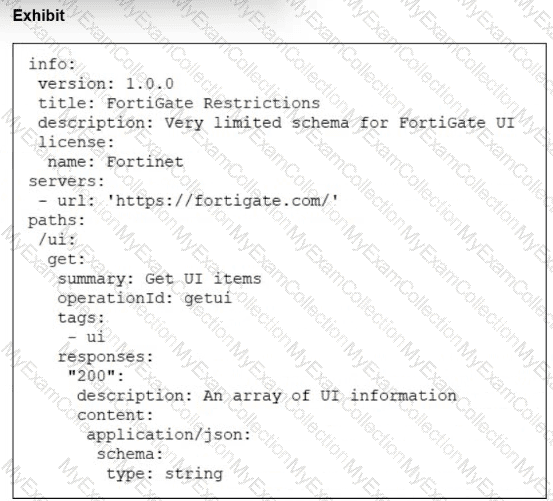
Refer to the exhibit.

A FortiWeb administrator is trying to enable policy-based traffic logging on FortiWeb but doesn’t see the traffic log option available in the server policy settings.

What is the most likely reason this option is not visible?

A.

The FortiWeb administrator must first connect to FortiSIEM or FortiAnalyzer, and then enable policy logs from those devices.

B.

Server policy logging only becomes available when FortiWeb is deployed in reverse-proxy mode and transparent mode.

C.

The global traffic log setting must be enabled manually in the CLI for the option to appear.

D.

The FortiWeb administrator must get a license to use this feature with FortiAppSec Cloud.

Full Access
Question # 7

You are a FortiWeb administrator investigating an SQL injection attack on your company’s customer portal. The network firewall and intrusion prevention system (IPS) did not stop the attack.

You decide to deploy a web application firewall (WAF) to help prevent this type of attack.

Which two actions can you take to block application-layer threats? (Choose two.)

A.

Focus on client-side risks, such as protecting user browsers.

B.

Inspect general network traffic equally between clients and servers.

C.

Detect and block threats like SQL injection, cross-site scripting (XSS), and other Layer 7 attacks.

D.

Filter and analyze HTTP/S requests to block attacks targeting the web server.

Full Access
Question # 8

You are reviewing the FortiWeb integration with the Advanced Bot Protection (ABP) service.

Match each step in the ABP flow with its description.

Full Access
Question # 9

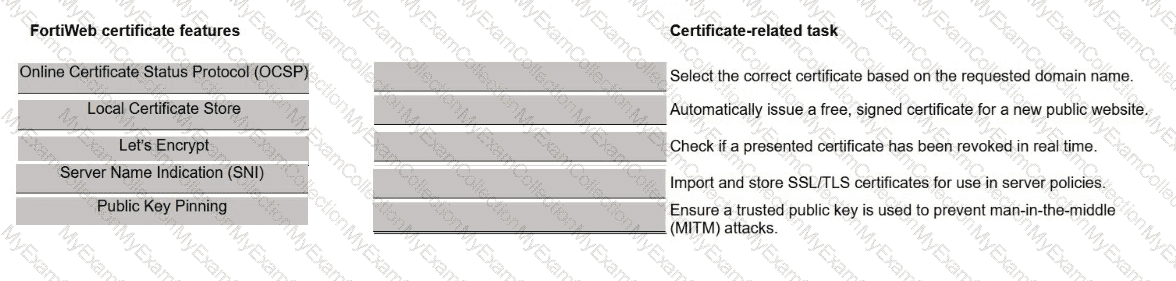
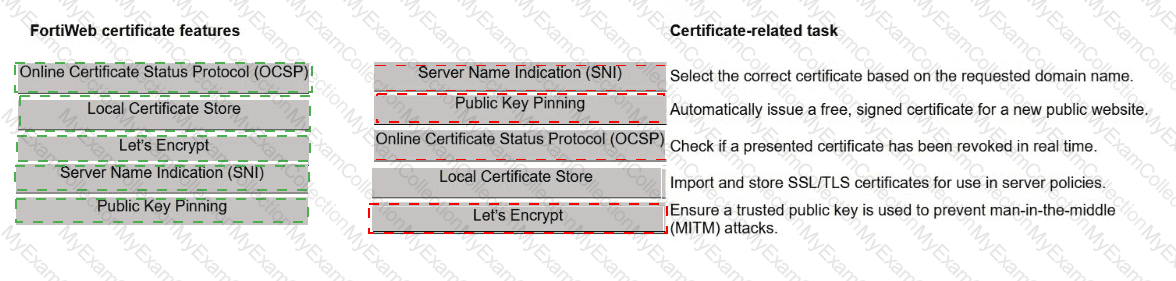
You are hosting multiple secure web applications behind a single public IP address on FortiWeb.

When a client connects to a service, FortiWeb needs to:

    Identify the correct SSL certificate.

    Decrypt the request.

    Route the request to the correct back-end server.

Match each FortiWeb function to the request handling step that performs the function.

Full Access
Question # 10

You recently deployed two FortiWeb devices in an active-active (A-A) high availability (HA) cluster.

During routine maintenance, you want to confirm that the cluster is synchronizing the correct configuration areas and that both FortiWeb devices behave consistently in production.

As the FortiWeb administrator, which two configuration areas should you examine to verify that HA synchronization is functioning correctly? (Choose two.)

A.

Check the network configuration on both FortiWeb devices—such as interfaces and static routes—to ensure they are aligned.

B.

Review policy configurations, including server policies and protection profiles, to confirm they match across the cluster.

C.

Review inspection and mitigation log files to determine if they are being replicated across both FortiWeb devices.

D.

Verify whether firmware images and upgrade history are synchronized between the FortiWeb devices.

Full Access