

Question # 4
What are two functions of the Routing Engine? (Choose two.)
A.
It evaluates firewall filters for transit traffic.
B.
It runs Junos OS.
C.
It processes all management traffic.
D.
It processes transit traffic.
Full Access
Answer:
B, C
Explanation:
The Routing Engine (RE) is the " brains " of a Juniper device, representing the control plane in the Junos dual-plane architecture. One of its primary functions is that it runs the Junos OS . The RE is essentially a high-performance workstation running a specialized version of FreeBSD that hosts the various software daemons responsible for the device ' s logic, such as the Routing Protocol Process (rpd) and the Device Control Process (dcd).
The second core function is that the RE processes all management traffic . Any packet destined for the router itself—such as an SSH session, an SNMP poll, a NETCONF request, or an NTP update—is handled by the Routing Engine ' s CPU. The RE also maintains the master routing table, manages configuration commits, and provides the CLI environment for the administrator.
It is critical to distinguish these control-plane duties from the duties of the Packet Forwarding Engine (PFE) . The PFE is responsible for the " heavy lifting, " such as processing transit traffic (data passing through the router) and evaluating firewall filters at wire speed. While the RE defines the policies and routing tables, it hands off a streamlined version of this information to the PFE so the RE isn ' t bogged down by millions of individual packets. This separation ensures that a busy management session or a complex routing calculation on the RE doesn ' t impact the device ' s ability to forward traffic at maximum capacity.
[Reference: Junos OS Fundamentals, Control Plane and Forwarding Plane., ]
Question # 5
Exhibit:
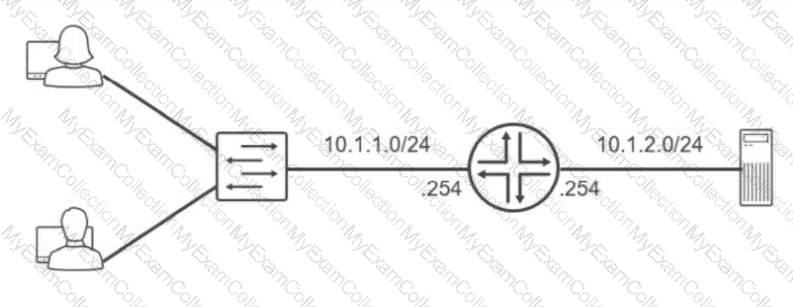
Referring to the exhibit, which routing configuration is required for these two users to access the remote server?
A.
Users and the server require a default gateway.
B.
Trunk ports must be enabled on the switch.
C.
Users must connect directly to the router.
D.
A routing protocol must be enabled on the router.
Full Access
Answer:
A
Explanation:
The network topology illustrates two distinct IP subnets, 10.1.1.0/24 and 10.1.2.0/24 , separated by a Layer 3 router. For hosts on the first subnet to communicate with the server on the second subnet, an intermediary device must perform inter-subnet routing. The router acts as the exit point for each local segment, utilizing its interfaces assigned with the .254 host address as the logical path to external networks.
The fundamental requirement for this communication is the configuration of a default gateway on all end-nodes. When the users (on 10.1.1.0/24 ) attempt to send data to the server (on 10.1.2.0/24 ), their local TCP/IP stack recognizes the destination is not on the local wire. Without a defined default gateway, the hosts would simply drop the traffic as unroutable. By setting the default gateway to 10.1.1.254 for users and 10.1.2.254 for the server, the hosts are instructed to forward all off-net traffic to the router. The router then consults its routing table—which contains these directly connected routes—and forwards the packets to the appropriate egress interface. While VLAN tagging or routing protocols could exist in more complex environments, the primary necessity for basic reachability between these two specific segments is a correctly configured gateway on the terminal devices. Reference: Networking Fundamentals, IP Routing Basics, Default Gateway Configuration.
==========
Question # 6
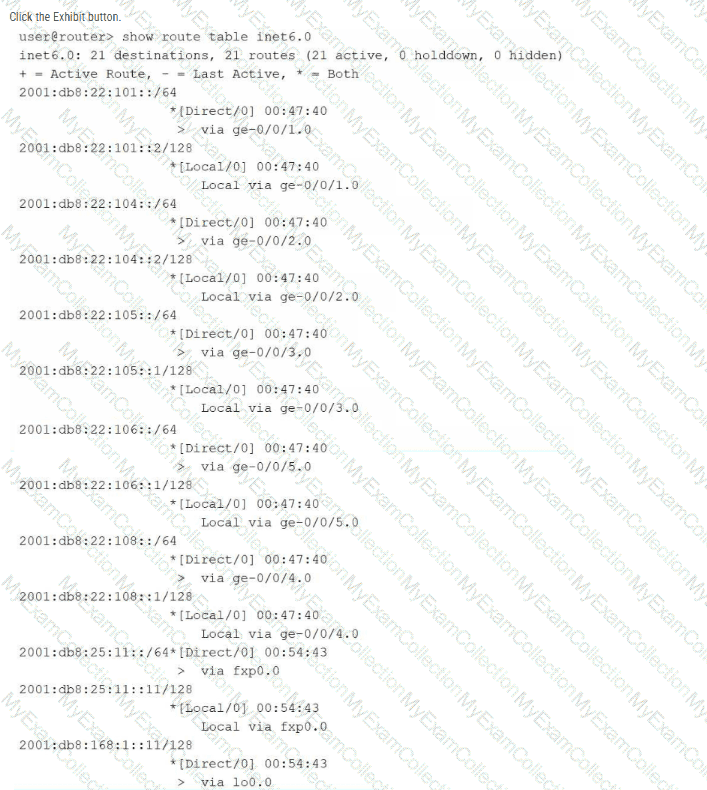
Referring to the exhibit, which two statements about IPv6 routing are correct? (Choose two.)
A.
The router is not learning IPv6 routes from peers.
B.
The router cannot forward traffic to remote IPv6 networks.
C.
Traffic destined for the 2001:db8:22:108::/64 network is forwarded using the ge-0/0/5.0 interface.
D.
The router is connected to the 2001:db8:22:107::/64 network.
Full Access
Answer:
A, B
Explanation:
The provided exhibit displays the output of the show route table inet6.0 command, which represents the master routing table for IPv6 unicast traffic in Junos OS. Analysis of the specific route entries reveals that all listed destinations are categorized as either [Direct/0] or [Local/0] . These route types indicate that the table only contains networks physically connected to the router ' s interfaces and the specific IP addresses assigned to those interfaces.
Because there are no routes identified by dynamic protocols (such as OSPFv3, IS-IS, or BGP) or static entries, it is verified that the router is not learning IPv6 routes from any neighbors or peers. Consequently, the routing table lacks reachability information for any non-local or remote IPv6 segments. Without these routes or a configured default gateway (::/0), the router is unable to forward traffic to remote IPv6 networks. Statements C and D are factually incorrect based on the exhibit: the 2001:db8:22:108::/64 network is associated with interface ge-0/0/4.0 (not ge-0/0/5.0), and the 2001:db8:22:107::/64 network is entirely absent from the displayed routing table.
[Reference: Routing Fundamentals, IPv6 Implementation, Routing Table Interpretation., ]
Question # 7
You must securely log in to a Junos device to perform maintenance.
Which command would you use to accomplish this task?
A.
ftp 172.16.10.1
B.
traceroute 172.16.10.1
C.
telnet 172.16.10.1
D.
ssh 172.16.10.1
Full Access
Answer:
D
Explanation:
Secure remote administrative access to a Junos OS device is performed by using SSH (Secure Shell) . Therefore, ssh 172.16.10.1 is the correct command. Juniper defines the Junos CLI ssh operational command as a mechanism for opening a secure connection between a local router or switch and a remote system. The destination can be specified by hostname or IP address.
SSH provides authenticated and encrypted remote access, protecting login credentials and management traffic while the administrator performs configuration, monitoring, or maintenance operations. Junos devices can accept incoming SSH sessions when SSH is enabled under the [edit system services ssh] configuration hierarchy.
telnet 172.16.10.1 can establish a remote terminal session, but Telnet does not provide the encryption required for secure administrative access. ftp is principally a file-transfer protocol and is not the appropriate mechanism for interactive device maintenance. traceroute is an operational diagnostic utility used to identify the Layer 3 path toward a destination; it does not provide device login functionality.
Study Guide Reference Topics: User Interfaces — CLI remote access; Junos OS Fundamentals — system services; Operational Monitoring and Maintenance — secure device management.
Question # 8
Which two statements accurately describe the relationship between the routing table and the forwarding table on a Junos device? (Choose two.)
A.
The routing table resides in the data plane for fast lookups.
B.
The routing table selects the best route based on routing information.
C.
The forwarding table is built from the routing table.
D.
The routing table is built from the forwarding table.
Full Access
Answer:
B, C
Explanation:
The relationship between the routing table (Routing Information Base or RIB) and the forwarding table (Forwarding Information Base or FIB) is the cornerstone of the Junos OS architectural separation between the control and data planes. The routing table resides in the control plane on the Routing Engine (RE). Its primary role is to aggregate all reachability information from every configured protocol and select the best route for each destination prefix based on criteria like preference and metrics.
Once the Routing Engine has identified the single " active " best path for a destination, it distills this complex routing data into a simplified, streamlined version called the forwarding table . The forwarding table contains only the essential information needed to move a packet: the destination prefix, the egress interface, and the Layer 2 next-hop MAC address. The RE then " pushes " this forwarding table to the Packet Forwarding Engine (PFE) in the data plane. By having the PFE use a table built from the routing table , Junos ensures that transit traffic can be processed at wire speed without the overhead of complex routing logic. This one-way flow—from the comprehensive RIB on the RE to the optimized FIB on the PFE—allows the device to maintain high performance even while routing protocols are recalculating or the management plane is under heavy load.
Question # 9
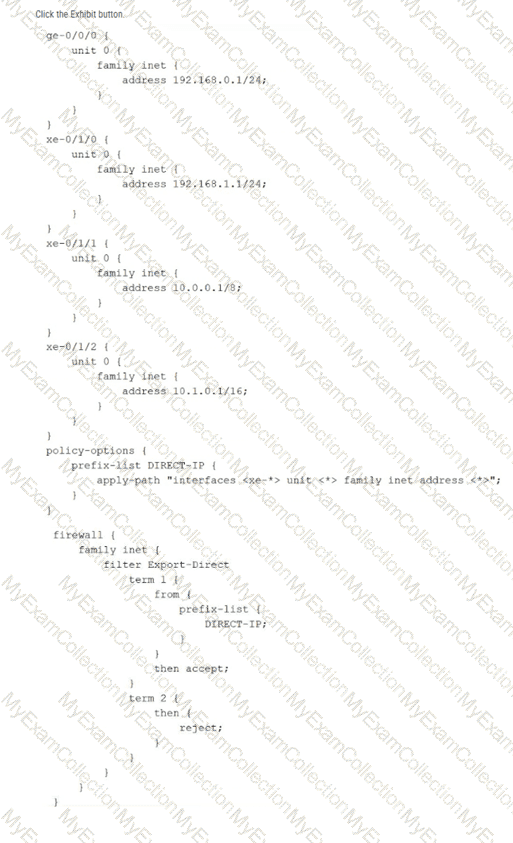
Referring to the exhibit, which command would be used to view the IP subnet addresses associated with prefix-list DIRECT-IP?
A.
show policy-options prefix-list DIRECT-IP
B.
show configuration policy-options prefix-list DIRECT-IP
C.
show configuration policy-options prefix-list DIRECT-IP | display inheritance
D.
show configuration policy-options prefix-list DIRECT-IP apply-path
Full Access
Answer:
C
Explanation:
The exhibit illustrates the use of the apply-path feature within a prefix list configuration. In Junos OS, apply-path is a dynamic configuration utility that allows a prefix list to be automatically populated with values derived from other parts of the configuration—in this case, all IPv4 addresses assigned to interfaces with the xe-* prefix. This is particularly useful for building automated firewall filters or routing policies that stay updated as interfaces are added or modified.
When viewing the standard configuration using show configuration, the CLI only displays the literal apply-path statement. To verify the actual list of IP addresses that the system has inherited and populated into the DIRECT-IP list, the administrator must use the | display inheritance pipe filter. This command instructs the Junos OS parser to expand all inherited values and dynamic paths, showing the effective configuration as it is seen by the Packet Forwarding Engine. Based on the exhibit, this would reveal the subnets associated with xe-0/1/0, xe-0/1/1, and xe-0/1/2, while ignoring ge-0/0/0 because it does not match the xe-* wildcard. This verification is a critical troubleshooting step before applying such a prefix list to a transit firewall filter like Export-Direct.
[Reference: Routing Policy and Firewall Filters, Prefix Lists, and the apply-path statement., , ]
Question # 10
Which two actions would you perform when you are in the operational mode of the CLI? (Choose two.)
A.
Clear the log files.
B.
Commit the configuration.
C.
Reboot the device.
D.
Configure routing protocols.
Full Access
Answer:
A, C
Explanation:
The Junos Command Line Interface (CLI) is strictly partitioned into operational and configuration modes to maintain a clear boundary between monitoring and administrative changes. Operational mode, identified by the > prompt, is designed for executing commands that monitor device status, troubleshoot network connectivity, and manage the physical system state. One typical administrative task performed here is clearing log files (using the clear log command) to free up storage space or reset diagnostic data during troubleshooting.
Additionally, high-level system requests that do not alter the persistent configuration database, such as rebooting the hardware, are executed in operational mode. The request system reboot command allows the administrator to gracefully restart the device after a software update or as part of a maintenance cycle. In contrast, actions such as configuring routing protocols or committing changes require transitioning to configuration mode (the # prompt). Committing a configuration is the specific act of moving changes from the candidate database to the active database, which is a logic-altering event strictly reserved for configuration mode. Therefore, operational mode remains the dedicated environment for real-time observation and system-level requests that ensure the device operates correctly within its existing parameters. Reference: User Interfaces, CLI Modes, Operational Mode Commands.
==========
Question # 11
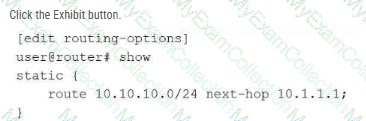
Referring to the exhibit, you are configuring a Junos router to provide connectivity to a building across town on the network 10.10.10.0/24. The next-hop router is at 10.10.1.1, which is reachable using interface ge-0/0/1. After committing the configuration in the exhibit, users report they still cannot reach the 10.10.10.0/24 network, and the route does not appear as active in the routing table. In this scenario, which statement is correct?
A.
The next-hop address 10.1.1.1 is not directly connected or reachable through another route.
B.
Static routes must include the outgoing interface as the next hop.
C.
The static route requires a preference value to be specified or it will not install.
D.
The static route requires the retain keyword to remain active in the routing table.
Full Access
Answer:
A
Explanation:
In Junos OS, the Routing Engine (RE) performs a validation check on every entry in the Routing Information Base (RIB). For a static route to be considered valid and transition to an active state in the inet.0 table, its designated next hop must be resolvable . A next-hop address is resolvable only if the router has an existing route (typically a directly connected route) to that specific IP address.
According to the exhibit, the static route for 10.10.10.0/24 has been configured with a next hop of 10.1.1.1 . However, the scenario states that the actual gateway router is located at 10.10.1.1 . If the local interface (ge-0/0/1) is configured with an IP in the 10.10.1.0/x subnet, the router will have a direct route to 10.10.1.1, but it will likely have no path to the 10.1.1.1 address provided in the exhibit.
Because the router cannot resolve the next hop 10.1.1.1 , the static route is placed in an " inactive " or " hidden " state. It will not be installed in the forwarding table pushed to the Packet Forwarding Engine (PFE), and standard show route commands will not display it unless specific flags like hidden or all are used. This logic ensures that the router does not attempt to forward packets into a " black hole " where the gateway is logically unreachable. To fix this, the administrator must modify the configuration to point to the correct, reachable next-hop address of 10.10.1.1.
[Reference: Routing Fundamentals, Static Route Resolution, and Troubleshooting Routing Tables., , , ]
Question # 12
You committed a new configuration on a Junos router, but users report connectivity issues. You must quickly restore the previous working configuration without manually editing the candidate configuration. Which command should you use to load the required configuration into the candidate configuration?
A.
rollback 0
B.
show | compare rollback
C.
rollback 1
D.
load override
Full Access
Answer:
C
Explanation:
In Junos OS, the configuration database is designed with a robust versioning system that facilitates rapid recovery from administrative errors. Every time a commit command is successfully executed, the system automatically archives the previous active configuration and assigns it a " rollback " index. The rollback command is used within configuration mode to revert the candidate configuration to a previously saved state.
The indices are zero-based, where rollback 0 represents the currently active configuration that was just committed. To restore the configuration that was functional immediately before the most recent, problematic commit, the administrator must use rollback 1. This command replaces the current candidate configuration with the contents of the last known working state. It is important to note that executing rollback 1 only populates the candidate buffer; to make this previous configuration active and restore connectivity, the administrator must subsequently issue the commit command. This mechanism is a cornerstone of Junos OS ' s commitment to high availability and operational resilience, allowing for nearly instantaneous restoration of services without the need for manual line-by-line configuration edits during a network outage.
[Reference: Configuration Basics, Managing Configurations, Rollback configurations., ==========]
Question # 13
Click the Exhibit button.
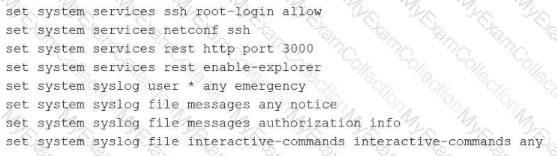
Which command displays the output in the format shown in the exhibit?
A.
show configuration | display inheritance
B.
show configuration | display set
C.
show configuration
D.
show configuration | display detail
Full Access
Answer:
B
Explanation:
The exhibit illustrates a Junos configuration rendered as a sequence of flat, executable lines that each begin with the set keyword. This is commonly referred to as the " set format. " By default, Junos OS displays the configuration in a hierarchical, brace-delimited format (often called " staza " or " curly brace " format). While the default format is excellent for visualizing the structural relationship between different configuration objects, the set format is often preferred for documentation, scripting, or copying specific configuration snippets between different devices.
To produce the output seen in the exhibit, an administrator must append the pipe filter | display set to the show configuration command. This filter instructs the CLI parser to flatten the hierarchical structure and prepend the necessary context to every individual leaf statement. These lines are highly functional because they can be pasted directly into the CLI of another device while in configuration mode to recreate the exact settings. In contrast, display inheritance is used to reveal hidden settings applied via configuration groups, and display detail provides additional technical metadata about the objects. Neither of those options would transform the output into the discrete set command lines shown in the exhibit. Understanding how to toggle between these display formats is a fundamental skill for any architect managing Junos infrastructures through the Command Line Interface.
[Reference: User Interfaces, Configuration Display Options, display set., , , ]
Question # 14
Which two statements describe the result when you enter ? at the command-line prompt? (Choose two.)
A.
It lists the available commands and options.
B.
It lists tips for the help menu.
C.
It displays help about a text string contained in a statement.
D.
It displays summary information about the commands and options.
Full Access
Answer:
A, D
Explanation:
The Junos Command Line Interface (CLI) is designed with an intuitive, context-sensitive help system that assists users in navigating the command hierarchy. When an administrator enters a question mark (?) at the prompt, the CLI provides immediate feedback based on the current location within the hierarchy. First, it lists all available commands and options that are valid at that specific point. This allows the user to see the breadth of possible next steps without needing to refer to external documentation.
Second, the ? character triggers the display of summary information for each of those commands and options. This brief descriptive text provides a clinical overview of what each command achieves, helping the user select the appropriate tool for their task. This " help-on-demand " feature is functional in both operational and configuration modes. It is important to distinguish this from the help command; while help (such as help topic or help reference) provides more exhaustive documentation and usage examples, the ? prompt is primarily a quick-reference tool for command completion and syntax discovery. This mechanism ensures that even complex configurations can be built accurately by exploring the available options and their summarized purposes directly within the terminal environment. Reference: User Interfaces, CLI Help Facilities, Command Discovery.
==========
Question # 15
Which two statements are correct about Junos OS? (Choose two.)
A.
Junos OS provides the ability to run unsigned third-party binaries.
B.
Junos OS provides modularization of software processes.
C.
Junos OS combines security and routing policies.
D.
Junos OS separates the control plane and the forwarding plane.
Full Access
Answer:
B, D
Explanation:
Junos OS is built upon a highly stable and secure architecture that distinguishes it from many legacy network operating systems. Two of its most defining characteristics are software modularization and the separation of the control and forwarding planes .
Modularization means that Junos OS runs each major function—such as the routing protocol process (rpd), the management process (mgd), and the interface process (dcd)—as an independent software daemon in its own protected memory space. This ensures that if a single process crashes or needs to be restarted, it does not bring down the entire system or interrupt traffic forwarding.
Furthermore, the physical and logical separation of the Control Plane (Routing Engine) and the Forwarding Plane (Packet Forwarding Engine) is a cornerstone of Junos design. The Routing Engine handles complex intelligence, protocol calculations, and management, while the Packet Forwarding Engine performs high-speed packet switching in hardware. This ensures that a heavy management load or a complex routing recalculation won ' t cause " jitter " or packet loss for transit traffic. Conversely, Junos strictly prohibits unsigned third-party binaries to maintain system integrity, and it maintains a clear functional distinction between routing policies (path selection) and security policies (traffic permit/deny).
Question # 16
Which two statements are correct about SNMPv3? (Choose two.)
A.
It uses plain-text community strings.
B.
It protects against tampering and eavesdropping.
C.
It is simpler to configure than SNMPv2c.
D.
It provides encrypted passwords for secure communication.
Full Access
Answer:
B, D
Explanation:
Simple Network Management Protocol version 3 (SNMPv3) represents a significant security evolution over its predecessors, SNMPv1 and SNMPv2c. While earlier versions relied on " community strings " sent in plain-text—which are easily intercepted and provide minimal security—SNMPv3 introduces a comprehensive security framework known as the User-based Security Model (USM). The primary benefit of SNMPv3 is that it protects against tampering and eavesdropping. It achieves this through two main mechanisms: message integrity (authentication), which ensures that a packet has not been altered in transit, and data confidentiality (privacy), which encrypts the payload of the SNMP packets using advanced algorithms like AES or DES.
Furthermore, SNMPv3 provides for secure communication by utilizing encrypted credentials rather than cleartext strings. Administrators define specific users and assign them security levels: noAuthNoPriv, authNoPriv, or authPriv. In the most secure mode (authPriv), the system requires both a password for authentication (validated via MD5 or SHA hashes) and a separate password for encryption. This architecture ensures that management traffic—including sensitive device telemetry and configuration data—remains confidential and authenticated as it traverses the network. While SNMPv3 is inherently more complex to configure than SNMPv2c due to these additional security parameters, it is the required standard for any production Junos environment where management plane integrity is a priority.
[Reference: Operational Monitoring and Maintenance, SNMP Management and Security., ==========, ]
Question # 17
What is the purpose of an ARP packet?
A.
to determine the MPLS label of a given IP address
B.
to determine the IP address of a given URL
C.
to determine the MAC address of a given IP address
D.
to determine the IP address of a given MAC address
Full Access
Answer:
C
Explanation:
The Address Resolution Protocol (ARP) is a fundamental Layer 2 utility used within the IPv4 suite to resolve a known network-layer (Layer 3) address to its corresponding physical media access control (MAC) or hardware address (Layer 2). In a typical Ethernet environment, when a Junos device needs to forward a packet to a next-hop on a local subnet, the Packet Forwarding Engine (PFE) requires the destination MAC address to properly encapsulate the frame.
The process begins with an ARP Request, which is broadcast to all hosts on the segment asking, " Who owns this IP address? " The host assigned that specific IP responds with an ARP Reply containing its MAC address. The Junos device then stores this mapping in its ARP cache (viewable via the show arp command) to avoid repeated broadcasts for subsequent packets. This resolution is essential because while IP addresses facilitate end-to-end logical routing, the actual delivery of data across a physical wire or switch fabric relies entirely on hardware addresses. Without successful ARP resolution, the device cannot complete the Layer 2 header, and the traffic will be dropped as " encapsulation failed. "
[Reference: Networking Fundamentals, Ethernet and Address Resolution Protocol., ==========]
Question # 18
What is the maximum number of IP addresses that would be assigned to hosts in the 192.168.1.0/24 network?
A.
24
B.
32
C.
128
D.
254
Full Access
Answer:
D
Explanation:
In the IPv4 addressing scheme used within Junos OS, the /24 prefix length (representing a subnet mask of 255.255.255.0) allocates 24 bits for the network portion and 8 bits for the host portion of the 32-bit address. To determine the total number of addresses in this block, the formula $2^n$ is applied, where $n$ is the number of host bits. With 8 bits available ($2^8$), there are a total of 256 possible IP addresses.
However, the architecture of standard IP networking requires the reservation of two specific addresses within any subnet, making them unavailable for assignment to individual host interfaces. The first address (192.168.1.0) is the network address, which identifies the subnet itself. The last address (192.168.1.255) is the directed broadcast address, used to send traffic to all hosts on the segment simultaneously. Consequently, the maximum number of addresses that can be assigned to actual hosts—such as router interfaces, servers, or workstations—is calculated as $2^n - 2$. In this specific scenario, $256 - 2 = 254$. This calculation is a fundamental requirement for network architects when defining address pools and ensuring the Packet Forwarding Engine (PFE) is correctly configured with valid host-layer identifiers.
[Reference: Networking Fundamentals, IPv4 Subnetting and Host Calculation., ]
Question # 19
What is the primary purpose of an IPv6 link-local address?
A.
to provide Layer 2 connectivity
B.
to assign a unique address for multicast traffic
C.
to enable communication between devices on the same segment
D.
to replace the default gateway in IPv6 networks
Full Access
Answer:
C
Explanation:
IPv6 link-local addresses, which are identified by the fe80::/10 prefix, are a mandatory component of the IPv6 architecture. The primary purpose of a link-local address is to enable immediate communication between devices located on the same local network segment (the same " link " ) without the requirement for a global unicast address or an external routing infrastructure. These addresses are non-routable, meaning they are never forwarded by a router to another network segment.
Every IPv6-enabled interface on a Junos device automatically generates a link-local address, typically derived from the interface ' s MAC address using the EUI-64 format or a stable privacy algorithm. These addresses are essential for several core functions: they are used by the Neighbor Discovery Protocol (NDP) to resolve MAC addresses, they serve as the source address for routing protocol adjacency formation (such as OSPFv3 or RIPng), and they are frequently used as the next-hop address in IPv6 routing tables. While they do not provide Layer 2 connectivity themselves (which is the role of the MAC address), they provide the necessary Layer 3 link-level presence required for nodes to discover one another and communicate across the physical medium before any global addressing is configured.
[Reference: Networking Fundamentals, IPv6 Addressing and Link-Local Scope., ==========]
Question # 20
What are two characteristics of transit traffic in Junos OS? (Choose two.)
A.
It includes routing protocol packets.
B.
It is traffic destined for the Routing Engine.
C.
It does not require control plane processing.
D.
It is forwarded by the Packet Forwarding Engine.
Full Access
Answer:
C, D
Explanation:
Transit traffic represents the primary " workload " of a Junos device; it is the data that enters one network interface and exits another, destined for a remote host. Unlike exception traffic, transit traffic is forwarded exclusively by the Packet Forwarding Engine (PFE) . The PFE uses specialized Application-Specific Integrated Circuits (ASICs) or programmable NPUs to perform lookups in the hardware-based forwarding table (FIB) at wire speed.
A defining characteristic of transit traffic is that it does not require control plane processing . Once the Routing Engine (RE) has populated the PFE with the necessary forwarding instructions, the RE steps out of the way. The packets pass through the PFE ' s ingress processing, lookups, and egress queuing without ever consuming CPU cycles on the Routing Engine. This bypass is what allows Junos devices to maintain massive throughput and low latency, even if the RE is busy recalculating a complex BGP table. Routing protocol packets (like OSPF updates) and traffic destined for the router ' s own management IP address are explicitly not transit traffic; they are control plane traffic because they terminate at the device ' s " brain. " Transit traffic is strictly " pass-through " data.
[Reference: Junos OS Fundamentals, Data Plane and Transit Traffic., , , ]
Question # 21
You want to automatically back up your Junos device configuration to an external server every time you commit a configuration change. In this scenario, which command would accomplish this task?
A.
set system commit synchronize
B.
set system archival configuration transfer-interval
C.
set system archival configuration transfer-on-commit
D.
set system archival configuration archive-sites
Full Access
Answer:
C
Explanation:
Junos OS provides robust automation features for configuration management, specifically through the system archival utility. When an administrator needs to ensure that every successful configuration change is mirrored to an off-box repository for disaster recovery or auditing, the transfer-on-commit statement is the appropriate tool. This command instructs the Junos device to initiate an automated upload process immediately following the validation and activation of a commit command.
To fully implement this, the administrator must also define the archive-sites, which specify the destination URIs (using protocols such as FTP, SCP, or HTTP) and the necessary credentials for the external server. While transfer-interval can be used to back up configurations on a chronological schedule (e.g., every 60 minutes), transfer-on-commit is superior for tracking specific change events as they happen. This ensures that the external backup is always synchronized with the current active configuration on the device. Once configured, the device handles the background transfer, allowing the administrator to maintain a historical record of configuration states without manual intervention, which is essential for large-scale operational environments.
[Reference: Configuration Basics, Managing Configurations, System Archival., ==========]
Question # 22
Which two statements describe rollback configuration behavior in Junos OS? (Choose two.)
A.
Rollback configurations are applied automatically after a commit confirmed timeout.
B.
Rollback 0 always refers to the factory default configuration.
C.
Rollback files are stored automatically after each commit.
D.
Up to 100 rollback configurations are maintained by default.
Full Access
Answer:
A, C
Explanation:
Junos OS incorporates a robust configuration versioning and recovery system designed to protect against configuration errors and human oversight. A key feature of this system is that rollback files are stored automatically by the device after each successful commit. These files represent a historical record of previous active configurations. By default, the system maintains a set number of these files, allowing an administrator to revert to a previous state (e.g., rollback 1) if the most recent changes result in unexpected network instability.
Another critical safety mechanism is the behavior associated with the commit confirmed command. If an administrator issues this command but fails to provide a subsequent confirmation within a designated timeframe (defaulting to 10 minutes), the system assumes a loss of management connectivity. Consequently, the rollback configurations are applied automatically after the commit confirmed timeout to restore the previous known-good state. This is an essential best practice for remote configuration management. It is important to note that rollback 0 refers to the currently active configuration, not the factory default, and that while Junos supports maintaining a large number of rollback files, the primary operational benefit lies in the automated storage and confirmation-based recovery processes that ensure the device remains reachable and stable. Reference: Configuration Basics, Rollback Configurations, Commit Confirmed Logic.
==========
Question # 23
What are two characteristics of IPv6 addressing? (Choose two.)
A.
The IPv6 address is represented by a 128-bit address.
B.
The IPv6 header automatically includes a checksum.
C.
IPv6 uses ARP to discover neighboring devices.
D.
IPv6 addresses that begin with fe80 are not routable.
Full Access
Answer:
A, D
Explanation:
IPv6 introduces several fundamental shifts in networking architecture compared to its predecessor, IPv4. The most prominent characteristic is the address length; IPv6 utilizes a 128-bit address space, represented in hexadecimal notation across eight groups of 16 bits. This massive expansion from IPv4 ' s 32-bit limit was designed to ensure long-term address availability for the global internet and the growing ecosystem of connected devices.
Another defining characteristic of IPv6 is the concept of address scope, particularly regarding link-local addresses . Any IPv6 address beginning with the fe80::/10 prefix is classified as link-local. These addresses are automatically configured on every IPv6-enabled interface and are strictly not routable beyond the local physical or logical link segment. They are essential for local link operations such as neighbor discovery and routing protocol adjacency formation.
Architecturally, IPv6 also improves performance by streamlining the packet header. Unlike IPv4, the IPv6 header does not include a checksum, as modern link-layer (Layer 2) and transport-layer (Layer 4) protocols perform their own error checking, making a redundant header checksum unnecessary at the network layer. Additionally, IPv6 replaces the broadcast-based Address Resolution Protocol (ARP) with the multicast-based Neighbor Discovery Protocol (NDP). Understanding these core traits—massive address length and non-routable link-local scoping—is critical for managing modern Junos-based network infrastructures.
[Reference: Networking Fundamentals, IPv6 Addressing and Characteristics., ==========]
Question # 24
Which two operational mode commands would you use to verify CPU and memory utilization on a Junos device? (Choose two.)
A.
show chassis routing-engine
B.
show chassis environment
C.
show system processes extensive
D.
show system resource-monitor summary
Full Access
Answer:
A, C
Explanation:
In the Junos OS architecture, maintaining visibility into the health of the Routing Engine (RE) is paramount for ensuring control plane stability. The command show chassis routing-engine is the primary tool for a high-level hardware status overview. It provides critical telemetry regarding the RE ' s current CPU utilization (broken down by user, background, and kernel tasks), memory usage statistics, and uptime. This command is essential for identifying if the device ' s " brain " is under significant stress due to heavy protocol processing or management tasks.
For a more granular, process-specific analysis, the show system processes extensive command is utilized. Similar to the ' top ' utility in Unix-based systems, it lists all active software daemons (such as rpd for routing, dcd for interfaces, and mgd for management) and ranks them by their real-time CPU and memory consumption. This allows an architect to pinpoint exactly which process might be causing a performance bottleneck. While show chassis environment focuses on physical hardware health like temperatures and fan speeds, and resource-monitor provides summary data, the combination of show chassis routing-engine and show system processes extensive offers the most comprehensive diagnostic view of the device ' s internal computational resources. Reference: Operational Monitoring and Maintenance, System Health Monitoring.
==========
Question # 25
You power on a new MX Series router for the first time and connect to the console. You notice that no transit interfaces are passing traffic. In this scenario, which statement is correct?
A.
All interfaces are enabled with DHCP client enabled.
B.
All interfaces are enabled and have an IP address of 10.0.0.1.
C.
The interfaces are configured as Layer 2 trunk ports.
D.
The interfaces are not configured.
Full Access
Answer:
D
Explanation:
When you initially unbox and power on a Juniper MX Series router, it loads a factory-default configuration . Unlike some consumer-grade or lower-end enterprise switches that might have all ports active in a default VLAN, high-performance routers like the MX Series prioritize security and intentionality. In the factory-default state, the transit interfaces are not configured .
While the physical hardware interfaces (such as ge-0/0/0 or xe-0/1/0) are detected by the Junos kernel, they lack any logical unit or protocol family definitions (like family inet or family inet6). Without a logical unit—even a simple unit 0—the Packet Forwarding Engine (PFE) will not accept or forward any traffic arriving on those ports. Furthermore, as discussed in previous questions, the device is essentially in a " locked " state; you cannot even commit new changes to enable these interfaces until you have defined a root-authentication password. This " blank slate " approach ensures that no traffic accidentally flows through a newly installed provider-edge device until an architect has explicitly defined the routing policies, firewall filters, and interface parameters required for the specific network environment. To begin passing traffic, you must manually define the logical units and assign the appropriate IP addresses or switching parameters to each interface.
[Reference: Configuration Basics, Initial Configuration, Factory Default Settings., , ]
Question # 26
You must view the forwarding table on your Junos device to troubleshoot a packet forwarding issue. In this scenario, which command would display the forwarding table?
A.
show route table
B.
show route forwarding-table
C.
show ip forwarding
D.
show forwarding-options
Full Access
Answer:
B
Explanation:
To effectively troubleshoot packet forwarding in a Junos environment, an architect must distinguish between the control plane ' s Routing Information Base (RIB) and the data plane ' s Forwarding Information Base (FIB). While the command show route displays the RIB (the master routing table maintained by the Routing Engine), it does not necessarily reflect the actual instructions being executed by the hardware. The definitive command for viewing the data plane ' s active path selection is show route forwarding-table.
Executing this command reveals the contents of the FIB as it has been pushed from the Routing Engine to the Packet Forwarding Engine (PFE). The output provides critical diagnostic data, including the destination prefix, the specific next-hop IP address, the interface through which the packet will egress, and the type of route (such as unicast or broadcast). This is the " ground truth " for packet movement; if a route exists in the RIB but is missing from the forwarding table, it indicates a failure in the communication between the RE and PFE. Utilizing this command is the primary method for identifying black holes, incorrect next-hop resolution, or issues with hardware-level filter applications that might be impacting transit traffic flow at wire speed.
[Reference: Routing Fundamentals, Forwarding Information Base (FIB), Troubleshooting Forwarding., , , ]
Question # 27
Which two tasks should be performed when creating a new user account on a Junos device? (Choose two.)
A.
Assign the user to a login class.
B.
Enable SSH for the user explicitly.
C.
Configure a password for the user.
D.
Configure the user to bypass authentication.
Full Access
Answer:
A, C
Explanation:
Creating a new user account in Junos OS involves several specific steps within the [edit system login] configuration hierarchy. To establish a functional and secure user account, an administrator must first define the username and assign that user to a login class. Login classes are essential because they define the permissions and access levels for the user, such as super-user, read-only, or operator. Without a login class, a user would have no permissions to perform tasks within the CLI.
The second mandatory task is to configure an authentication method for the user, most commonly a password. This is typically done using the authentication plain-text-password command, which prompts the administrator to enter and confirm the secret string that the system then hashes and stores. While Junos also supports public-key authentication for SSH, a local password remains the standard for basic access control. It is important to note that SSH access is generally controlled at the system level under [edit system services] and does not need to be enabled on a per-user basis individually. Furthermore, allowing a user to bypass authentication is contrary to the Junos security model and is not a standard task in user account creation. Reference: User Interfaces, User Management, Login Classes.
Question # 28
Which two tasks are performed by the Routing Engine in a Junos device? (Choose two.)
A.
The Routing Engine runs routing protocols.
B.
The Routing Engine evaluates transit traffic against firewall filters.
C.
The Routing Engine manages the device configuration.
D.
The Routing Engine forwards transit traffic.
Full Access
Answer:
A, C
Explanation:
The Routing Engine (RE) functions as the centralized processor and administrative core of any Junos OS-based platform. Its primary responsibility involves the execution and maintenance of the control plane, which includes running all active routing protocols such as OSPF, BGP, and IS-IS. Through these protocols, the RE exchanges topology information with neighboring routers, builds the Routing Information Base (RIB), and calculates the optimal paths for traffic. Once these paths are determined, the RE distributes the resulting Forwarding Information Base (FIB) to the Packet Forwarding Engine (PFE) for hardware-level execution.
In addition to its protocol duties, the Routing Engine manages the device configuration and the overall system environment. This includes providing the user interface (CLI or J-Web), managing the candidate and active configuration databases, and handling the commit process. While the PFE is specifically designed to forward transit traffic and evaluate that traffic against firewall filters at line rate, the RE focuses on the higher-level logic and management tasks. This architectural separation ensures that management functions—such as a complex configuration commit or a protocol re-convergence event—do not degrade the performance of the data plane, allowing the device to continue forwarding user traffic without interruption. Reference: Junos OS Fundamentals, Routing Engine Functions, Management and Control Planes.
==========
Question # 29
Which command is used to view real-time traffic statistics for all interfaces?
A.
show interfaces extensive
B.
monitor interface traffic
C.
monitor traffic interface all
D.
show interfaces statistics
Full Access
Answer:
B
Explanation:
In Junos OS, there is a distinct difference between show commands and monitor commands. While show commands provide a static snapshot of the current state of the device or its interfaces at the moment the command is executed, monitor commands provide dynamic, real-time updates. To view live traffic statistics across all physical and logical interfaces, the correct command is monitor interface traffic.
When this command is executed, the CLI enters an interactive text-based interface (TUI) that displays a list of interfaces along with their input and output rates in bits per second (bps) and packets per second (pps). The display refreshes automatically (usually every few seconds), allowing an administrator to observe traffic spikes or drops as they occur without manually re-running a command. This is an invaluable tool for troubleshooting congestion or verifying that traffic is flowing as expected after a configuration change. Commands like show interfaces extensive provide significantly more detail—including error counters and physical layer parameters—but they are not real-time and require manual execution to update the statistics. The monitor interface traffic command simplifies the view to focus specifically on throughput metrics across the entire device. Reference: Operational Monitoring and Maintenance, Interface Monitoring, Real-time Statistics.

