Pre-Summer Sale Special - Limited Time 70% Discount Offer - Ends in 0d 00h 00m 00s - Coupon code: mxmas70

Home > F5 > F5-CA > F5CAB1

F5CAB1 BIG-IP Administration Install, Initial Configuration, and Upgrade Question and Answers

Question # 4

A BIG-IP Administrator needs to verify the state of equipment in the data center.

A BIG-IP appliance has a solid yellow indicator on the status LED.

How should the administrator interpret this LED indicator?

A.

Appliance is halted or in End-User Diagnostic (EUD) mode

B.

Appliance is a standby member in a device group

C.

A warning-level alarm condition is present

D.

A power supply is NOT operating properly

Full Access
Question # 5

Which configuration file can a BIG-IP administrator use to verify the provisioned modules ?

A.

/config/bigip.license

B.

/config/bigip_base.conf

C.

/config/bigip.conf

D.

/var/local/ucs/config.ucs

Full Access
Question # 6

A BIG-IP Administrator upgrades the BIG-IP LTM to a newer software version. After the administrator reboots into the new volume, the configuration fails to load.

Why is the configuration failing to load?
A.

The upgrade was performed on the standby unit.

B.

The license needed to be reactivated before the upgrade.

C.

A minimum of at least two reboots is required.

D.

Connectivity to the DNS server failed to be established.

Full Access
Question # 7

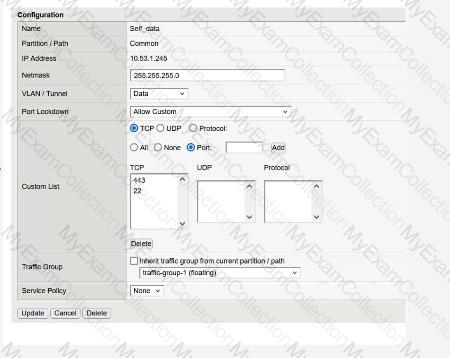
Refer to the exhibit.

What traffic will be permitted to reach the BIG-IP?

A.

FTP

B.

SSH

C.

Telnet

Full Access
Question # 8

What will setting a Self IP to “Allow None” for Port Lockdown do?

A.

Block HA communications, causing the systems to report their peer as offline and go active-active.

B.

Block HA communications, causing the systems to report their peer as online ready.

C.

Default allow port 1026 access between peer devices and traffic processing across the network failover.

Full Access
Question # 9

How should a BIG-IP Administrator check the provisioned CPU percent for a module?

(Choose two.)

A.

By running the top command and reviewing the output for the provisioned module.

B.

By running tmsh show /sys cpu and reviewing the specific module provisioned output.

C.

By going to System » Resource Provisioning and hovering over the CPU section colors.

D.

By running tmsh show /sys provision and reviewing the specific module in the output.

E.

By checking the Dashboard output in the Statistics tab in the GUI.

Full Access
Question # 10

The BIG-IP Administrator uses Secure Copy Protocol (SCP) to upload a TMOS image to the /shared/images/ directory in preparation for an upgrade.

After the upload is complete, what will the system do before the image appears in the GUI under:

System » Software Management » Image List ?

A.

The system performs a reboot into the new partition

B.

The system verifies the internal checksum

C.

The system copies the image to /var/local/images/

Full Access
Question # 11

A BIG-IP Administrator needs to purchase new licenses for a BIG-IP appliance.

The administrator needs to know:

    Whether a module is licensed

    The memory requirement for that module

Where should the administrator view this information in the System menu ?

A.

Configuration » OVSDB

B.

Software Management

C.

Configuration » Device

D.

Resource Provisioning

Full Access
Question # 12

The BIG-IP Administrator needs to update access to the Configuration Utility to include the 172.28.31.0/24 and 172.28.65.0/24 networks.

From the TMOS Shell (tmsh), which command should the BIG-IP Administrator use to complete this task?

A.

modify /sys httpd allow add { 172.28.31.0/255.255.255.0 172.28.65.0/255.255.255.0 }

B.

modify /sys httpd allow add { 172.28.31.0 172.28.65.0 }

C.

modify /sys httpd permit add { 172.28.31.0/255.255.255.0 172.28.65.0/255.255.255.0 }

Full Access
Question # 13

Which two items demonstrate the creation of a new volume for software images?

(Choose two.)

A.

tmsh install software image /shared/images/BIGIP- < version > .iso volume HD1.5 create-volume

B.

tmsh install /sys software image BIGIP- < version > .iso volume HD1.5 create-volume

C.

Using the GUI, go to System > Disk Management , select New Volume . In the pop-up window, type the name or number of the new volume and click Apply .

D.

tmsh install sys software image /shared/images/BIGIP- < version > .iso volume HD1.5 create-volume

E.

Using the GUI, go to System > Software Management > Available Images > Install , and in the Install Software Image pop-up window, type the new volume name or number and click Install .

Full Access
Question # 14

Refer to the exhibit.

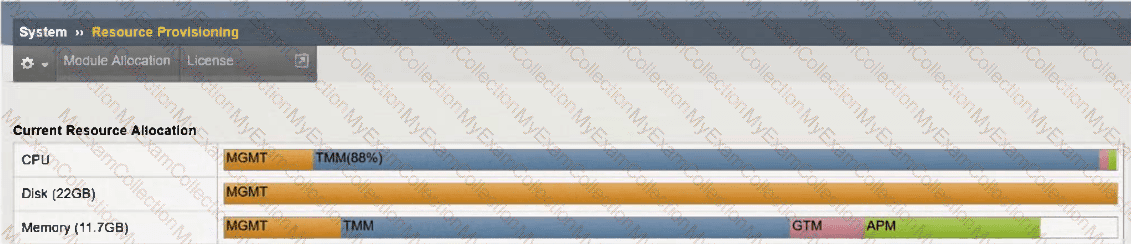
An organization has purchased a BIG-IP license that includes all available modules but has chosen to provision only the modules they require.

The exhibit displays the current resource allocation from the System → Resource Provisioning page.

Based on the information provided, which F5 modules have been provisioned?

A.

LTM, APM

B.

DNS, APM

C.

LTM, DNS, APM

D.

TMM, DNS, APS

Full Access