

Question # 4
A container image scanner is set up on the cluster.
Given an incomplete configuration in the directory
/etc/kubernetes/confcontrol and a functional container image scanner with HTTPS endpoint https://test-server.local.8081/image_policy
1. Enable the admission plugin.
2. Validate the control configuration and change it to implicit deny.
Finally, test the configuration by deploying the pod having the image tag as latest.
Question # 5
You can switch the cluster/configuration context using the following command:
[desk@cli] $Â kubectl config use-context devÂ
Context:
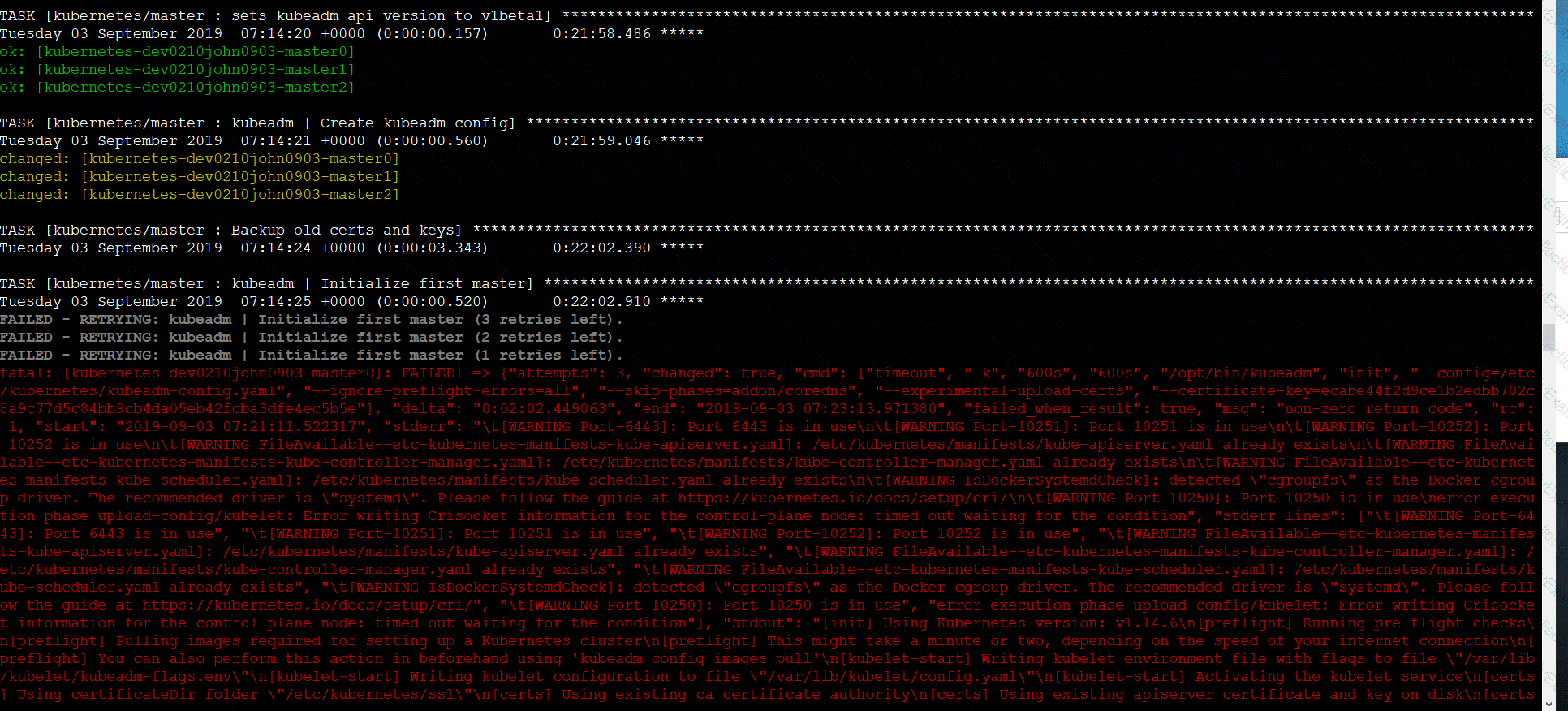
A CIS Benchmark tool was run against the kubeadm created cluster and found multiple issues that must be addressed.
Task:
Fix all issues via configuration and restart the affected components to ensure the new settings take effect.
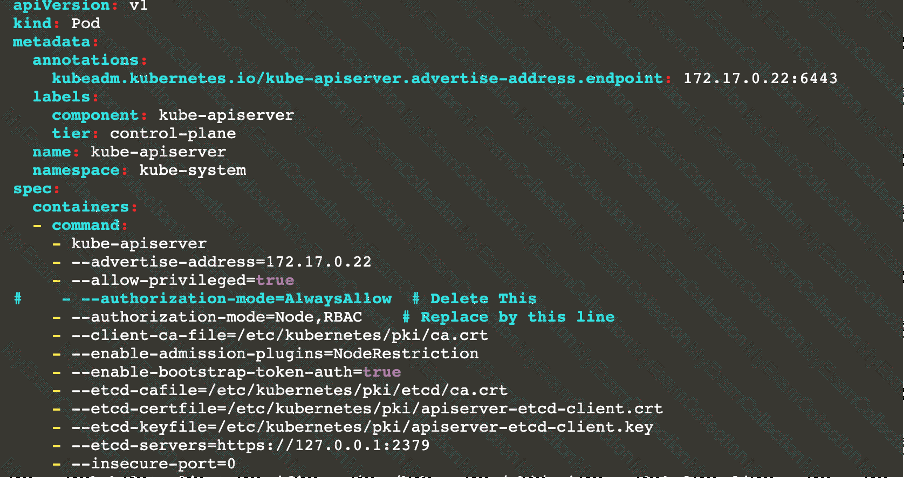
Fix all of the following violations that were found against the API server:
1.2.7 authorization-mode argument is not set to AlwaysAllow  FAIL
1.2.8 authorization-mode argument includes Node  FAIL
1.2.7 authorization-mode argument includes RBAC  FAIL
Fix all of the following violations that were found against the Kubelet:
4.2.1 Ensure that the anonymous-auth argument is set to false FAIL
4.2.2 authorization-mode argument is not set to AlwaysAllow FAIL (Use Webhook autumn/authz where possible)
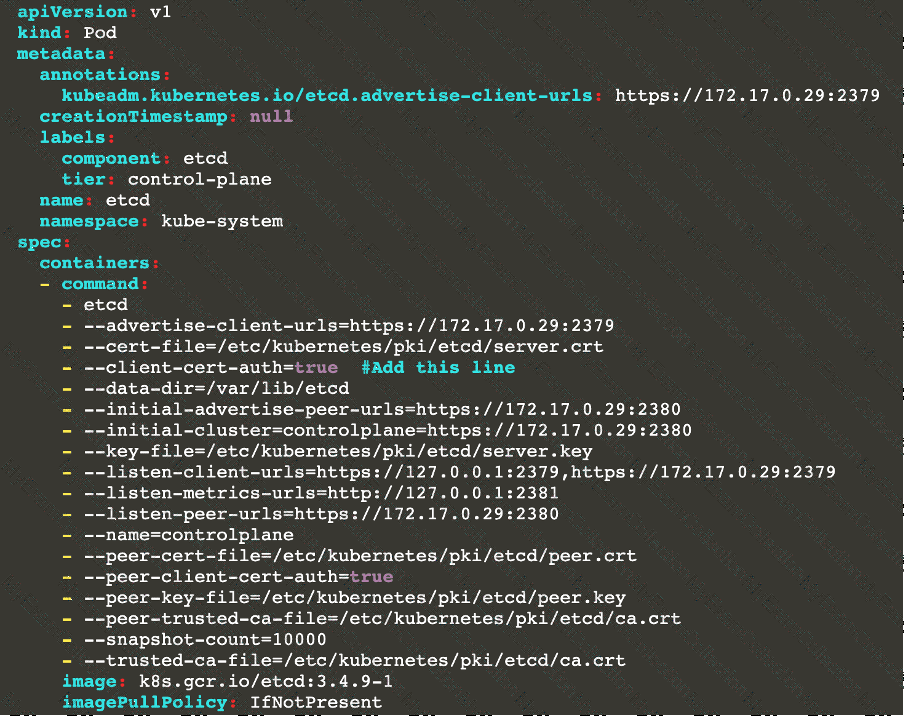
Fix all of the following violations that were found against etcd:
2.2 Ensure that the client-cert-auth argument is set to true
Question # 6

Context
The kubeadm-created cluster's Kubernetes API server was, for testing purposes, temporarily configured to allow unauthenticated and unauthorized access granting the anonymous user duster-admin access.
Task
Reconfigure the cluster's Kubernetes API server to ensure that only authenticated and authorized REST requests are allowed.
Use authorization mode Node,RBAC and admission controller NodeRestriction.
Cleaning up, remove the ClusterRoleBinding for user system:anonymous.


Question # 7
Create a new NetworkPolicy named deny-all in the namespace testing which denies all traffic of type ingress and egress traffic
Question # 8
Given an existing Pod named nginx-pod running in the namespace test-system, fetch the service-account-name used and put the content in /candidate/KSC00124.txt
Create a new Role named dev-test-role in the namespace test-system, which can perform update operations, on resources of type namespaces.
Create a new RoleBinding named dev-test-role-binding, which binds the newly created Role to the Pod's ServiceAccount ( found in the Nginx pod running in namespace test-system).
Question # 9
You must complete this task on the following cluster/nodes:
Cluster:Â trace
Master node:Â master
Worker node:Â worker1
You can switch the cluster/configuration context using the following command:
[desk@cli] $ kubectl config use-context trace Â
Given: You may use Sysdig or Falco documentation.Â
Task:
Use detection tools to detect anomalies like processes spawning and executing something weird frequently in the single container belonging to Pod tomcat.Â
Two tools are available to use:
1.  falco
2.  sysdig
Tools are pre-installed on the worker1 node only.
Analyse the container’s behaviour for at least 40 seconds, using filters that detect newly spawning and executing processes.Â
Store an incident file at /home/cert_masters/report, in the following format:
[timestamp],[uid],[processName]
Note:Â Make sure to store incident file on the cluster's worker node, don't move it to master node.


Question # 10
Documentation
Installing the Sidecar, PeerAuthentication, Deployments
You must connect to the correct host . Failure to do so may result in a zero score.
[candidate@base] $ ssh cks000041
Context
A microservices-based application using unencrypted Layer 4 (L4) transport must be secured with Istio.
Task
Perform the following tasks to secure an existing application's Layer 4 (L4) transport communication using Istio.
Istio is installed to secure Layer 4 (L4) communications.
You may use your browser to access Istio's documentation.
First, ensure that all Pods in the mtls namespace have the istio-proxy sidecar injected.
Next, configure mutual authentication in strict mode for all workloads in the mtls namespace.
Question # 11
Create a Pod name Nginx-pod inside the namespace testing, Create a service for the Nginx-pod named nginx-svc, using the ingress of your choice, run the ingress on tls, secure port.
Question # 12

Task
Create a NetworkPolicy named pod-access to restrict access to Pod users-service running in namespace dev-team.
Only allow the following Pods to connect to Pod users-service:
 Pods in the namespace qa
 Pods with label environment: testing, in any namespace


Question # 13
You can switch the cluster/configuration context using the following command:
[desk@cli] $Â kubectl config use-context qaÂ
Context:
A pod fails to run because of an incorrectly specified ServiceAccount
Task:
Create a new service account named backend-qa in an existing namespace qa, which must not have access to any secret.
Edit the frontend pod yaml to use backend-qa service account
Note:Â You can find the frontend pod yaml at /home/cert_masters/frontend-pod.yaml
Question # 14
Context
For testing purposes, the kubeadm provisioned cluster 's API server
was configured to allow unauthenticated and unauthorized access.
Task
First, secure the cluster 's API server configuring it as follows:
. Forbid anonymous authentication
. Use authorization mode Node,RBAC
. Use admission controller NodeRestriction
The cluster uses the Docker Engine as its container runtime . If needed, use the docker command to troubleshoot running containers.
kubectl is configured to use unauthenticated and unauthorized access. You do not have to change it, but be aware that kubectl will stop working once you have secured the cluster .
You can use the cluster 's original kubectl configuration file located at etc/kubernetes/admin.conf to access the secured cluster.
Next, to clean up, remove the ClusterRoleBinding
system:anonymous.
Question # 15
On the Cluster worker node, enforce the prepared AppArmor profile
#include
Â
profile nginx-deny flags=(attach_disconnected) {
 #include
Â
 file,
Â
 # Deny all file writes.
 deny /** w,
}
EOF'
Edit the prepared manifest file to include the AppArmor profile.
apiVersion: v1
kind: Pod
metadata:
 name: apparmor-pod
spec:
 containers:
 - name: apparmor-pod
  image: nginx
Finally, apply the manifests files and create the Pod specified on it.
Verify: Try to make a file inside the directory which is restricted.
Question # 16
Create a PSP that will only allow the persistentvolumeclaim as the volume type in the namespace restricted.
Create a new PodSecurityPolicy named prevent-volume-policy which prevents the pods which is having different volumes mount apart from persistentvolumeclaim.
Create a new ServiceAccount named psp-sa in the namespace restricted.
Create a new ClusterRole named psp-role, which uses the newly created Pod Security Policy prevent-volume-policy
Create a new ClusterRoleBinding named psp-role-binding, which binds the created ClusterRole psp-role to the created SA psp-sa.
Hint:
Also, Check the Configuration is working or not by trying to Mount a Secret in the pod maifest, it should get failed.
POD Manifest:
apiVersion: v1
kind: Pod
metadata:
name:
spec:
containers:
- name:
image:
volumeMounts:
- name:
mountPath:
volumes:
- name:
secret:
secretName:
Question # 17
a. Retrieve the content of the existing secret named default-token-xxxxx in the testing namespace.
  Store the value of the token in the token.txt
b. Create a new secret named test-db-secret in the DB namespace with the following content:
   username: mysql
   password: password@123
Create the Pod name test-db-pod of image nginx in the namespace db that can access test-db-secret via a volume at path /etc/mysql-credentials
Question # 18
Documentation dockerd
You must connect to the correct host . Failure to do so may result in a zero score.
[candidate@base] $ ssh cks000037
Task
Perform the following tasks to secure the cluster node cks000037 :
Remove user developer from the docker group.
Do not remove the user from any other group.
Reconfigure and restart the Docker daemon to ensure that the socket
file located at /var/run/docker.sock is owned by the group root.
Re-configure and restart the Docker daemon to ensure it does not listen on any TCP port.
After completing your work, ensure the Kubernetes cluster is healthy.
Question # 19
Documentation Ingress, Service, NGINX Ingress Controller
You must connect to the correct host . Failure to do so may result in a zero score.
[candidate@base] $ ssh cks000032
Context
You must expose a web application using HTTPS routes.
Task
Create an Ingress resource named web in the prod namespace and configure it as follows:
. Route traffic for host web.k8s.local and all paths to the existing Service web
. Enable TLS termination using the existing Secret web-cert.
. Redirect HTTP requests to HTTPS .
You can test your Ingress configuration with the following command:
[candidate@cks000032]$ curl -L http://web.k8s.local

