

Question # 4
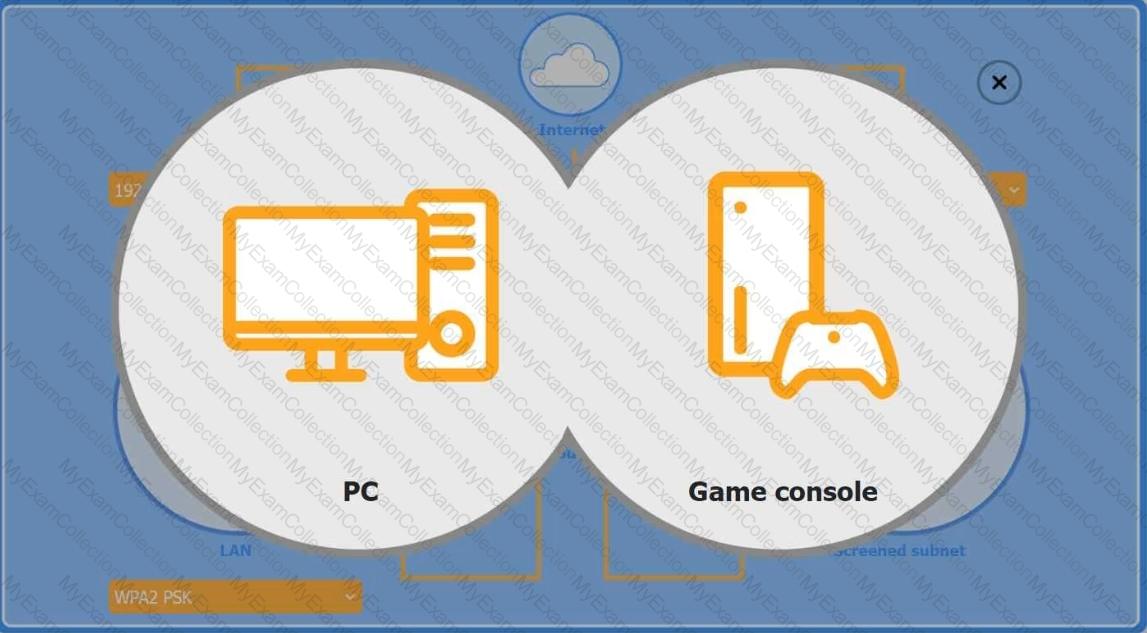
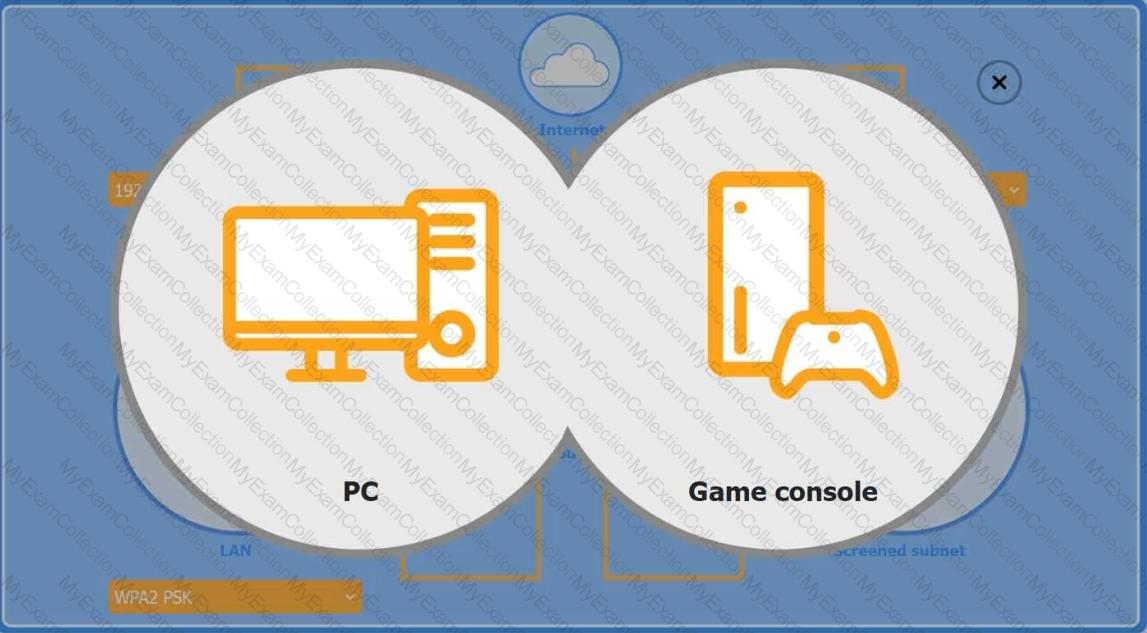
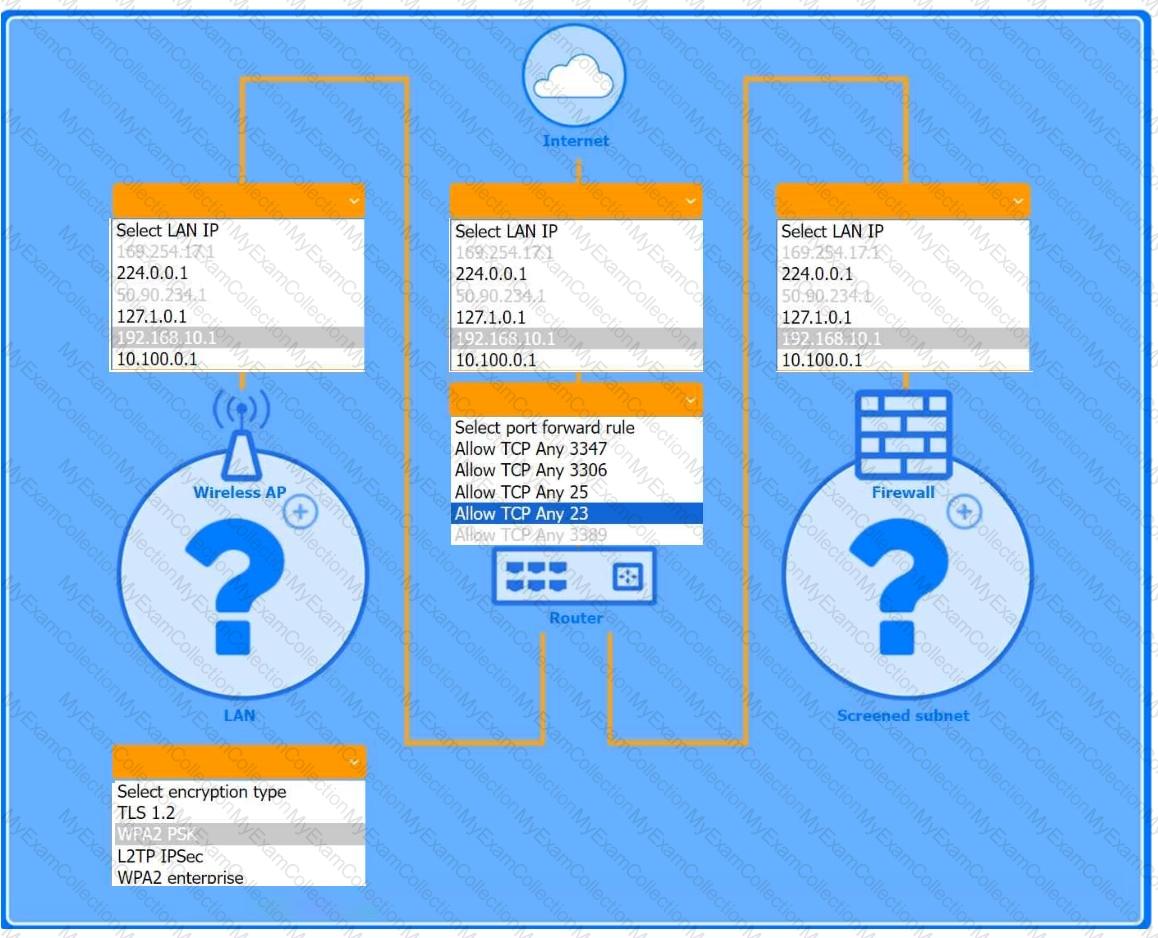
You are configuring a home network for a customer. The customer has requested the ability to access a Windows PC remotely, and needs all chat and optional functions to work in their game console.
INSTRUCTIONS
Use the drop-down menus to complete the network configuration for the customer. Each option may only be used once, and not all options will be used.
Then, click the + sign to place each device in its appropriate location.
If at any time you would like to bring back the initial state of the simulation, please click the Reset All button.
Wireless AP LAN
Firewall Screened Subnet
Question # 5
A technician is assisting a user who is growing increasingly frustrated because an application continuously crashes. The technician must coordinate with another department to resolve the issue. Which of the following actions should the technician take to effectively and professionally communicate with the user?
Question # 6
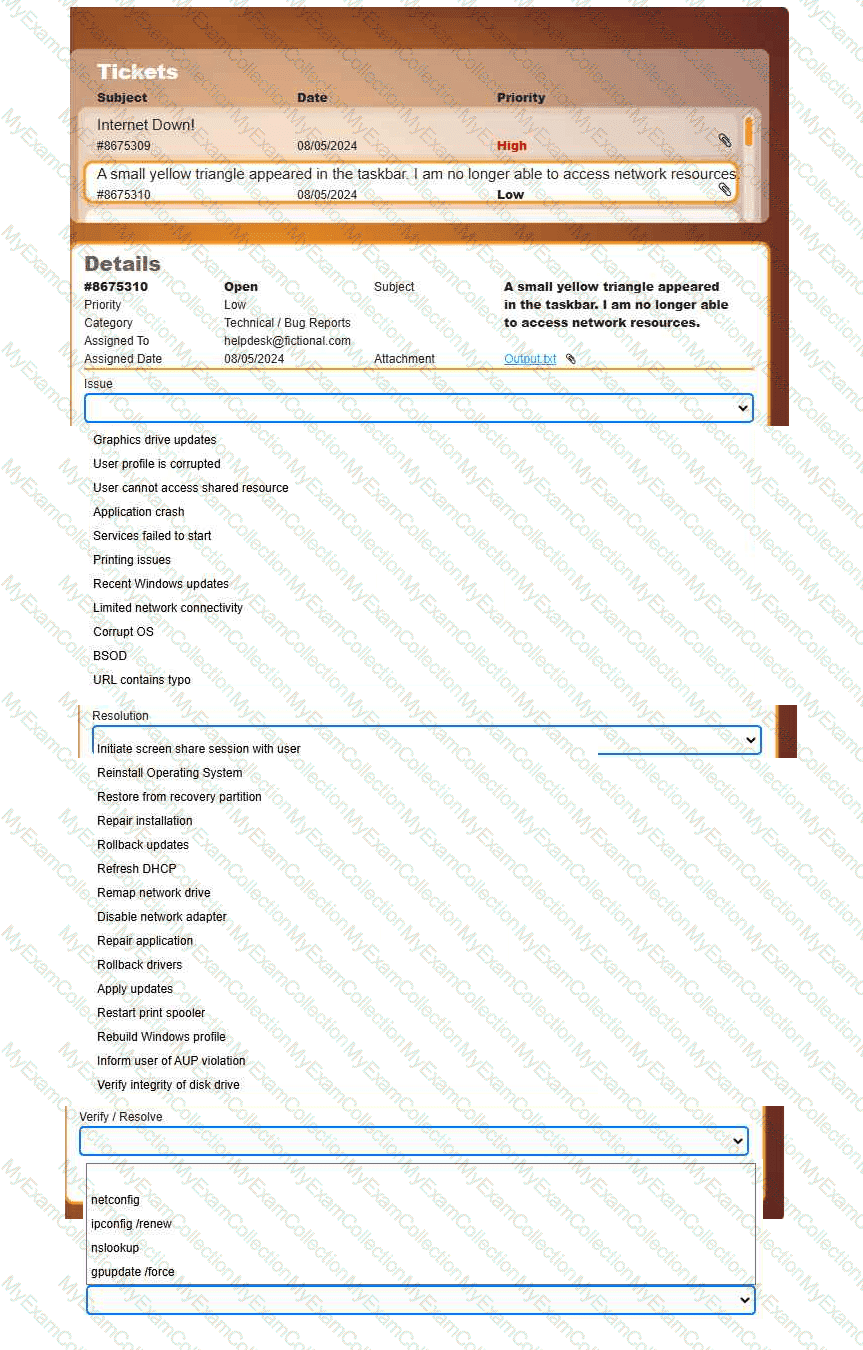
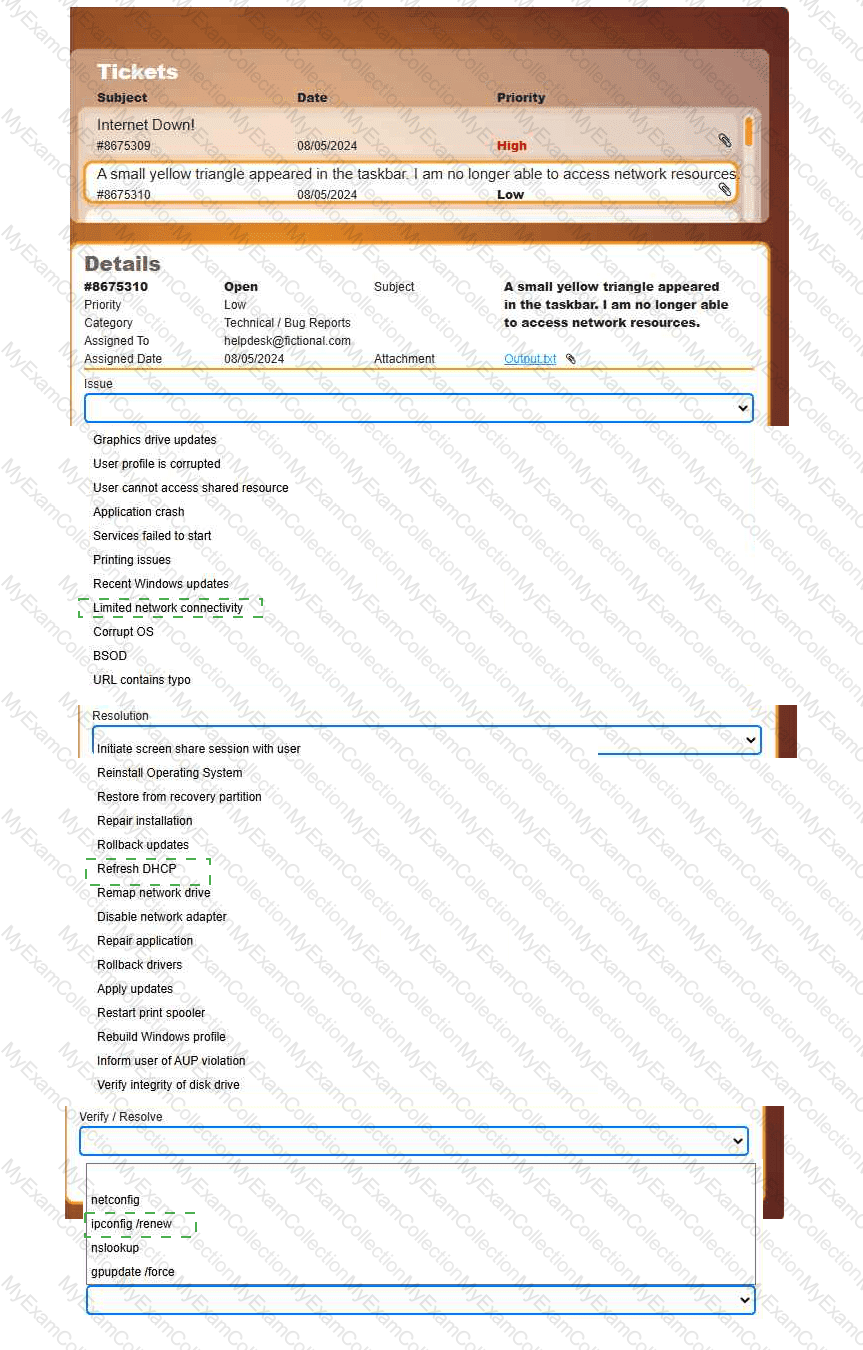
Welcome to your first day as a Fictional Company, LLC helpdesk employee. Please work the tickets in your helpdesk ticket queue.
INSTRUCTIONS
Click on individual tickets to see the ticket details, and view applicable attachments to
determine the problem.
Select the appropriate issue from the ' Issue ' drop-down menu. Then, select the most
efficient resolution from the ' Resolution ' drop-down menu. Finally, select the proper
command or verification to remediate or confirm your fix of the issue from the
' Verify/Resolve ' drop-down menu.
Question # 7
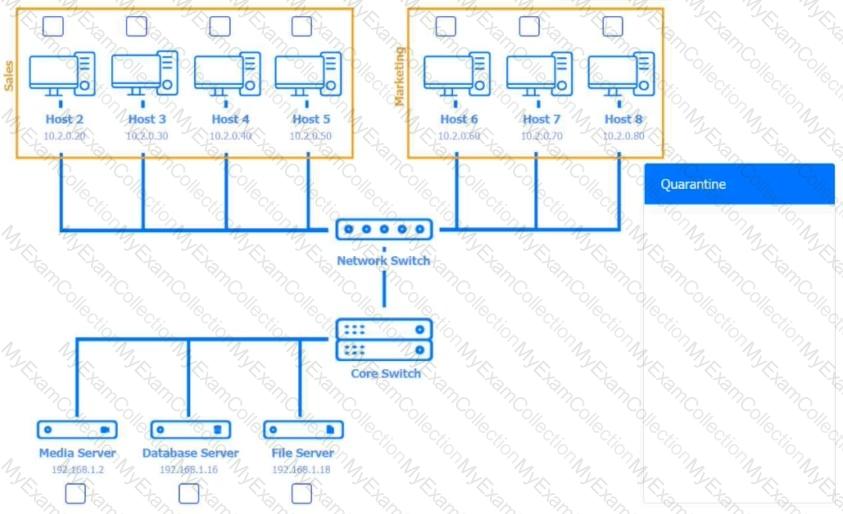
Multiple users are reporting audio issues as well as performance issues after downloading unauthorized software. You have been dispatched to identify and resolve any issues on the network using best practice procedures.
INSTRUCTIONS
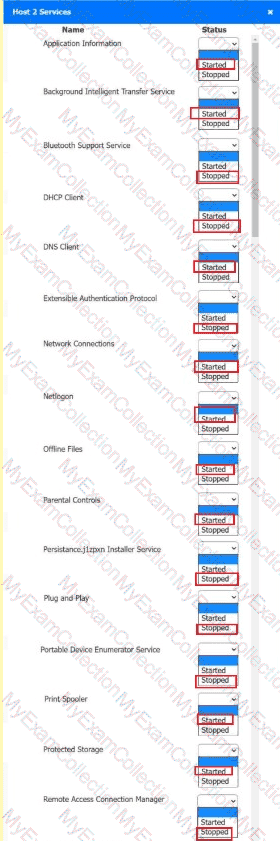
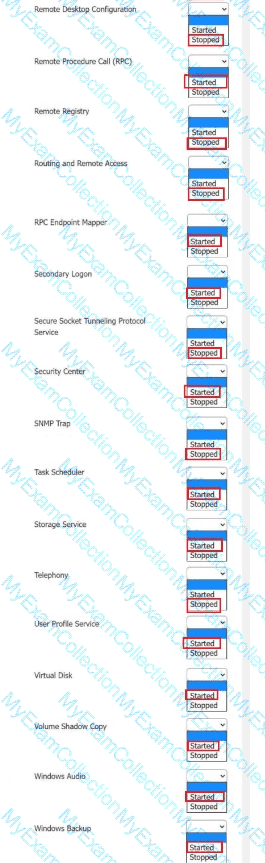
Quarantine and configure the appropriate device(s) so that the users’ audio issues are resolved using best practice procedures.
Multiple devices may be selected for quarantine.
Click on a host or server to configure services.
If at any time you would like to bring back the initial state of the simulation, please click the Reset All button.










 A screenshot of a computer AI-
 A screenshot of a computer AI-
Question # 8
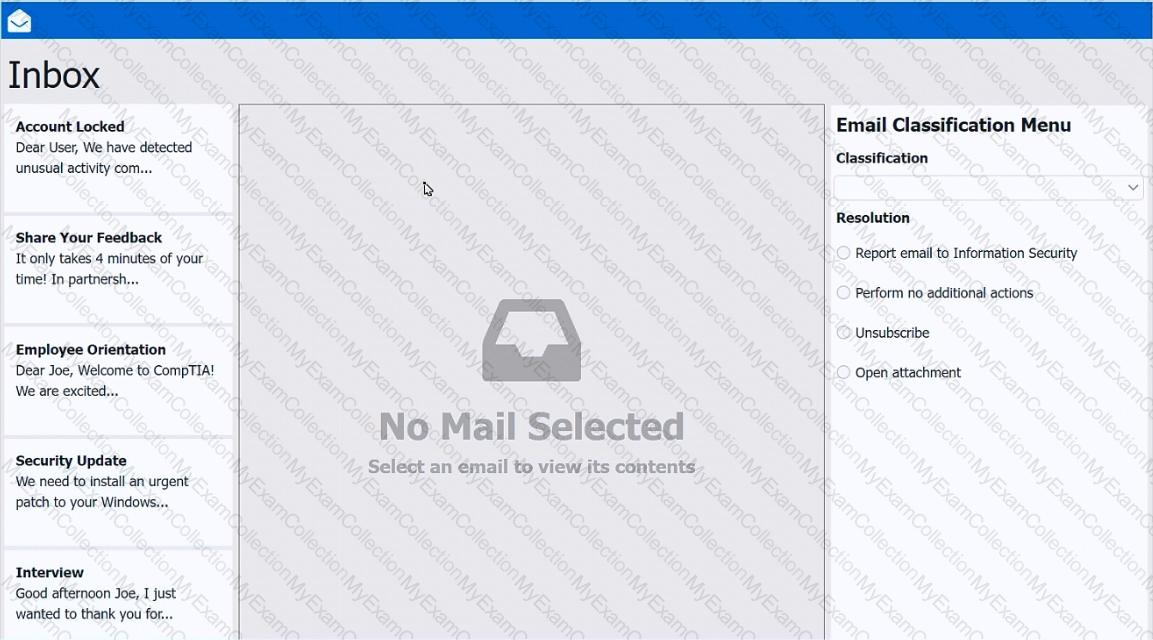
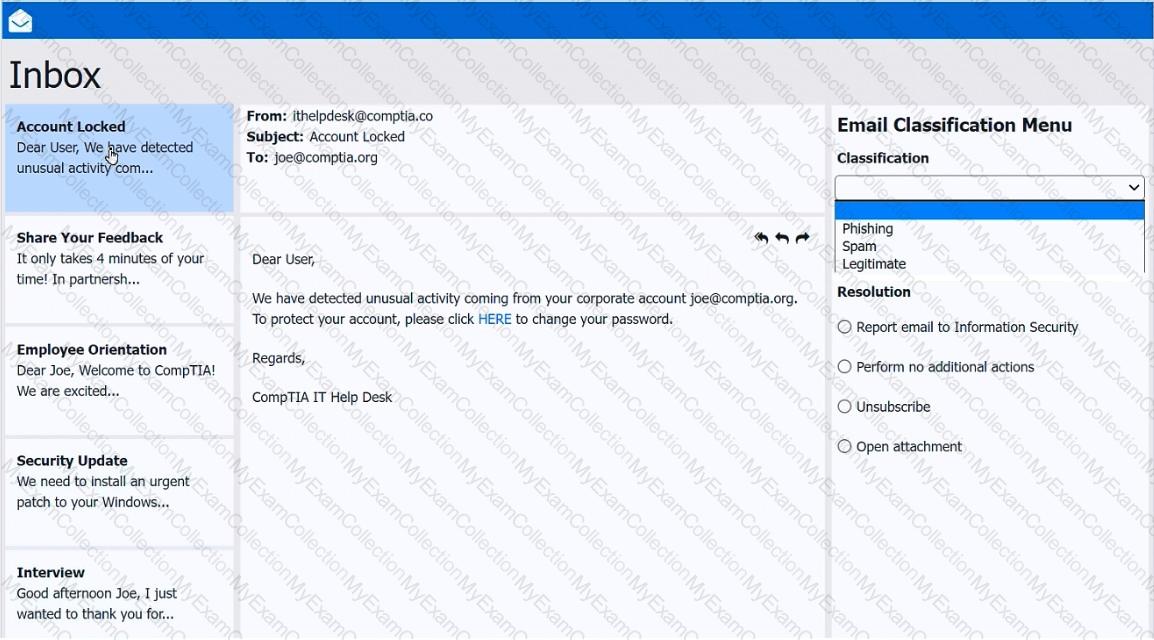
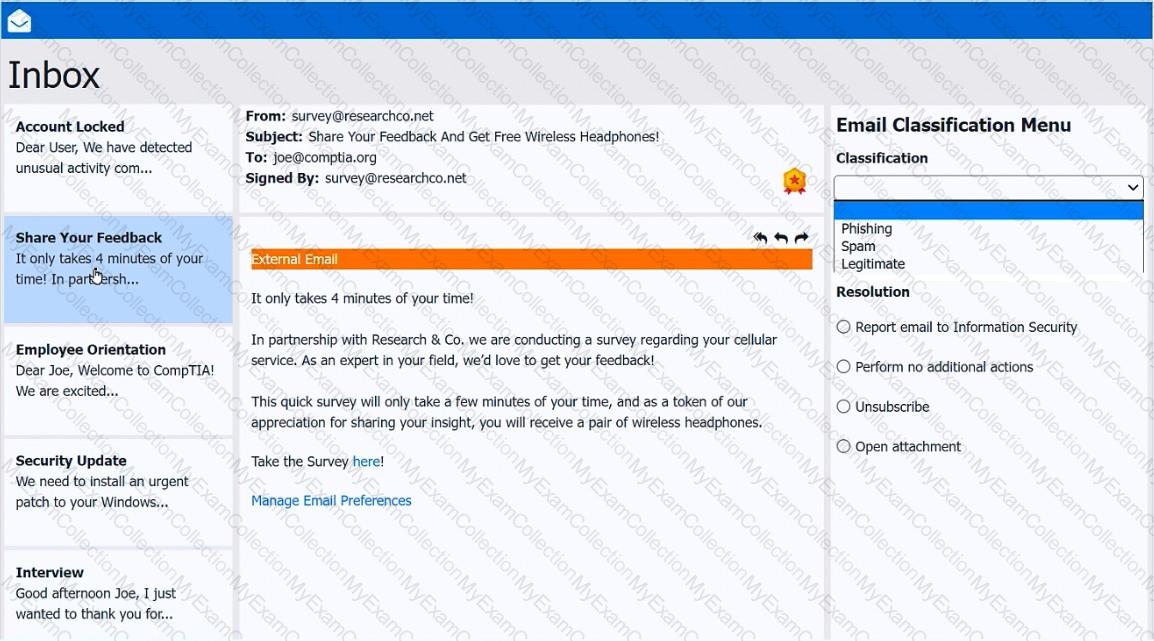
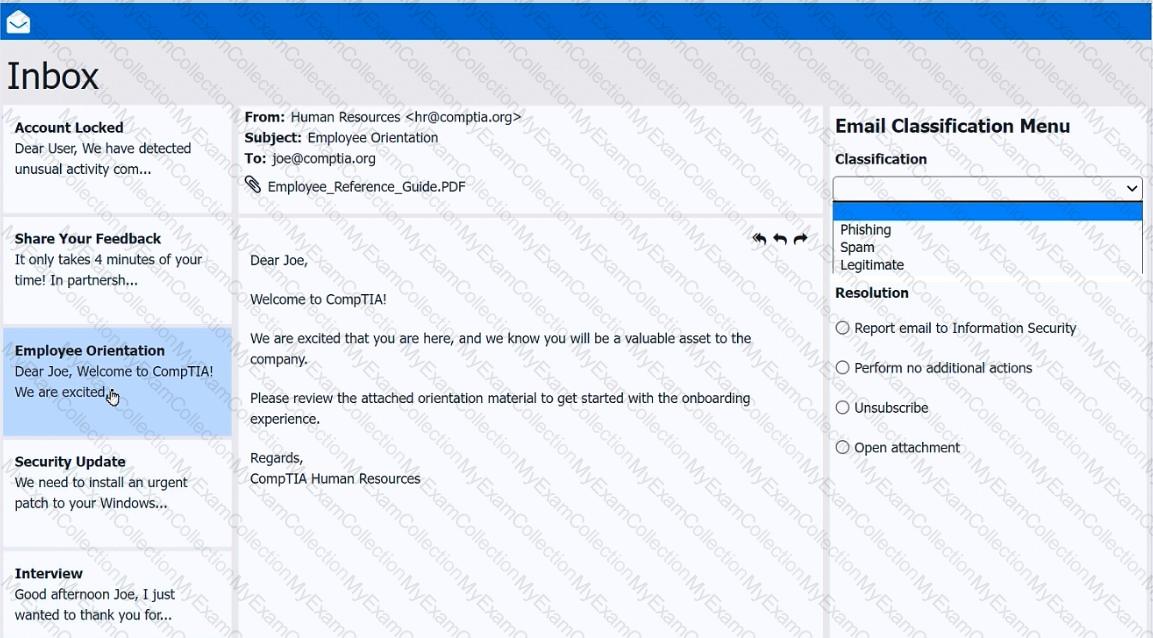
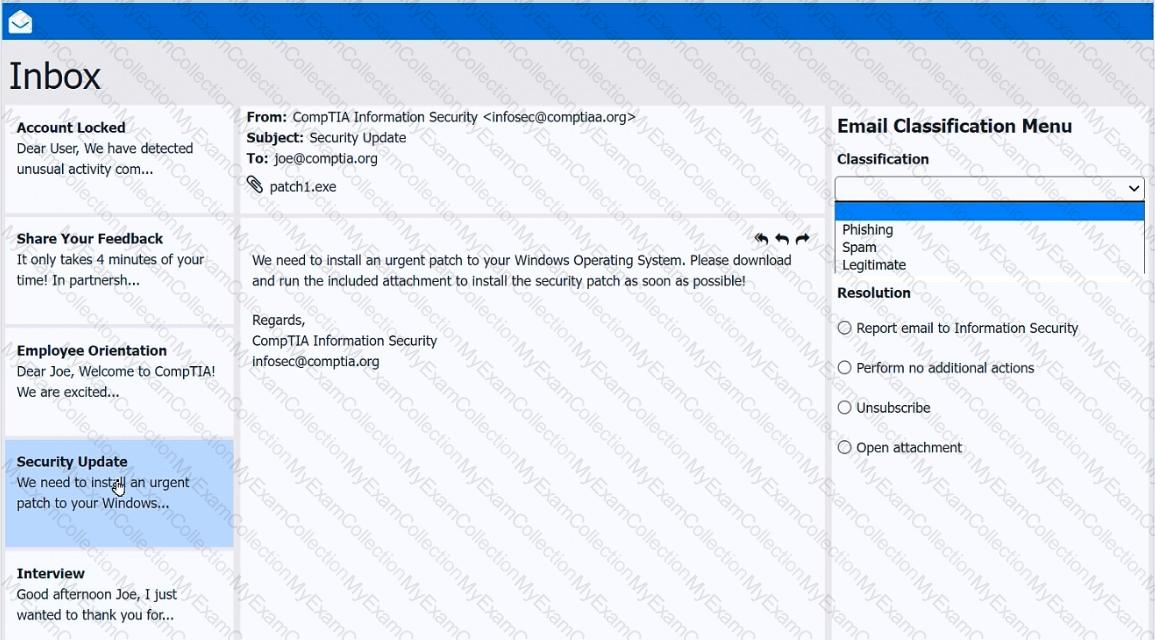
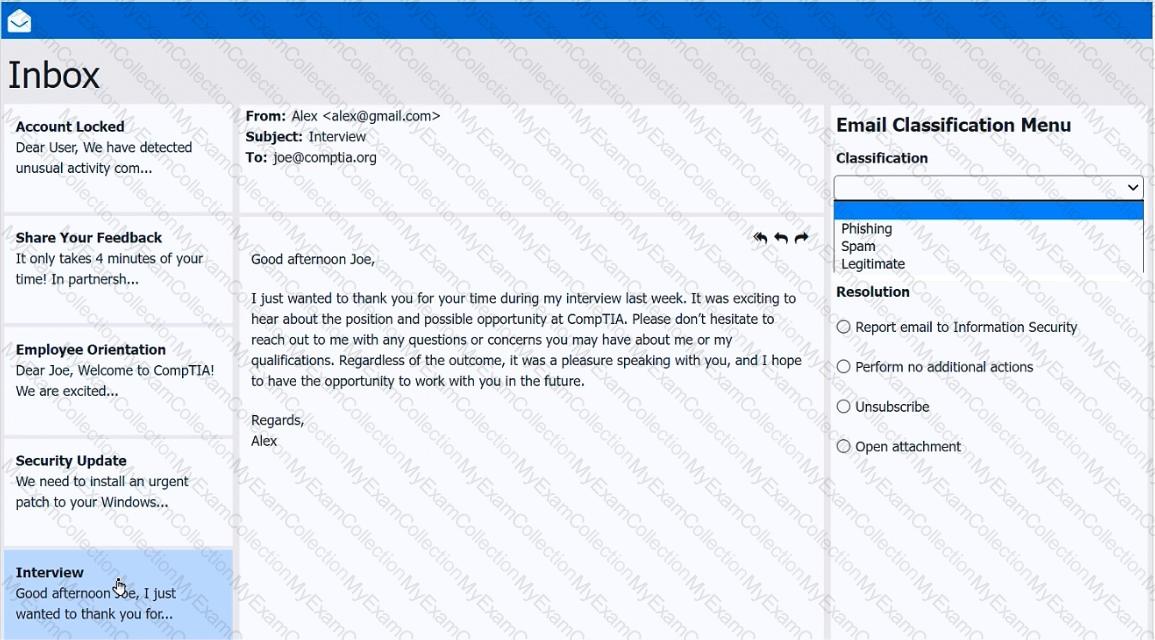
As a corporate technician, you are asked to evaluate several suspect email messages on a client ' s computer. Corporate policy requires the following:
> All phishing attempts must be reported.
> Future spam emails to users must be prevented.
INSTRUCTIONS
Review each email and perform the following within the email:
> Classify the emails
> Identify suspicious items, if applicable, in each email
> Select the appropriate resolution
If at any time you would like to bring back the initial state of the simulation, please click the Reset All button.
Question # 9
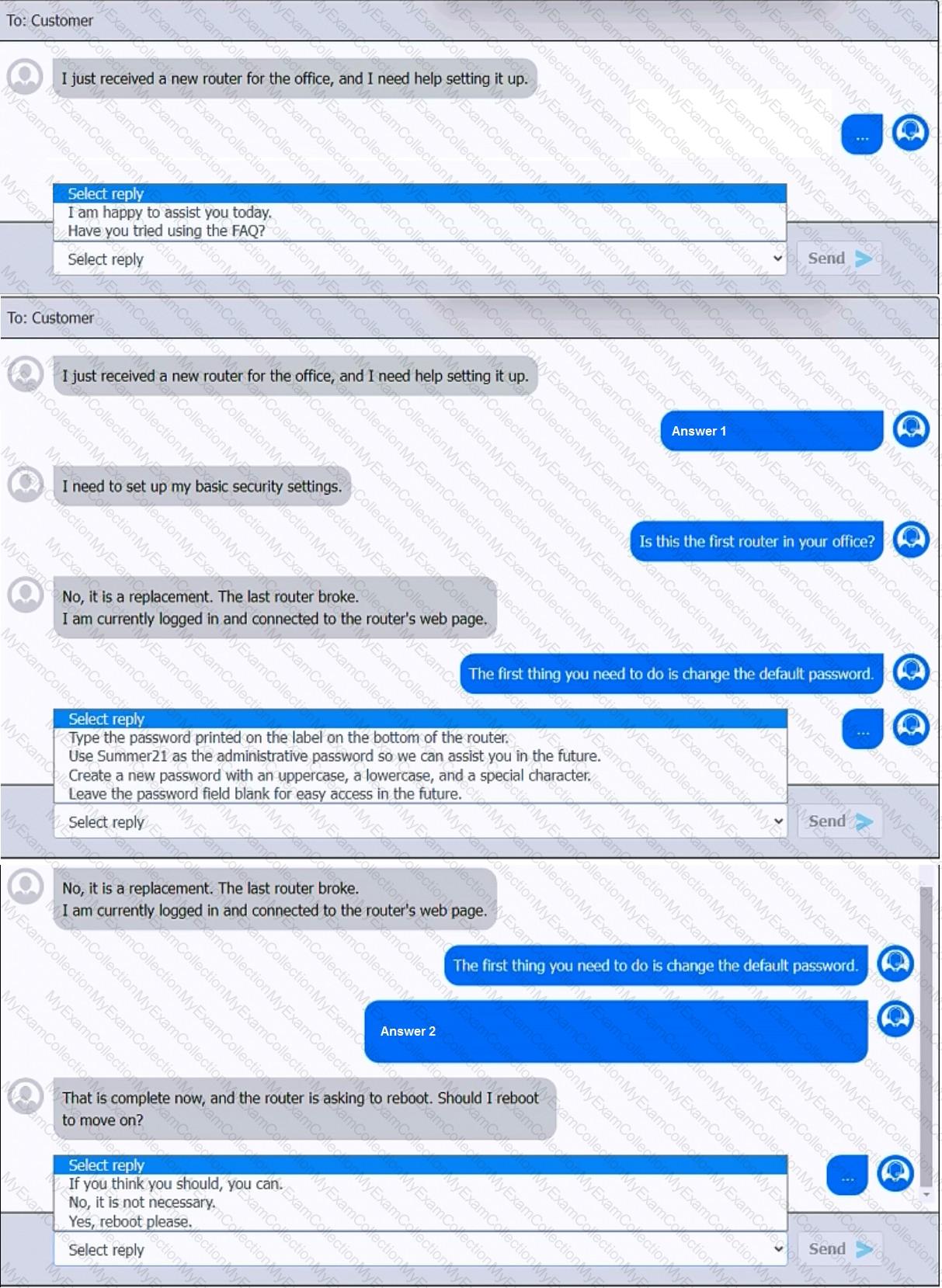
You have been contacted through the help desk chat application. A user is setting up a replacement SOHO router. Assist the user with setting up the router.
INSTRUCTIONS
Select the most appropriate statement for each response. Click the send button after each response to continue the chat.
If at any time you would like to bring back the initial state of the simulation, please click the Reset All button.
Question # 10
A user wants to use several used computers to set up a low-cost lab at home to study and test scripts for managing servers. Which of the following would be the best operating system choice?
Question # 11
An end user sees frequent onscreen messages from a retail site they visited a week ago. A technician investigates and determines that the pop-up blocker is turned on. Which of the following should the technician do next?
Question # 12
A user’s computer is running slowly. Task Manager shows:
Disk: 2%
Network: 12%
GPU: 15%
CPU: 70%
Memory: 97%
Which of the following would a technician most likely do to resolve the issue?
Question # 13
Which of the following Linux commands is used to read another command ' s documentation?
Question # 14
A user is trying to install a preferred word processor on their work laptop, but the installation fails each time. Which of the following is most likely the cause of this failure?
Question # 15
A user recently installed an application that accesses a database from a local server. When launching the application, it does not populate any information. Which of the following command-line tools is the best to troubleshoot the issue?
Question # 16
A SOHO customer purchases a Windows 11 computer. When the technician attempts to join the computer to the domain, the option is grayed out. Which of the following explains the reason the option is unavailable?
Question # 17
Independent contractors often work from a business ' s lobby. Although the business has Wi-Fi, contractors often plug in their laptops to Ethernet ports in the lobby. Which of the following should a security engineer do to most efficiently address a potential security concern with this network setup?
Question # 19
A network engineer is dealing with an emergency situation in which a wired network connection needs to be replaced. A facility manager tells the network engineer that the current connection goes underneath a carpet and must be rerouted. Which of the following is the best reason to reroute this connection?
Question # 20
Which of the following describes a vulnerability that has been exploited before a patch or remediation is available?
Question # 21
A user wants to connect a retro gaming console to the internet so that they can participate in online gaming. In order for the console to work, the Wi-Fi connection must adhere to a WPA-protected broadcast. Which of the following is the best option for the user to implement?
Question # 22
A popular game frequently freezes and crashes on a mobile phone. The user updates the OS, but the issue persists. The device is one year old and has plenty of free storage space. Which of the following is the most appropriate first step to troubleshoot this issue?
Question # 23
Which of the following is used in addition to a password to implement MFA?
Question # 24
Which of the following is a protocol that provides AAA for network services?
Question # 25
A technician is assisting a customer who is experiencing frequent network issues. The customer asks whether other clients have experienced similar issues and how those situations were handled. Which of the following is the best way for the technician to respond?
Question # 26
An endpoint ' s screensaver no longer activates automatically. The global security policy states that the screensaver should activate after the endpoint has been idle for an hour. Which of the following commands should the technician run on the endpoint to investigate this issue?
Question # 27
A technician is troubleshooting a print spooler that fails to start on a Windows 11 desktop computer. The technician determines the root cause is that required dependencies are failing to run. Which of the following tools is the technician using?
Question # 28
Which of the following is required to have a central log-in for a Windows computer?
Question # 29
A technician uses AI to draft a document about new software benefits. Upon reading, the technician sees factually incorrect info. What term best describes this?
Question # 30
Thousands of compromised machines are attempting to make fake purchases from an online store. Which of the following is taking place?
Question # 31
Some users report that they cannot use the VPN to connect to the office via their browsers. A technician finds that the users are all receiving the error message, “Your connection is not secure.†Which of the following is most likely causing this issue?
Question # 32
Which of the following is an example of an application publisher including undisclosed additional software in an installation package?
Question # 33
A user reports that their computer is running extremely slowly. They are also often redirected to unknown websites when attempting to access internal applications. The computer ' s antivirus software is outdated, and the user cannot access certain security-related settings. A network administrator confirms that all other workstations are operating normally, and network diagnostics show no issues. Which of the following should the administrator do next to troubleshoot these issues?
Question # 34
A customer laptop has been shutting down unexpectedly. The customer explains that a blue screen appears just before the laptop turns off, but the screen disappears too quickly to see anything. Which of the following tools should a technician use to find details about the error?
Question # 35
A technician is replacing a rack-mounted UPS. Which of the following should the technician consider?
Question # 36
An employee receives a message urging them to scan an image with their company-owned smartphone that will access the account management portal in order to reset their password. Which of the following describes this type of social engineering attack?
Question # 37
Why would a network engineering team provide a help desk technician with IP addresses for a wired network segment?
Question # 38
A user is unable to upload files to the corporate servers from their mobile phone when outside the office, but uploading files works without issue in the office. The user saw an error notification but dismissed it. Which of the following should a technician do to determine the root cause?
Question # 39
A help desk team was alerted that a company-owned cell phone has an unrecognized password-cracking application. Which of the following should the help desk team do to prevent further unauthorized installations from occurring?
Question # 40
A user switches from Linux to Windows and tries to migrate data using an external USB drive. Windows prompts that the device must be formatted. It works fine on Linux. What should the user do?
Question # 41
A user reports a critical application issue. The user tells the technician that a former IT employee previously resolved this same issue. Which of the following steps should the technician take first?
Question # 42
A technician is troubleshooting the reason that an application is down. The technician verifies that a service that was running has unexpectedly stopped. The technician tries to manually start the service, but it fails to start. Which of the following is the cause of this issue?
Question # 43
A Windows 11 Home device is receiving constant pop-ups about an urgent need to update antivirus software in order to remove a detected threat. The user has been clicking the " X " button but the window keeps reappearing. The pop-up includes an " OK " button to install the update. What should the user do next?
Question # 44
Which of the following filesystems supports read and write operations for Windows, macOS, and Linux?
Question # 45
Which of the following is used to detect and record access to restricted areas?
Question # 46
A company wants to enforce the following browser requirements:
Administrators can add URLs to the Trusted URL list
Passwords will not be stored through the browser
When the browser is closed, all history will be saved
Browser security will be set to high
Specific URLs or ratings will be restricted from access
Which of the following is the best for the technician to configure?
Question # 47
A user is trying to install 3-D rendering software on a new Windows computer, but the installation fails. An error states that the system does not meet the minimum hardware configuration. Which of the following features should the user check first?
Question # 48
A company wants to use a single operating system for its workstations and servers and avoid licensing fees. Which of the following operating systems would the company most likely select?
Question # 49
A company is implementing the 3-2-1 backup rule. Which of the following should the company do?
Question # 50
A technician must map a network drive on a piece of legacy equipment running an end-of-life OS. Which of the following is the best script to map the drive using simple Windows commands?
Question # 51
A customer wants to be able to work from home but does not want to be responsible for bringing company equipment back and forth. Which of the following would allow the user to remotely access and use a Windows PC at the main office? (Choose two.)
Question # 52
Which of the following file types would a desktop support technician most likely use to automate tasks for a Windows user log-in?
Question # 53
A technician is installing a cloud-based productivity suite and gets an error saying the installation is unavailable. What should be tried first?
Question # 54
A technician is selecting a remote access method so users can securely access Linux and Windows servers when working from home. Which of the following should the technician choose to best meet this requirement?

